UNS test — /uns/live-test
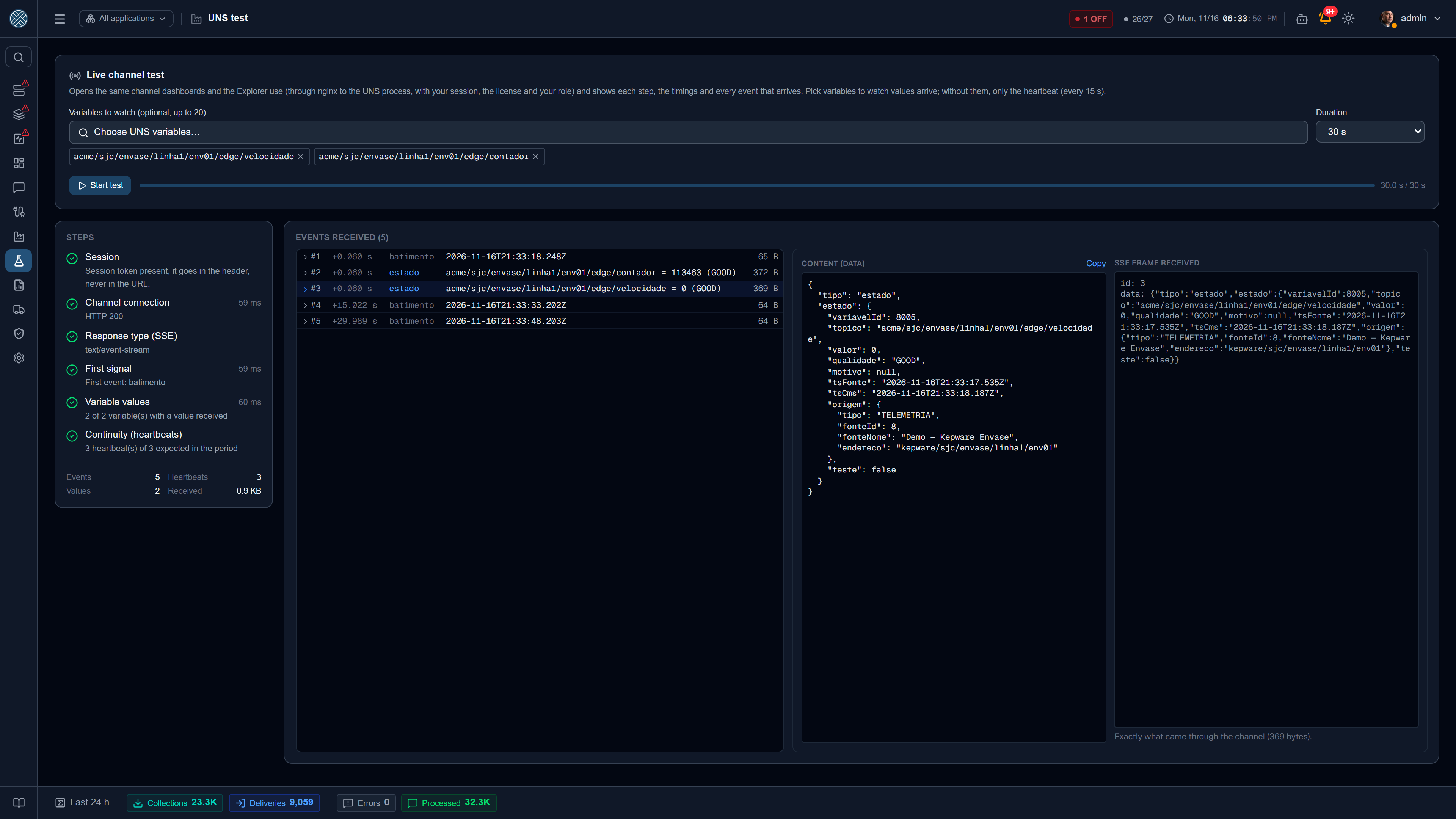
The dashboards and the Namespace Explorer receive values
live through a channel open with the UNS process (cms-uns). When a dashboard shows Live
dimmed, or the values do not change, this screen tells you at which point the channel fails.
It opens the same channel, along the same path — nginx up to cms-uns, with your session, the
license and your UNS role —, and shows each step with the time it took, the counters and every event
that arrives.
The screen is under Integration Tests › UNS test, next to the Test Bench and the Simulators. It used
to be a tab of UNS Settings; the old address leads here. It follows the /uns
Tool and only shows up with the UNS module in the license.
Running a test
| Field | What it holds |
|---|---|
| Variables to watch (optional, up to 20) | Choose UNS variables… opens the variables popup (browse by branch, filter by type). The popup stays open so you can pick several; the x on each one removes it from the list. With no variables, the test only checks the heartbeat |
| Duration | 30 s, 60 s, 120 s or 300 s. The test stops by itself at the end |
Start test begins; Stop ends it early. The bar shows the elapsed time. With the UNS process down, the button is disabled and the screen warns: “The UNS process is down: nobody would answer the channel.”
The process sends a heartbeat as soon as the channel opens and then every 15 seconds. With variables chosen, it first sends the current value of each one and then every change — only for the ones your role lets you read.
The steps
| Step | Turns OK when | If it fails |
|---|---|---|
| Session | There is an open session. The token goes in the header, never in the URL | “No session: sign in again.” |
| Channel connection | The channel answers successfully (the HTTP status shows next to it, with the time) | Shows the HTTP status and the error message (see below) |
| Response type (SSE) | The response is text/event-stream | Shows the type that arrived: something along the path answered in place of the channel |
| First signal | The first event arrived, with the time until it | “No event arrived in the period.” |
| Variable values | Every chosen variable received a value (“N of N variable(s) with a value received”) | The missing ones have no value yet or are outside your role. With no variables, the step is skipped |
| Continuity (heartbeats) | The heartbeats expected for the duration arrived, with a tolerance of one | Too few heartbeats, or “The server closed the channel before the end of the test” |
Below the steps, the counters: Events, Heartbeats, Values and the total Received.
The events
Events received lists each event as it arrives: the number, the time since the start, the type
(batimento, estado or another), the summary — for a value, the topic, the value and the quality —
and the size. The list keeps the last 300.
Clicking an event shows it on the right (without clicking, it shows the last one):
- Content (data): the event JSON, formatted, with Copy;
- SSE frame received: exactly what came through the channel, with the size in bytes.
How to read a failure
| What shows up | Likely cause | What to do |
|---|---|---|
| Connection with HTTP 502 | The cms-uns container is stopped, or nginx cannot reach it | Bring cms-uns up and check the Installation page of UNS Settings |
| Connection with HTTP 401 | Expired session or inactive user | Sign in again |
| Connection with HTTP 403 | The UNS module is not in the license | Check the license |
Response type other than text/event-stream | A proxy along the path answered with something else (error page, login) | Check the proxy between the browser and the CMS |
| Connected, but no event arrived | A proxy is holding the response in a buffer | The /api/uns/live/ path must go through without buffering and without compression |
| Continuity failed with “The server closed the channel” | cms-uns restarted or the connection was cut midway | Check the logs of cms-uns and of the proxy |
| Values with variables missing | The variable has no value yet, or your role does not read it | Look at the variable in the Namespace Explorer and at the roles in UNS access |
The test uses your role. A variable that arrives here may not arrive for another person, and vice versa: to check what another person sees, run the test with their user.