SAP CPI (Cloud Integration)
The CMS calls SAP Cloud Integration (Integration Suite) iFlows through the sender adapter
endpoint: HTTPS under /http/... and SOAP under /cxf/.... It is the path when the SAP integration
already goes through CPI — the iFlow does the mapping and talks to S/4HANA, and the CMS only delivers
to it.
Like SAP Gateway, it is plain HTTP: no SDK and no microservice. It works in all three environments: Cloud Foundry, Neo and Edge Integration Cell.
See SAP to compare with RFC/BAPI, IDoc and Gateway.
How it fits together
- The External Connection is the tenant. It has two parts, with separate credentials in BTP:
- the runtime, where the iFlows run — Collections and Deliveries go there;
- the management API (optional), which the CMS only reads: deployed endpoints and how the processing of each message ended.
- The Application is of the SAP CPI type and shows in the SAP group on every screen. Its URL comes from the connection and is locked.
- The iFlow path goes in each Collection (Collection Path) and each Delivery (URI).
Example: runtime https://mytenant.it-cpi018-rt.cfapps.us10-001.hana.ondemand.com, Delivery with the
path /http/pp/confirmation. The call goes to
https://mytenant.it-cpi018-rt.cfapps.us10-001.hana.ondemand.com/http/pp/confirmation.
The other direction — the iFlow calling the CMS — does not need this connection: the iFlow uses the HTTP inbound or the dynamic Collection API, with an API Token, like any other system.
What to prepare in BTP
On Cloud Foundry, the credentials come from instances of the SAP Process Integration Runtime service, under Services › Instances and Subscriptions in the subaccount (trial included):
| Instance | Plan | Roles | What for |
|---|---|---|---|
| Runtime | integration-flow | ESBMessaging.send | Calling the iFlows |
| Management API (optional) | api | Monitoring read only — at least MonitoringDataRead | Endpoint catalog and processing status |
In both, the Grant type is Client Credentials. After creating the instance, create a Service Key on it: that is the JSON the CMS reads.
{
  "oauth": {
    "clientid": "sb-xxxx!b123|it-rt-mytenant!b456",
    "clientsecret": "....",
    "url": "https://mytenant.it-cpi018-rt.cfapps.us10-001.hana.ondemand.com",
    "tokenurl": "https://mysubaccount.authentication.us10.hana.ondemand.com/oauth/token"
  }
}
The url of the runtime service key has -rt in the host; the management API one does not.
On Neo and Edge Integration Cell the usual setup is user and password of a user with the
ESBMessaging.send role.
Setting up the connection
In External Connections, type SAP CPI (Cloud Integration), in the SAP group.
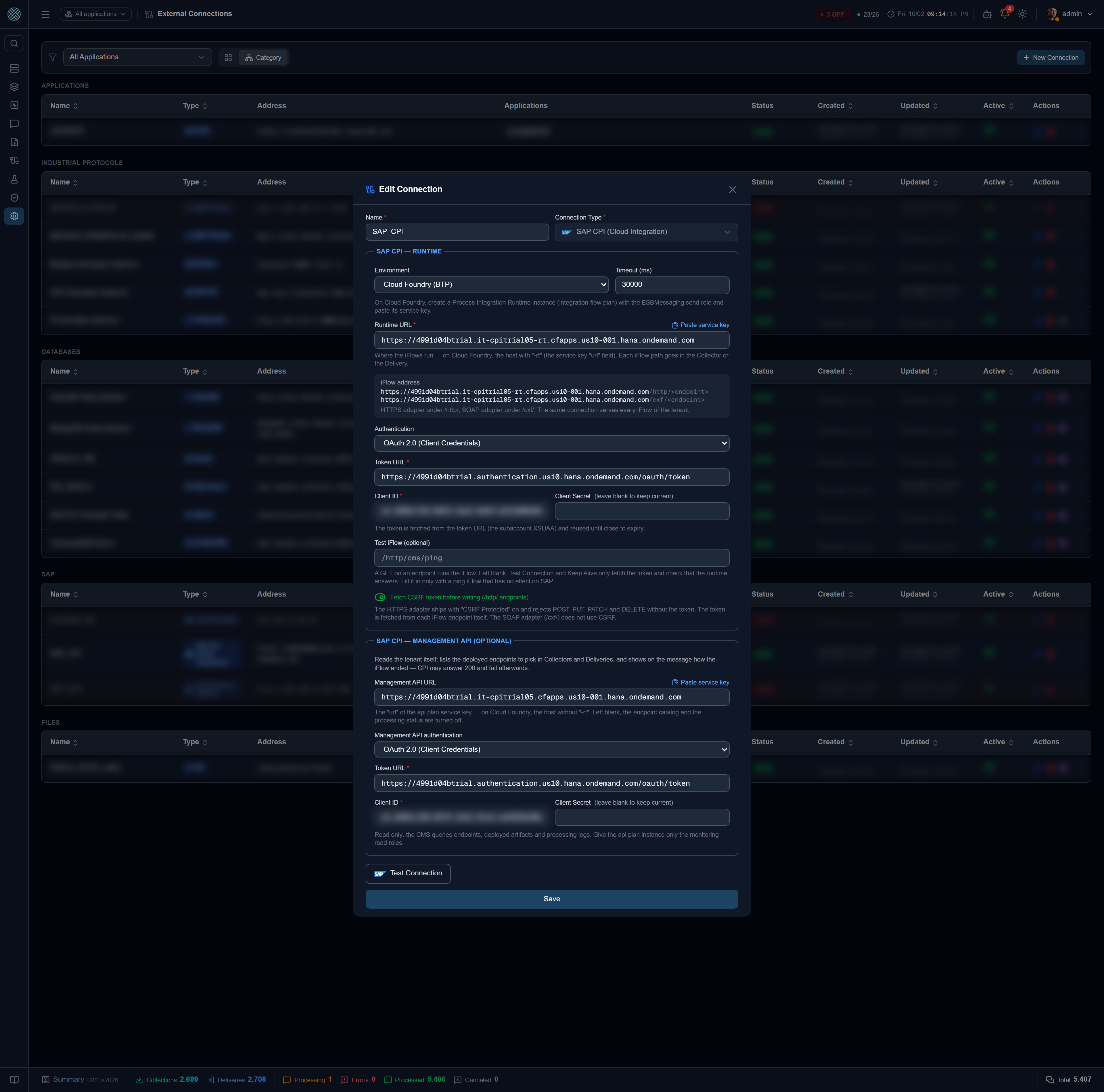
Paste service key
Next to the runtime URL and the management API URL there is the Paste service key link. Paste the whole JSON and click Fill in: the URL, token URL, client id and client secret are filled in (with a certificate service key, the certificate and private key). The JSON is not saved — only the fields go with Save, secrets encrypted.
Both service keys have the same format, and pasting one in place of the other is the most common
mistake. If the URL pasted for the runtime has no -rt (or the management API one has), the screen
warns.
Runtime
| Field | What it is for |
|---|---|
| Environment | Cloud Foundry, Neo or Edge Integration Cell. Changes the screen hints and shows the CA certificate on Edge |
| Runtime URL | Where the iFlows run — on Cloud Foundry, the url of the integration-flow plan service key |
| Authentication | OAuth 2.0 Client Credentials (default), Client certificate (X.509) or Basic |
| Test iFlow (optional) | See The connection test |
| CA certificate (PEM) | Only on Edge Integration Cell with an internal CA certificate |
| Fetch CSRF token before writing | On by default — see CSRF token |
| Timeout (ms) | Ceiling for the calls. Collection and Delivery use their own timeout; the connection test, 5 s at most |
| Authentication | When to use |
|---|---|
| OAuth 2.0 Client Credentials | Standard Cloud Foundry service key. The token is requested from the token URL and reused until close to expiry |
| Client certificate (X.509) | Certificate service key: the iFlow is called directly with the certificate, no token. Requires HTTPS |
| Basic | Neo and Edge. On Cloud Foundry, the clientid and clientsecret also work as user and password |
Password, client secret, private key and key passphrase are encrypted and never come back to the screen: when editing, leaving them blank keeps the current one.
Management API (optional)
Fill in the Management API URL — the url of the api plan service key — and its credential
(OAuth 2.0 or Basic). Left blank, the connection works normally; only the
iFlow catalog and the status on SAP CPI
are turned off.
The connection test
The CPI runtime has no “ping”, and a GET on an endpoint runs the iFlow. So, with Test iFlow
blank, Test Connection and Keep Alive call no iFlow at all: they fetch the token (which proves client
id and secret) and check that the runtime answers. A 401 or 403 there is a rejected credential — on
Cloud Foundry, almost always the ESBMessaging.send role is missing on the instance.
Fill in the test iFlow only with a ping iFlow that has no effect on SAP. Then the test becomes a GET on it.
The Test Connection button also tests the management API, when configured, and only succeeds with both up. Keep Alive tests only the runtime: the management API being down does not stop Deliveries, and does not take the Application down.
When editing, the test uses what is in the fields. With a secret left blank (“keep current”), the screen asks you to type it before testing — the management API one included.
The Application
In Applications, pick the SAP CPI type and the connection in the Keep Alive field. The Application URL shows locked, with the runtime URL, and changes by itself if the connection changes — together with the destination of its Deliveries. Authentication and certificates do not live on the Application.
Collections and Deliveries
| Types | Typical use | |
|---|---|---|
| Collection | HTTP_GET, HTTP_POST | An iFlow that returns data (a query to S/4HANA through CPI) |
| Delivery | HTTP_POST, HTTP_PUT, HTTP_PATCH, HTTP_DELETE, HTTP_SOAP | Sending the data to the iFlow — HTTPS under /http/..., SOAP under /cxf/... |
The path starts at /http/ or /cxf/: the host comes from the connection. For a read test, the
HTTP_GET Collection does not need to be active — the form’s Test button opens the
Test Bench and runs the read.
Picking the iFlow from the list
With the management API configured, the path field of Collections and Deliveries gets the iFlows button: the list of endpoints deployed on the tenant, with the iFlow name and version, the type (HTTP or SOAP) and the artifact status — STARTED running, ERROR deployed with an error. Clicking + fills in the path.
- In a Collection, only HTTP endpoints can be picked.
- In a Delivery, picking a SOAP endpoint switches the type to
HTTP_SOAP, and picking an HTTP one switches it back. - An endpoint on another host does not go through this connection and is disabled.
CSRF token
The HTTPS sender adapter ships with CSRF Protected on and rejects POST, PUT, PATCH and DELETE without a valid token. The CMS handles it on its own:
- before the first write to an
/http/endpoint, it sends a HEAD to the endpoint itself withX-CSRF-Token: Fetchand keeps the token and the session cookies; - the following writes to the same endpoint reuse the token (renewed every 20 minutes);
- if CPI rejects the token (403 with
x-csrf-token: Required), the CMS fetches another and retries once.
In CPI the token belongs to the iFlow: one endpoint’s token does not work for another, so each
endpoint has its own. The SOAP adapter (/cxf/) does not use CSRF, and the CMS never fetches a token
for it. Turn the option off only if the iFlows have the protection off.
Another user on a Collection or Delivery
The runtime credential is the default. When an iFlow requires another user, pick a Credential of the Application in the Credential field of the Collection or Delivery — the first option, From the SAP CPI Connection, is the default. Only authentication changes; the CSRF token still comes from the connection, kept per user.
Status on SAP CPI
CPI answers the Delivery as soon as it receives it. In an asynchronous iFlow — with a JMS queue, or one that calls S/4HANA after answering — the failure comes later, inside the tenant, and the CMS would show “Processed” without knowing anything.
Every CPI response carries the processing log id (SAP_MessageProcessingLogID). The CMS stores
that id on each Delivery and Collection attempt, on success and on failure, and uses it in two ways:
On the message detail, the Status on SAP CPI panel queries the management API and shows, per attempt: the status on the tenant (COMPLETED, FAILED, PROCESSING, RETRY, ESCALATED…), the iFlow, when it ended, the error text and the Open in the CPI Monitor link. The tenant keeps logs for about 30 days; older than that, the panel says it was not found.
Through the iFlow failure (SAP CPI) alert: the Check-sap-cpi-processamento system scheduler
checks, every minute, the Deliveries of the last 24 hours that CPI accepted and that have no final
status yet. When the iFlow ends in FAILED, ESCALATED or ABANDONED, it fires the
alert — once per attempt.
The message status does not change. The CMS delivered, and the message stays “Processed”. What warns about the failure inside CPI is the alert, and the message detail shows what happened there.
The alert is pre-registered, disabled and with no recipients, when a Delivery is created for a SAP CPI Application, next to the Delivery Error. To receive it, enable it in Alerts and pick the recipients. With no management API on the connection, the sweep makes no calls at all.
When it fails
A Collection or Delivery failure carries the text the iFlow returned, after the status.
| Symptom | Likely cause | Where to look |
|---|---|---|
| Failed to get the OAuth2 token | Token URL, client id or client secret | Runtime service key |
| 401 / 403 on the test or the call | Rejected credential; the ESBMessaging.send role is missing | integration-flow plan instance |
403 with x-csrf-token: Required repeated | The iFlow rejected the token twice | CSRF setting of the HTTPS adapter |
| 404 | Wrong path, or iFlow not deployed | iFlows button, or Monitor › Manage Integration Content |
| 500 with iFlow text | The iFlow ran and failed | Status on SAP CPI panel and the CPI Monitor |
| 403 on the iFlow list or the Status | The management API credential lacks the read role | api plan instance |