Discovery by URL
This assistant starts from an API address and returns a configuration proposal. It is the generalist of the set: it works for any system that speaks HTTP, whether or not it has formal documentation.
Opens from the wand icon on the Application row, under Applications.
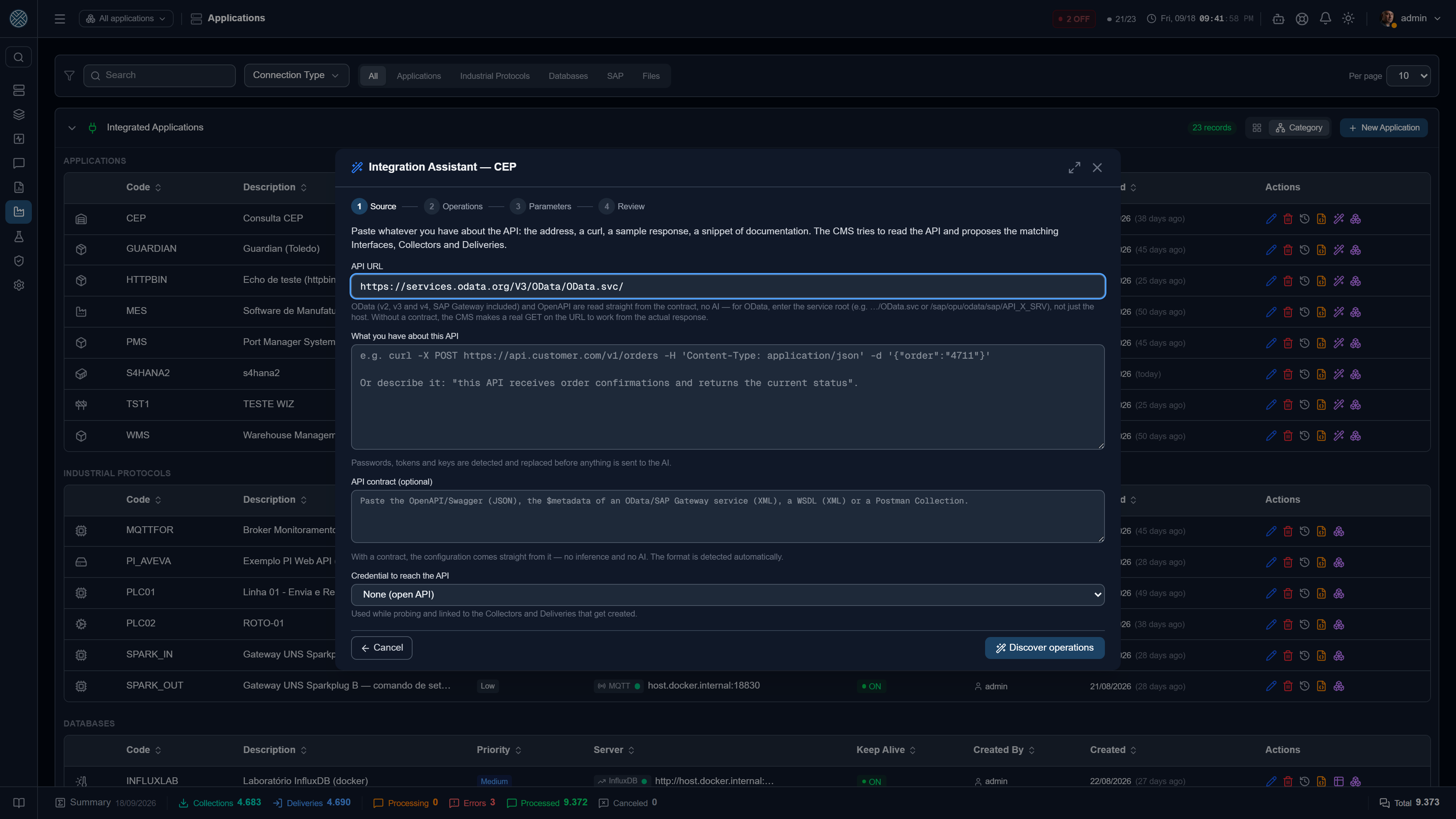
What you can provide
A URL, and optionally a note about what you want from that API.
| You provide | CMS does |
|---|---|
The URL of a contract (.../swagger.json, .../$metadata, .../?wsdl) | Reads the contract and extracts the operations precisely |
| The base URL of the system | Looks for the contract in the known paths; if it finds none, probes the URL |
The root of an OData service (.../OData.svc, /sap/opu/odata/sap/API_X_SRV) | Finds the $metadata right below it and reads the whole service — see OData |
| URL + a prompt (“I need to pull open orders and confirm production”) | Uses the text to prioritise and name what matters |
Contracts it understands
The type is detected by content, not by extension — a Swagger served at /api with no extension
at all is recognised just the same.
| Format | Note |
|---|---|
| OpenAPI / Swagger | JSON and YAML, versions 2 and 3 |
| OData | v2, v3 and v4 — SAP Gateway, S/4HANA, .NET services. Each EntitySet becomes a read and a write; functions and actions become operations of their own |
| WSDL | Each SOAP operation with its soapAction |
| Postman collection | v2.1 — useful when the API has no contract but someone already built the collection |
MCP (tools/list) | An MCP server seen as a catalog of operations |
Here CMS is the client of somebody else’s MCP server, reading its catalogue of operations. The opposite direction — an external AI configuring CMS — is the MCP Server, under Security Services.
Paths it tries on its own
First, the address you pasted itself: if it already is the contract (.../$metadata,
.../openapi.json, ...?wsdl), that is the one used. Alongside it, the $metadata right below it
and the one a level up — the case of someone who pasted the root of an OData service or the URL of
an EntitySet.
If none of that answers, CMS tries the conventional paths from the host and from the first levels of
the address: /openapi.json, /swagger.json, /api-json, /v3/api-docs,
/swagger/v1/swagger.json, /api-docs and /$metadata — the latter at every level of the path,
because the root of an SAP service sits deep. Parameters such as sap-client go along.
/api-json is on the list because it is the NestJS convention — the framework CMS itself is built
on. If your API is NestJS, give it the base URL and that is it.
OData
Enter the service root, not just the host. A host usually publishes several services — an SAP
Gateway has hundreds — and only the root of each one has a $metadata. The URL of an EntitySet or
of an entity (.../Customers('ALFKI')) works too: CMS walks up to the root.
The version comes from the $metadata itself, and the configuration follows its rules:
| What changes by version | What comes out |
|---|---|
| Key in the URL | Text between quotes — /OrdemSet('4711'), as SAP requires. Up to v3, Guid, Int64, Decimal and dates carry their own literal (guid'...', 10L, 1.5M, datetime'...'). Composite keys come out named |
| JSON body | Up to v3, Int64 and Decimal travel as text ("Menge": "10.000") and Edm.DateTime has no time zone; in v4, numbers. Complex types become objects, and inheritance between entities is resolved |
| Functions and actions | v2: service operation, with parameters in the URL even on POST. v3: an action is a POST with the parameters in the body, a function is a GET. v4: FunctionImport is a GET, with the values in the Fixed Parameters; ActionImport is a POST. One bound to an entity starts from it — /Ordem('4711')/<namespace>.Liberar |
| Sample response | With the envelope the Collector actually receives: d.results in v2, value with odata.metadata in v3, value with @odata.context in v4 |
What the service declares is respected: a read-only set (sap:creatable="false" on SAP,
Capabilities annotations in v4) gets no write, a media entity gets no JSON create, and
$format=json already comes in the Collector’s Fixed Parameters — without it SAP answers in XML.
An entity with concurrency control (ETag) requires the If-Match header to update or delete, and
the Delivery does not send it — the operation shows up in the list with that warning. In v2, the
update goes out as PATCH: SAP Gateway accepts it, but a non-SAP v2 server may require MERGE.
SAP Gateway Application
On an Application of the SAP Gateway type, the URL opens as
http://host:port/sap/opu/odata/sap/ — complete it with the service (PP_PRODOPS_CONFIRM_SRV/).
Leaving only that prefix is rejected with a clear message: SAP would answer 500 “Access using a
‘ZERO’ service”, because there is no service there.
- Reading the contract uses the connection user and client — or the Credential picked in the assistant —, but only when the URL is the connection’s server. For any other address the call goes out without authentication and without following redirects, so nobody receives the SAP user by typing an address of their own.
- The Contract field also accepts the contract URL (
.../PP_PRODOPS_CONFIRM_SRV/$metadata), downloaded on the spot. If it cannot be downloaded, the message shows the status the server returned.
The probe, and its limits
When there is no contract, CMS makes a real request to the URL to see what comes back. That is a call into the customer’s system, so it is fenced in:
- GET only — nothing that changes state;
- 10 seconds timeout;
- 1 MB response, at most;
- 3 redirects, at most;
- cloud metadata addresses (AWS/Azure/GCP’s
169.254.169.254and equivalents) are blocked, so that a URL pasted by mistake does not turn into reading an instance credential.
Where each operation came from
Every operation in the list carries a provenance tag, and it is what separates what CMS knows from what it supposes:
| Tag | Meaning |
|---|---|
| CONTRACT | Came from the Swagger/OData/WSDL. Exact information |
| PROBE | Came from a real API response |
| INFERRED | Proposed by the AI from context |
Pay particular attention to the INFERRED ones when reviewing: those are the ones that can be
plausible and wrong at the same time.
The operation list
A real-world Swagger file brings hundreds of operations. The list is built for that:
- grouped by scenario, groups collapsed, with a count on each;
- select / clear a whole group at once;
- filter by direction (Collector or Delivery) and text search — searching opens the groups by itself;
- detail on demand: required fields and a body example are fetched when you click “view detail”, not for all 450 operations at once.
Review and install
Before writing, the review shows each object as CREATE, UPDATE or CUSTOMIZED, and lets you
rename any code or point at an existing Interface instead of the proposed one.
Test the reads now runs the selected Collectors against the API, at the address and with the
Fixed Parameters they will have, and shows each response. Deliveries are never fired from there —
they would write to the target system. A read that depends on a message field (the key in
/OrdemSet('{{Aufnr}}')) can only be tested with a real message.
The Application URL. The Collector calls the Application’s address plus the operation path. If
the Application has no URL yet, it gets the base URL confirmed in the assistant. If it has only the
host, the Collectors carry the service root path (/sap/opu/odata/sap/API_X_SRV/OrdemSet). A URL on
another host is not changed — that is the call of whoever registered the Application (a proxy,
another environment) — so check the Collectors’ path after installing.
After installing, the assistant shows what was created, with a link to each screen — Interfaces, Collectors, Deliveries and Business Errors. Since everything is born disabled, that link is the next step, not a detail.
Authentication
If the API requires a credential, register it first under Credentials and pick it in the
assistant. CMS covers Basic, Bearer, API Key, token login and OAuth2 client credentials — the
latter with automatic renewal, scope and extra parameters when the provider demands them.
Secrets never reach the AI. Token, password and API key are replaced with markers before any text is sent to the model — including when they show up inside a request example within the contract.