AI Governance
This page answers, naming each screen and each setting, the questions that usually arrive in a compliance questionnaire before AI is allowed onto a plant floor.
What reaches the model
Only what is needed to answer, and always through the provider you configured under Settings › AI — which can be a model running inside your own network.
| Goes | Never goes |
|---|---|
| Your question, with secrets already redacted | Passwords, tokens or keys from any Connection or Credential |
| Metadata: codes, states, counts, error messages | Message bodies — the AI sees the shape, never the data |
| The manual pages it opened | Definitions with an active Encryption Rule |
Secret redaction happens before a row exists in the database: a URL pasted with a token inside already reaches the sessions table redacted. The final answer goes through the same filter before being stored.
The AI sees exactly what you would see on the screens. Its tools are cut by your Role and your Applications — an Interface out of your reach does not appear to it.
When a request is out of scope
The assistant deals with the CMS and with your plant’s integrations. A clearly unrelated request — writing a personal text, general knowledge, entertainment — is refused: the session ends with the status Out of scope, the answer explains why and, when there is something close, points the way.
Refusing is not the same as blocking. A badly worded question, a code the AI does not recognize, an error in another language and an industrial system it has never seen are still its job — the instruction explicitly prefers investigating over refusing. The expensive mistake here is the false positive: it is paid by whoever is waiting with the line stopped.
Moderation, before the answer
There are two layers, and both run before the model writes anything.
Stage A — deterministic. No network call and no cost, so it keeps working even when the provider is down. It recognizes attempts to alter the assistant’s instructions or reveal its internal configuration, text above the maximum size, and the cap on sessions per person per hour.
Stage B — intent classifier. A short call to the model classifying the intent of the request. It can use its own, smaller model — classifying is cheap work, and it runs on every question.
The three postures
Under Settings › AI › Input moderation:
| Posture | What it does |
|---|---|
| Permissive | Nothing is blocked; whatever is recognized shows up flagged for review |
| Standard (factory default) | Blocks attempts to manipulate the instructions and text above the limit. Everything else passes flagged |
| Strict | Also blocks what is classified as out of scope or sensitive |
The classifier ships in observation mode: it flags, it does not block. The idea is that you see what it was flagging, under Reports › AI Sessions, before letting it bar anything — a classifier that blocks with no history is a firewall rule with no log.
Who reviews, and how often
The Reports › AI Sessions screen shows everything asked in this installation: who asked, what, in which mode, what it cost, what moderation decided, and what is still waiting for review.
The reviewer is whoever holds the /reports/ai-sessions Tool, granted under Roles. It is
deliberately separate: nobody reaches this screen by administering something else.
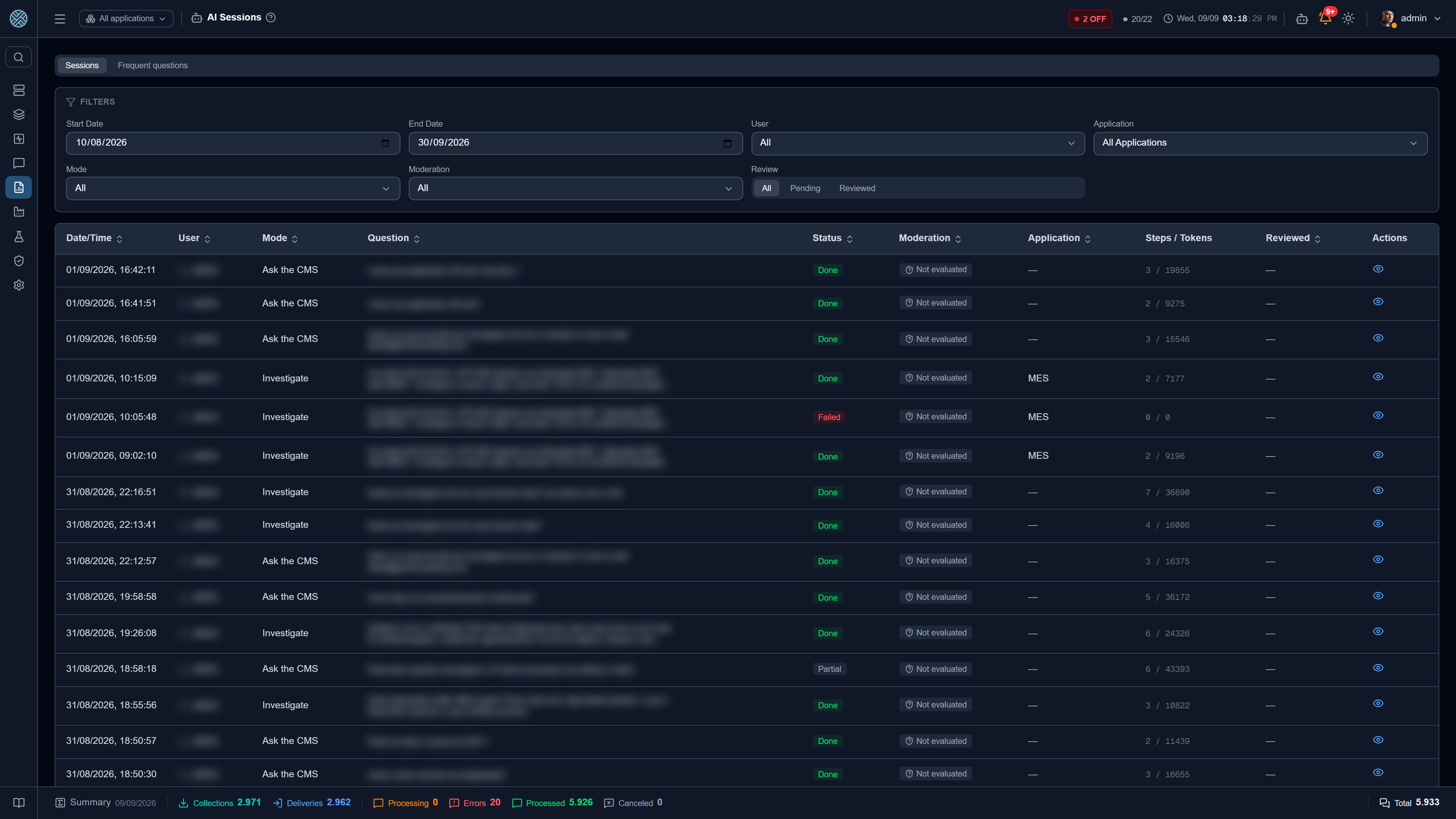
The frequency is a scheduler, not an intention. revisao-ia runs every day at 07:00 and e-mails
the reviewers when there is a flagged session waiting. You can see and change the time under
Schedulers.
Whoever reviews is also reviewable
Opening someone else’s session records an IA_SESSAO_LIDA event in the Audit Log, with user
and IP. Opening your own does not — that is not privileged access.
The Frequent questions tab groups identical questions and counts how many times and how many people. A large group is almost never an incident: it is a missing manual page, or a screen that is not explaining what it should.
What is recorded, and for how long
There are two clocks, and that is what allows being strict about privacy without losing the trail:
- The content — the question, the steps and the answer — expires by the period under
Settings › AI › AI session retention. Default 90 days;
0never purges. The purge runs with the daily cleanup. - The audit events — session blocked, flagged, read by a reviewer, history cleared — do not expire. They stay in the Audit Log.
When someone clears their own AI history, the content goes away — that is the right of whoever asked — but it stays on record that it was cleared, by whom and how many sessions. That is what keeps the trail from depending on the goodwill of the person being audited.
What the AI never does
- It does not save configuration on its own. Not even the builder agent: it proposes, and saving is a person’s click, on screen, with a preview of what will be created.
- It does not browse the open internet. The embedded manual and the CMS tools, nothing else.
- It does not answer about the product without reading. A claim about the CMS with no manual page behind it is treated as “I did not find it”.