Screen map
This index follows the side menu order, so that looking here and looking in the system take the same path. Every route is inside the authenticated area; the Cockpit is the only one that opens without a login, and even it requires a wallboard token.
A screen only appears in the menu if the user’s Access Profile grants the matching Tool — see Security. Application-grouped screens show only the Applications and Interfaces the user is allowed to see.
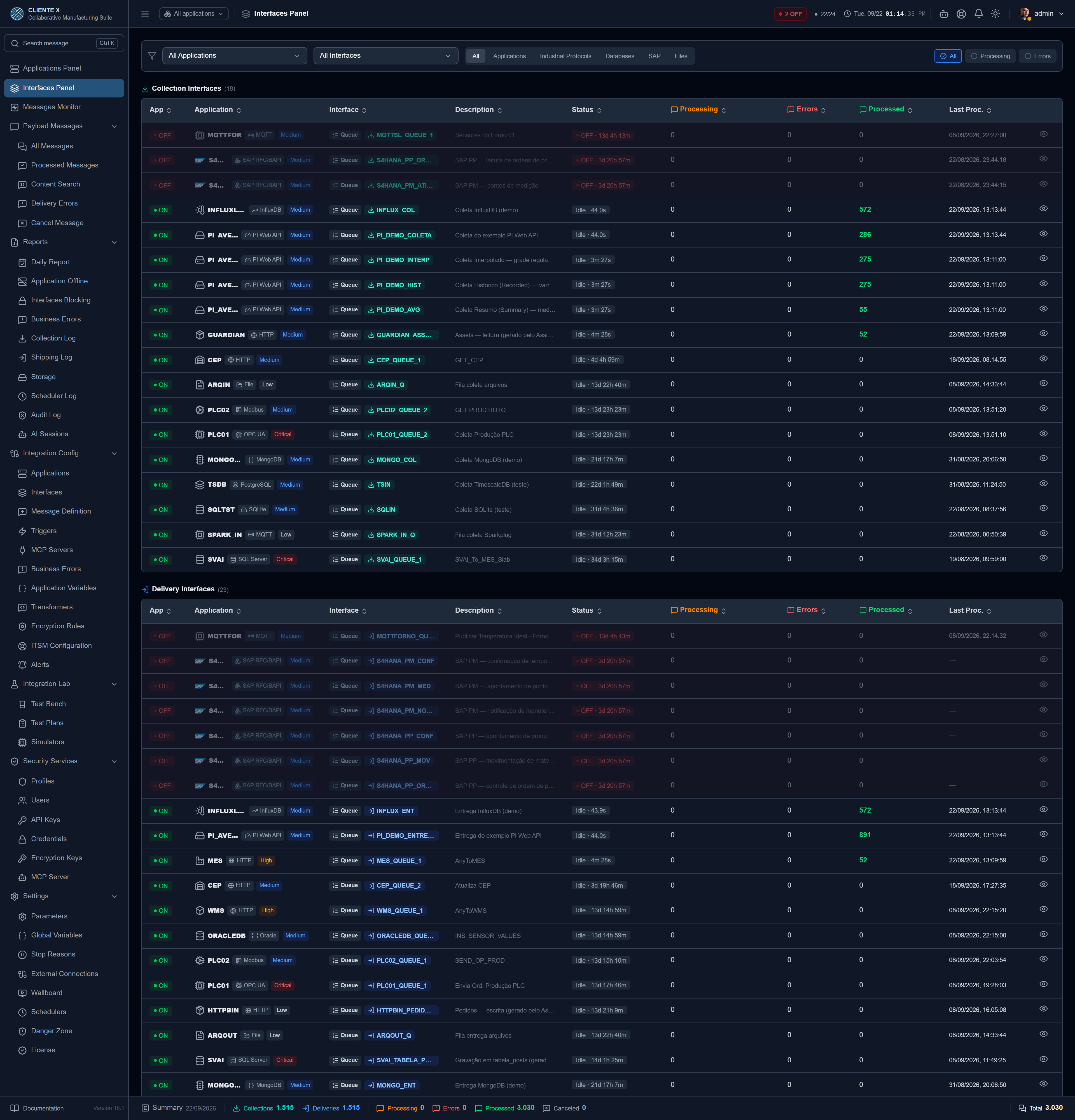
At the top of the menu
| Screen | Route | What it shows |
|---|---|---|
| Applications Panel | /application-dashboard | Who is online, with today’s counters per application |
| Interfaces Panel | /dashboard | Collection and Delivery interfaces, with queue, errors and status |
| Messages Monitor | /interface-monitor | Pace of each interface: last processing and average time |
| Real-time monitor | /dashboard/:id/monitor | The messages of one interface, live |
| Cockpit | /cockpit | Wallboard for a TV: opens with a user session or with a wallboard token |
Outside the menu
Two screens have no sidebar entry — you reach them through the robot icon in the header, present on every screen.
| Screen | Route | What it does |
|---|---|---|
| AI Assistant | side panel | Asks the manual, investigates the installation and proposes an integration |
| Integration Agent | /agent | The full screen: step timeline, evidence and the approval of a plan |
Messages
| Screen | Route | What it shows |
|---|---|---|
| All Messages | /messages | Everything that went through, with search and status filter |
| Processed Messages | /messages/processed | Delivered successfully |
| Content Search | /messages/content-search | Search inside the payload |
| Messages with Error | /messages/delivery-errors | Technical and business failures, with bulk reprocessing |
| Cancel Message | /messages/cancellation | Bulk cancellation, with confirmation |
| Message detail | /messages/:id | Full payload and attempt history |
→ Messages
Reports
| Screen | Route | What it shows |
|---|---|---|
| Daily X-Ray | /reports/daily-summary | Yesterday closed out, with a shortcut to where each problem gets fixed |
| Application Offline | /reports/application-availability | Uptime, downtime and justified windows per application |
| Interface Blocking | /reports/interface-blocking | Blocks, origin and time blocked |
| Business Errors | /reports/business-errors | Messages classified as business errors |
| Total Collections | /reports/collection-log | History of collection runs |
| Total Deliveries | /reports/shipping-log | History of deliveries |
| Storage | /reports/storage-usage | Volume per application → interface → definition |
| Scheduler Log | /reports/scheduler-history | Past job executions |
| Audit Log | /reports/audit-log | Sensitive actions, with justification, result and IP |
| AI Sessions | /reports/ai-sessions | Conversations with the AI, with the moderation tag and the reviewed mark |
| Definition Report | /reports/definicao/:tipo/:id | Consolidated view of a Collection or Delivery, exportable as PDF |
→ Reports · Daily X-Ray · AI Governance
Integration Config
Until September 2026 this group was called Shop Floor. Its name changes if you fill in the Plant Alias in Settings → Appearance.
| Screen | Route | What it does |
|---|---|---|
| Applications | /applications | CRUD of applications, keep-alive, and the entry point to the assistants |
| Interfaces | /interfaces | CRUD of interfaces, scheduling, order, retention, block/release |
| Message Definition | /message-management | Unified view of Collection and Delivery per application |
| Collection Definitions | /collectors | What the CMS fetches, and where it forwards it |
| Delivery Definitions | /definitions | What the CMS sends: destination, timeout, attempts |
| Triggers | /triggers | Internal schedule, with fixed values, for Collectors and Deliveries that require parameters |
| MCP Servers | /mcp-servers | Applications that expose Collectors and Deliveries as AI tools: usage per credential, input contract and enable/disable |
| Business Errors | /business-errors | Rules that classify responses as failures |
| Application Variables | /application-variables | Reusable values scoped to one Application |
| Transformers | /transformers | Payload conversion scripts |
| Transformer (editor) | /transformers/:id | Monaco editor or AI generation |
| Encryption Rules | /encryption-rules | Conditional encryption by wildcard text and direction |
| ITSM Configuration | /ticket-destinations | Where each alert opens a ticket: tool, body and ticket history |
| Alerts | /alerts | Who gets told, about what and through which channel |
→ Configuration · Triggers · MCP integration server · Transformers · Business Errors · Help Desk · Alerts
Integration Lab
Integration Config is where an integration is set up; this is where it gets exercised. Simulators belong to that second job and changed group in September 2026: the simulator fakes the source, the Test Bench fires the stimulus, and testing a field Collection means using both together.
| Screen | Route | What it does |
|---|---|---|
| Test Bench | /test-bench | Fires a Collection or Delivery down the production path, marked as a test |
| Test Plans | /test-plans | Ordered scenarios with expectations, run in one go |
| Simulators | /simulators | Embedded OPC UA, Modbus and PI servers |
→ Test Bench · Test Plans · Simulators
Security Services
| Screen | Route | What it does |
|---|---|---|
| Access Profiles | /roles | Profiles and permissions per Tool |
| Users | /users | CRUD of users, allowed interfaces, 2FA, alerts |
| API Keys | /api-tokens | Tokens per application, with allowed interfaces |
| Credentials | /credentials | Inbound and outbound authentication |
| Encryption Keys | /encryption-keys | AES-256 keys, creator and who may decrypt |
| MCP Server | /mcp-tokens | Tokens that give an external AI read and configuration access |
→ Security and encryption · MCP Server
Settings
| Screen | Route | What it does |
|---|---|---|
| Parameters | /settings | System, appearance, e-mail, LDAP, tools, webhook, AI, SAP SDK and Help Desk |
| Global Variables | /global-variables | Reusable values across the whole system |
| Stop Reasons | /stop-reasons | Catalogue for justifying downtime |
| External Connections | /external-connections | Databases, brokers, OPC UA, Modbus, SAP, PI, folders |
| Wallboard | /settings/cockpit | Tokens that let a TV open the Cockpit without a login, scoped per Application |
| Schedulers | /schedulers | System and interface jobs, cron and manual runs |
| Workers | /settings/workers | Internal processing queue: waiting, active, failed and executions |
| Licence | /settings/license | Installation identification and contract validity |
| Danger Zone | /settings/danger-zone | Bulk blocking, purge and configuration import/export |
→ Settings · Schedulers · Connections and credentials · Wallboard · Stop Reasons
Where the assistants live
The assistants are not screens of their own: they open from inside an existing screen, from a row icon or a button at the top. Since that is the hardest thing to find unaided, here is the map.
| Assistant | Where | How it appears |
|---|---|---|
| Discovery by URL | /applications | Purple wand icon, on the Application row |
| Database catalog | /external-connections or /applications | Purple table icon |
| Folder catalog | /external-connections or /applications | The same icon, on a file connection |
| Packs | /applications | Purple boxes icon, on any Application with an installable pack |
| Between Applications | /transformers | Integrate two Definitions button |
| Transformer by AI | /transformers/:id | Generation tab inside the editor |
The icon that opens an assistant is always purple and sits last in the actions column — that way the edit, delete and history buttons never move between rows.
Which assistant appears depends on the Application type. With an SAP RFC connection, you get the pack; with a database or folder connection, the catalog; otherwise, discovery by URL. Where none applies — MQTT, OPC UA, Modbus — no icon appears at all: offering an inapplicable form is worse than offering nothing.
Other actions worth knowing
| Action | Where | What it does |
|---|---|---|
| Export Postman | /applications, orange icon | Downloads a Postman v2.1 collection with one folder per Interface of the Application. The token never goes into the file |
| Change history | Clock icon, on most configuration screens | Who changed what, and when |
| View catalog | /external-connections | Browses a database or folder structure, generating nothing |
| Test connection | /external-connections | Validates host, credential and reachability before configuring anything |
| Application in focus | Header, on any screen | Narrows every screen to one Application, and the choice persists as you navigate |
| Open ticket | Failed message, in the popup and the detail page | Opens a ticket in a Help Desk destination already filled in with the Application, the Interface, the error and the message link, and shows the number the tool returned. See Help Desk |
| Content search | Ctrl+K, from any screen | Searches for a snippet inside the payload — order number, batch, material — without picking any filter first |
| Send by e-mail | /credentials, /api-tokens, /mcp-tokens and the message detail | Sends a credential, a token or the message PDF to an eligible recipient, with an audit record |
| Connect via MCP | /api-tokens, /credentials (Inbound) and /mcp-servers | Shows the Application’s MCP address and the AI client configuration snippet, without revealing the secret. See MCP integration server |
| AI Assistant | Robot icon in the header | Asks about the product by reading the manual and — with the Agent module — about your installation. The red counter is Standby. See AI Assistant |
| Connection details | Collection and Delivery, on the source/target bar | Shows the server name, type and address, and opens a popup with that External Connection’s fields |
On a phone
The CMS is a desktop product and stays one — but whoever opens an alert link at two in the morning needs to see what went down. So no screen blocks on a phone; they fall into three behaviours:
| Group | Screens | How it looks |
|---|---|---|
| Prepared | The panels, Interface Monitor, every Messages screen, the message detail, the Cockpit and Licence | A phone layout of their own: the menu becomes a drawer, and the table becomes a card list with a sort selector |
| Degrade well | The Reports | No dedicated layout, but readable — they inherit the card mode and already had filters that follow the width |
| Warned | The configuration screens | They open normally, with a dismissable banner saying they were designed for a computer |
Above 768 px wide nothing changes — the desktop is exactly what it always was.