Daily X-Ray — /reports/daily-summary
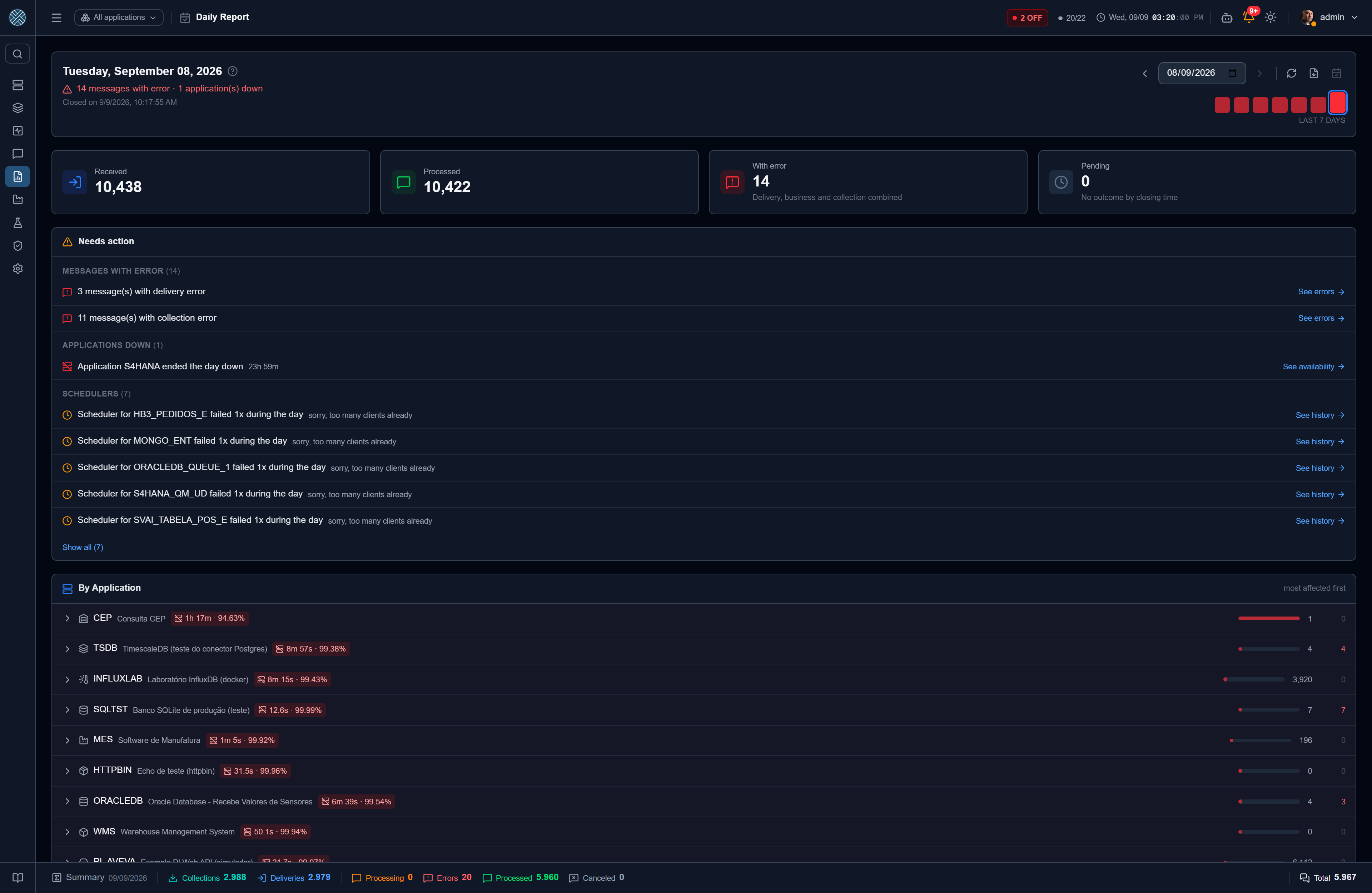
When the day turns, the CMS closes an X-ray of the previous day: what came in, what went out, what failed, which Applications were down, which Interfaces got blocked and what was left behind. The result is stored, shows up on this screen and goes out by e-mail to whoever subscribed.
This is not one more report to print. It is the next morning’s triage screen — and that is why every number here links to the place where that problem gets solved.
The picture is frozen
A day’s X-Ray is a snapshot, written at closing time. It is not recalculated on every visit, and that is deliberate:
- It survives housekeeping. Message retention is per Interface. On an Interface with 30 days of retention, a recalculated report would simply stop answering “how did 14 July go”.
- The screen and the e-mail never disagree. Recalculated, the number that went out by e-mail would change the moment somebody reprocessed a message — and whoever got the e-mail would start doubting both.
- It allows the comparison that matters. With the closing frozen and the present alive, you can say “the day closed with 12 delivery errors; 9 are still failing now, 3 were reprocessed”.
The honest consequence: the snapshot does not fix itself. The screen stamps “closed at” and offers Rebuild, for anyone who wants the picture redone with today’s data — aware that the numbers may then diverge from what the e-mail said.
A day computed after the following turn gets the Computed late tag: messages already removed by retention may not be counted in it.
How to read it
The verdict comes before the numbers. One line at the top says whether the day was clean or what happened — “12 messages with errors · 2 Interfaces blocked” — in red, or “Day with no incidents” in green. It is what you read first, and usually all you need to read.
Below it, the recent-days strip gives the context a single day cannot: is “12 errors” a lot, or is it Tuesday? A day with no computation shows grey and never turns green — an unmeasured day is not a day without problems.
Every counter has its own date
| Counter | Counted by |
|---|---|
| Received | Arrival date |
| Processed and the three error types | Outcome date |
| Cancelled | Cancellation date |
| Pending | Received by end of day and still without an outcome when the snapshot was taken |
A message that arrived yesterday and finished today counts on the day it finished. Using the wrong date is the classic mistake in this kind of report, and it is what would make the numbers disagree with the Messages screen.
Messages from the Test Bench are left out of everything: a test is not accountability.
Needs action
The block that exists for triage. Each line is an occurrence that survived the closing, with the shortcut to where it gets resolved:
| Occurrence | Takes you to |
|---|---|
| Interface that closed the day blocked | The message that blocked it |
| Application that ended the day down | The availability report |
| Scheduler inactive at closing | Schedulers |
| Scheduler that failed during the day | The run history |
| Messages that closed the day in error | The errors screen, already filtered to the day |
Message errors appear split by type — delivery, business and collection. “12 messages with errors” does not say where to start, and the three are solved in different places: reprocess, fix the data at the source, or look at the collection origin.
Per Application
The full breakdown comes sorted most occurrences first, not by code: an alphabetical list would force you to walk the whole catalogue looking for red. Each Application expands into Interfaces, with the counters, the day’s downtime (duration, reason and the error captured by Keep Alive) and the blocks.
Closing the screen are the most frequent business errors and the alerts fired during the day.
You only see the Interfaces you have access to, and the totals at the top add up only what is being shown — the big number never disagrees with the list under it.
PDF and e-mail
The PDF button turns the day’s closing into a document, with the numbers, the downtime, the blocks and the schedulers.
The nightly e-mail is cut per recipient: each person gets the summary of the Applications and Interfaces they can see. It carries an HTML body with the numbers and the links to the screen, and it does not carry the PDF attached — the PDF is drawn in the browser, in the timezone and language of whoever is looking; the API would know neither.
To receive it, tick Receives daily summary on the user record. It is a field of its own, separate from “receives alerts” — the latter also governs WhatsApp and therefore requires a phone number, which makes no sense for someone who only wants the e-mail summary.
The send time is that of the Daily X-Ray job, under Schedulers — so changing the e-mail hour needs no new screen and no support ticket. Each run’s duration is recorded there like any other job.