Routers — /routers
A Delivery receives at POST /api/{interface}/{delivery} and delivers to one target. Most of
the time that is what you want. When the same data has to go to several targets — sometimes to
all of them, sometimes only to some, depending on the content —, the way to do it is a Router.
A Router is a generic API that belongs to no Application:
POST /api/router/{sigla}It takes the payload, checks the input contract, walks a decision flow and creates one message in each Delivery the flow reached. It delivers nothing by itself: target, credential, Transformer, encryption, retries and Business Error stay with the Delivery, which receives the message as if it came from an external producer.
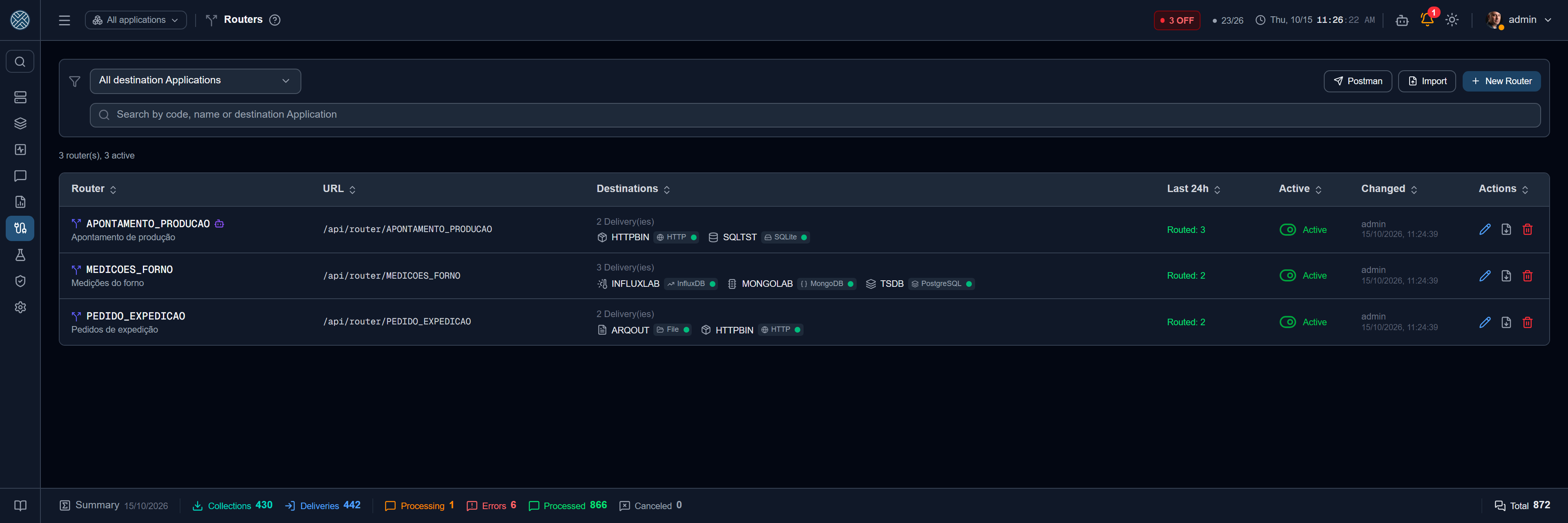
The list
Each row shows the sigla and name, the URL, the targets — how many Deliveries and their Applications, each with the icon and the connection type badge, which opens the connection details — and the traffic of the last 24 hours. The robot icon next to the sigla means the router is exposed as an MCP tool.
The filter at the top is by target Applications, and the search looks at sigla, name, description, tool name or target Application. The Active column turns the router on and off right from the list; turning it off asks for confirmation, because the router stops accepting calls at once (callers get 503) and the Collectors forwarding to it stop distributing.
The flow
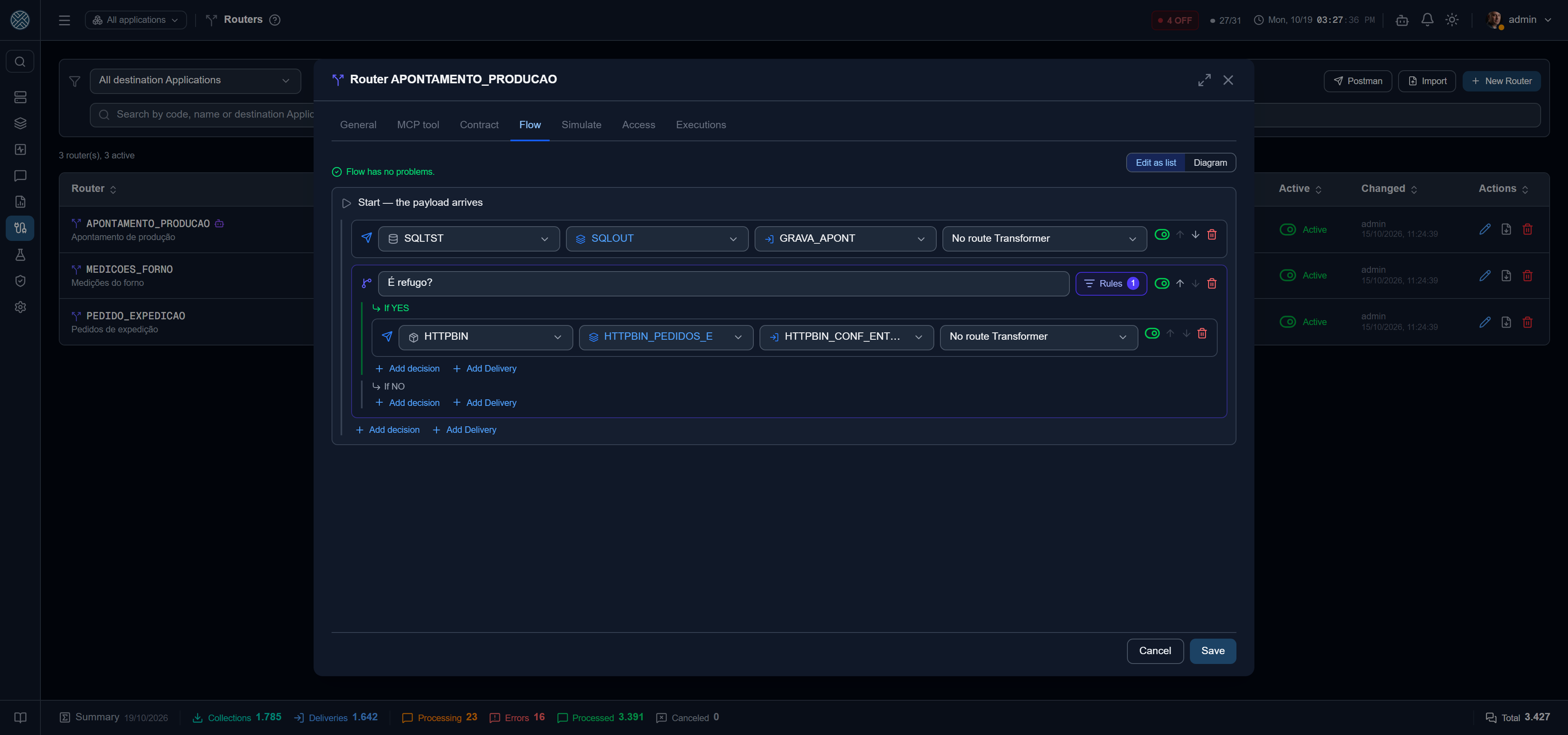
The flow is a tree that starts at Start (the payload arrived), with two kinds of step:
- Decision — a condition on the payload, with rules and AND/OR groups. It has an If YES side and an If NO side, and each side can lead to several steps.
- Delivery — the end of the path: a Delivery already registered in Message Management, picked in three combos — Application, Interface and Delivery. When the Application has a single Interface, it comes already selected. Help Desk Applications do not show: a ticket is opened by an alert, not by a router. On the link that reaches the Delivery you can pick a Transformer, which turns the Router payload into what that Delivery expects (before the Delivery’s own Transformer). In the list, the Transformer sits on the same row as the Delivery, after it.
The two classic ways of spreading data are just shapes of the same flow:
| You want | Build it like this |
|---|---|
| Every match — the data goes to each target whose rule holds | Several decisions side by side, straight under Start |
| The first match, with an “else” | Decisions chained through the NO side; the last NO leads to the default target |
| Always one target, plus others depending on the rule | A Delivery straight under Start, next to the decisions |
The Flow tab edits as an indented list; the Diagram button shows the same flow drawn left to right. Errors (cycle, decision without a condition, loose step) show while you build and block saving; warnings (decision with no output, the same Delivery through two different Transformers) only warn.
In the Diagram, each Delivery box shows the Delivery, the Application with its connection type, the Interface and, in purple, the route’s Transformer when there is one. The Decision box shows its name and how many rules it has.
The same Delivery reached by two paths receives one message — unless the paths use different Transformers: then it receives one per Transformer.
The input contract
On the Contract tab:
- Define here — the top-level fields of the incoming JSON, with Required (a toggle) and default value. The Suggest from traffic button shows the fields that arrived in the last 50 calls.
- Inherit from a Delivery — uses the Input Payload of an existing Delivery, read on every call: changing its contract changes the Router’s. The Delivery is picked in the same three combos as in the flow.
The contract fields are also available in decisions as input.<field>.
The default value applies when the field is missing from the payload, and accepts
Global Variables through the {} button —
{{DEFAULT_SHIFT}}, for example, resolved on every call. Only Global ones: a router belongs to no
Application.
Only the default value is resolved. If the caller sends {{DEFAULT_SHIFT}} in the payload itself,
the text goes on as it came — otherwise an external producer could read any variable’s value back
through a decision.
Maximum size at 0 (or empty) uses the global limit in Settings; a router’s own value can only be lower.
What to do when the payload does not meet the contract is the Router’s choice:
| Option | Effect |
|---|---|
| Reject (400) | The caller gets 400 with the missing fields. Nothing is stored |
| Record without routing | The call is recorded as out of contract and nothing is spread |
| Route with a warning | Follows the flow and keeps the warning in the execution |
Who can call
A Router accepts the same authentication forms as a Delivery — x-api-token, Authorization: Bearer or Basic —, but with keys from the Routers group, created in
API Keys and Credentials. An Application key
does not authenticate on a Router, and a Router key does not authenticate on an Interface. The
Access tab lists who can call that Router and, below, How to call this Router: the URL
POST /api/router/{code}, a cURL with API Key (x-api-token) and one with Credential (Basic), both
with the contract JSON in the body, and the response format, described next. Each block has a copy
button.
The answer is always immediate: the Router decides the routes on arrival and creates the messages right after.
{
  "id_message": "b81c090a-…",
  "message_type": "ASYNC",
  "return_message": "Message received and routed to 2 destination(s)",
  "hasError": false,
  "routes": ["SAP/CONFIRMA_ORDEM", "QMS/NAO_CONFORMIDADE"]
}
It is the same format as a Delivery’s response. id_message is the id of the Router execution —
the messages of each route are created right after, one per Delivery. Searched in Ctrl+K or opened at
/messages/{id}, it leads to the messages that execution generated. routes lists the chosen
Deliveries. return_message says what happened:
return_message | hasError |
|---|---|
Message received and routed to N destination(s) | false |
Message received; no route matched — no route matched | false |
Message outside the router contract — comes with contract_missing, the missing fields | true |
A Collector can also send what it collected to a Router: in the Collector’s forwarding, pick the Router target instead of Delivery. The forwarding condition and Transformer still apply before the Router. Since nobody would receive a 400, “Reject” becomes “Record” for this origin. A Trigger can also target a Router, with a schedule and fixed values.
Simulate and test
The Simulate tab shows the path a payload would take now, with the saved flow: the decisions with the value read in each rule, the Deliveries that would receive it and the diagram with the path lit. Nothing is stored or sent.
With a contract, the box already opens with the JSON of the fields to fill in, and the line above lists the required ones. A field with a fixed default comes filled in; one with a Global Variable comes empty — empty counts as missing, and the server applies the resolved default. Contract template resets the box to that JSON, and Use the last call brings the most recent real payload.
Run as test really sends, along the same path as an external call, with the messages marked as test — as in the Test Bench, and so it requires that tool.
Executions
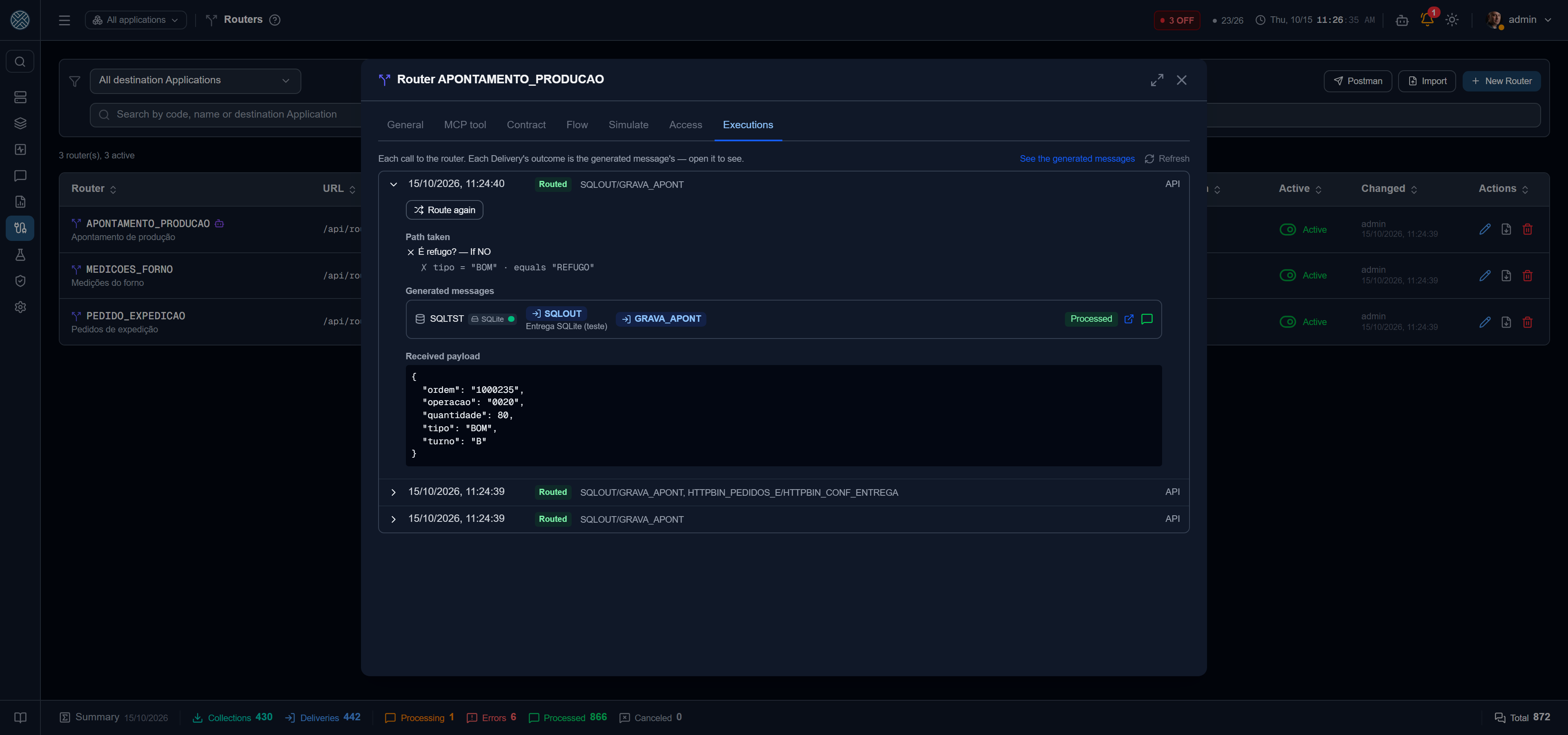
Each call becomes an execution, with the origin (API, Collector, Trigger — with its name —, test or MCP), the path taken, the messages generated and the payload — the latter only for whoever sees every Application it went to.
Each generated message shows its Application (icon and connection badge), Interface, Delivery and message state. At the end of the row, the arrow opens the full message in a new window, without closing the router, and the message icon — in the state’s color — opens the summary, the same popup as in Messages.
The execution state is the routing state:
| State | Means |
|---|---|
| Routed | Every route became a message |
| Partial | Some route failed to create the message (Delivery disabled, Content-Type, Transformer) |
| Error | Every route failed |
| No target | The flow reached no Delivery |
| Out of contract | The payload did not meet the contract and the policy said not to route |
The outcome of each delivery is that of the message itself — open it to see. In the Messages list, a message generated by a Router carries its mark, and See the generated messages opens the list already filtered.
- Reprocess failed routes retries only what failed; whoever already received does not receive again.
- Route again sends the same payload through the current flow, in a new execution that points to the original and records who asked. Deliveries that already received may receive again — hence the confirmation.
In the Panel and in Messages
In the Interfaces Panel, the Router Interfaces section shows each Router with its destinations, today’s calls and the generated messages; clicking the Router opens the Router monitor. In Messages, the Router combo filters the generated messages — it is the one that comes filled in from See the generated messages.
Notices
On the General tab, pick which states trigger a notice (no target, out of contract, partial, error) and who receives it — only users who can see Routers. The e-mail goes out on the transition into the state, not on every call, and a recovery notice arrives when a call goes through whole again. Test calls do not notify.
Web Service, Postman and portability
- SOAP — with Also publish as a Web Service, the Router answers at
/api/ws/router/{sigla}(WSDL with?wsdl), operationEnviarAoRoteador. With WS-Security, the key goes in the header’s UsernameToken — the password as API Key, or login and password of a Routers-group Credential. - Postman — downloads a collection with one request per Router, with the body built from the contract. The API Key is left blank.
- Export / Import — a Router goes out as a JSON file that carries no ids: Deliveries go as
INTERFACE/DELIVERYand Transformers by name. Imported in another environment, if any reference is missing nothing is created and the list of what is missing shows up. API Keys and Credentials do not go along. In the installation’s Import / Export, Routers is a group of its own. On import, the file can be dragged onto the popup; it accepts.jsonup to 1 MB (and up to 500 nodes), and is only sent when you click Import.
Through the configuration MCP Server, cms_list_routers,
cms_get_router, cms_simulate_router and cms_list_router_executions read; cms_create_router
creates from the same document as the export, and the Router is born disabled.
As an MCP tool
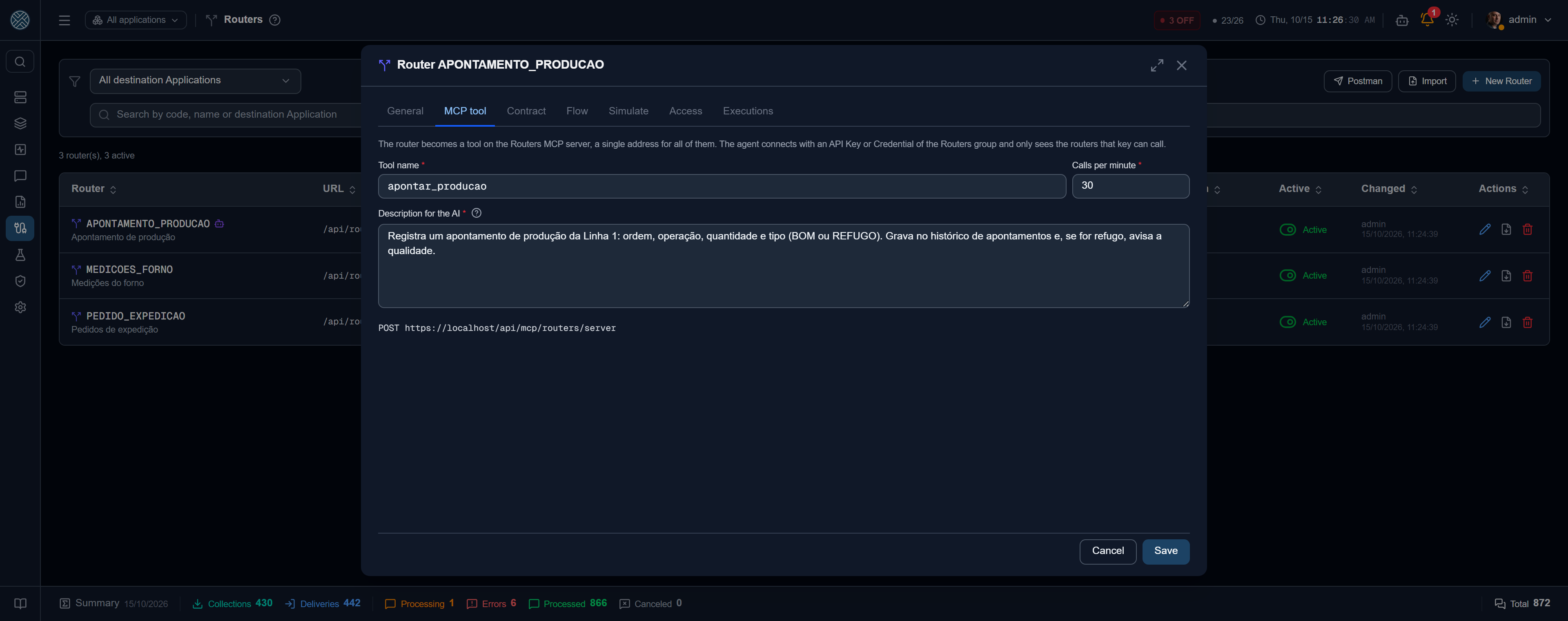
A router can also be called by an AI agent. Tick Expose as an MCP tool on the General tab: the MCP tool tab opens, with the tool name, the calls per minute and the description the model reads to decide when to call it — all three required.
Every exposed router sits on a single server:
POST /api/mcp/routers/serverThe agent connects with an API Key or Credential of the Routers group and only sees the tools of
the routers that key can call; each tool call checks the key again against that router. With a
contract, each field becomes a tool argument; without one, the tool takes the whole payload in
payload. The answer carries idExecucao and the routes — the delivery itself is asynchronous, and
the fixed cms_router_execution_status tool shows the state of the executions that key fired. The
execution is recorded with origin MCP and the credential that called.
The tool name is unique among routers, and the export carries name, description and limit, but never the “on” switch: an imported router is born with the tool off. The server shows in MCP Servers as one more block, and obeys the same Settings › AI switch as the Application server.
Rules for every Router
- The sigla is part of the URL. After the first call it locks, so as not to break existing callers.
- Building a route to an Application’s Delivery requires seeing that Application. Routes to Applications you do not see show masked and cannot be removed by you.
- A Delivery with a Router route shows Receives from in its record, and cannot be deleted while the Router uses it — nor can the Transformer of a route. A Router used by a Collector cannot be deleted either.
- In the Delivery’s Receives from, clicking the Router shows right there its input contract (its own, or inherited from another Delivery), the Content-Type and the Transformer of the route that reaches the Delivery — no need to open the Router. The JSON icon copies a sample body with the contract fields, and Open Routers opens the Router in a new tab, without closing the Delivery.
Permission
The tool is /routers, under Integration Config, right below Triggers. It also unlocks the Routers group in the
API Keys and Credentials screens.