Test Plans — /test-plans
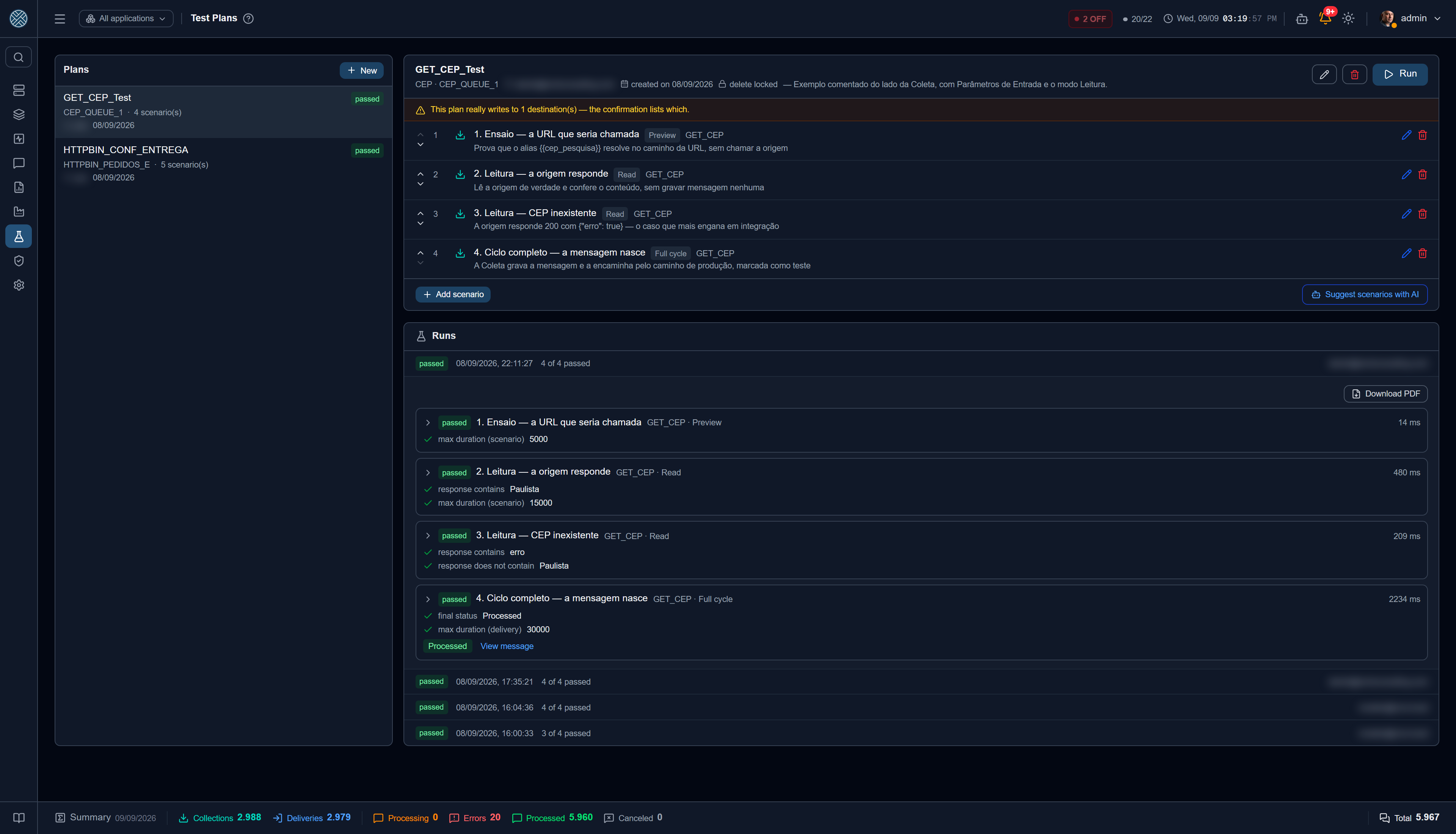
A Test Plan is an Interface’s smoke test: an ordered list of scenarios that runs in one go and says what passed and what did not.
It is what today lives in somebody’s Postman — which is why it does not travel along when the integration is installed at another customer, is reviewed by nobody, and is not re-run when the integration changes.
Every scenario runs down the same path as the Test Bench, which in turn is the production path. Nothing here reimplements collection or delivery — so a green plan is a statement about the real system.
The plan
| Field | What it means |
|---|---|
| Name and description | How the team refers to this set of cases |
| Interface | Chosen at creation and fixed afterwards: the scenarios point at its Collections and Deliveries |
| Visibility | Public = anyone with access to the Interface sees it; Private = only you |
| Deletion locked | Other people can still edit and run it; only the owner deletes |
The plan’s scope is not declared — it emerges from the scenarios. The list shows which Applications and Definitions that plan touches, computed from what is inside it. A separately declared field would start lying the day somebody added a new scenario.
Scenarios
A scenario is a Test Bench run with what you expect from it written alongside: target (Collection or Delivery), Definition, mode, payload and parameters, plus the expectations. The targets are the same as the Test Bench’s — without the Deliveries of the Help Desk tools.
Order matters and it is yours: scenarios move up and down the list, and the run follows that sequence.
Expectations
| Expectation | Checks |
|---|---|
| Final status | The message outcome (processed, delivery error, business error…) |
| HTTP | The code returned by the destination |
| Max duration (ms) | The acceptable time ceiling for that scenario |
| Response contains / does not contain | A snippet that must (or must not) appear in the answer |
Leave blank whatever you do not want checked.
What could not be checked turns neither green nor red: it shows up grey, with the reason. A scenario with no checkable expectation is marked no assertion, not passed — otherwise a plan would go all green without having tested anything.
Scenarios suggested by AI
The Suggest scenarios with AI button builds a list of cases from what the CMS already knows about the Interface: its Definitions, the payload contract observed in real traffic, and the registered Business Errors. The Transformer script is not sent.
Suggested scenarios are born disabled. The suggestion executes nothing: switching them on and running them stays a person’s decision. See AI Governance for how those conversations are logged and moderated.
Running
The Run button executes the enabled scenarios in order. When the plan writes for real to any destination, the confirmation lists which destinations those are and asks for the plan name to be typed — the same logic as Full cycle in the Test Bench, applied to a set at once.
Each scenario ends in one of these:
| Result | When |
|---|---|
| Passed | Every checkable expectation matched |
| Failed | Some expectation did not match — the screen shows expected and obtained |
| No assertion | It ran, but there was nothing checkable |
| Error | The run itself failed |
| Not run | The scenario was disabled |
History and PDF
Every run is kept with who ran it, when, how long it took and the score (“7 of 9 passed”). Opening a run shows it scenario by scenario, with the same detail as the Test Bench: what was sent, what came back, and expected against obtained.
The full response is only kept when a scenario fails. Storing the body of every response of every scenario of every run would fill the database with what nobody will read; what matters afterwards is always the failure.
The Download PDF button produces the run report — run identification, scenario summary and the detail of each one. It is the document you attach to a sign-off.
The plan travels along
Test Plans are part of the configuration Import/Export and of the Pack. When the integration is installed at another customer, the test cases go with it — which is exactly what did not happen while they lived in a Postman collection.
Where it sits in the menu
Integration Lab, right below the Test Bench: a plan is the same Test Bench action, repeated and kept.