SAP Gateway (OData)
The third path to SAP, and the only one that does not need the SDK: the CMS speaks HTTP to the
SAP ICM and consumes the OData services published on SAP Gateway (/sap/opu/odata/...). It is the
natural path when the service already exists — Fiori apps use the same ones —, or when the SAP team
prefers exposing OData to opening RFC.
See SAP to compare with RFC/BAPI and IDoc.
How it fits together
- The External Connection is the server: protocol, host and port, plus client, authentication and TLS. One connection serves every service on that server.
- The Application is of the SAP Gateway type and shows in the SAP group on every screen, next to RFC and IDoc. Its URL comes from the connection and is locked.
- The service path goes in each Collection (Collection Path) and each Delivery (URI), exactly as in an HTTP integration.
Example: connection http://192.168.15.98:7200, Collection with the path
/sap/opu/odata/sap/PP_PRODOPS_CONFIRM_SRV/WorkCenters. The call goes to
http://192.168.15.98:7200/sap/opu/odata/sap/PP_PRODOPS_CONFIRM_SRV/WorkCenters?sap-client=100.
Setting up the connection
In External Connections, type SAP Gateway (OData), in the SAP group.
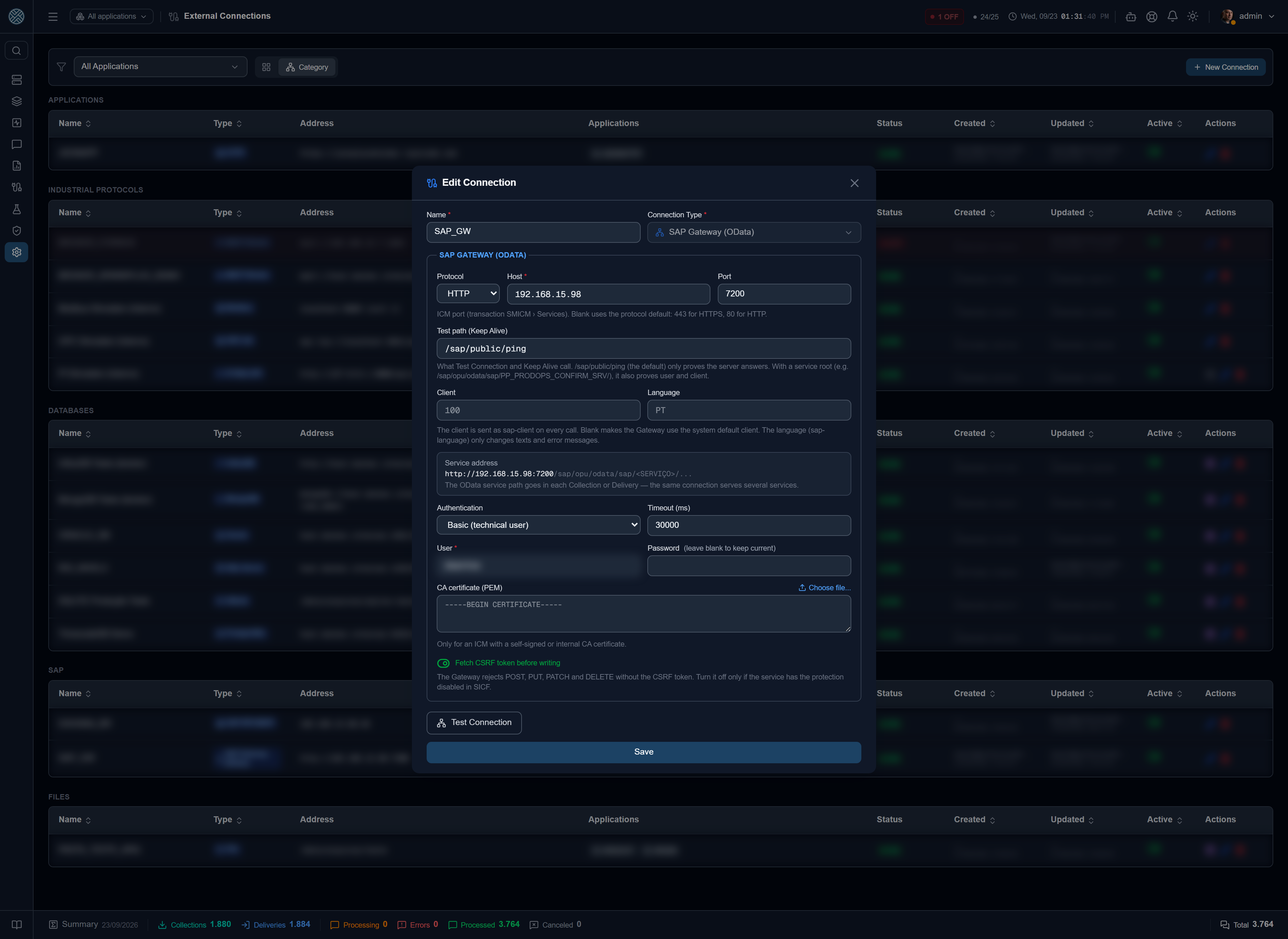
| Field | What it is for |
|---|---|
| Protocol | HTTP or HTTPS — whatever the ICM exposes on that port |
| Host | Address of the SAP server (or the Web Dispatcher) |
| Port | ICM port (transaction SMICM › Services). Blank uses the protocol default: 443 or 80 |
| Test path (Keep Alive) | What Test Connection and Keep Alive call. Comes filled with /sap/public/ping |
| Client | Sent as sap-client on every call |
| Language | Sent as sap-language. Only changes texts and error messages |
| Authentication | Basic (technical user), OAuth 2.0 Client Credentials or Client certificate (X.509) |
| CA certificate (PEM) | Only for an ICM with a self-signed or internal CA certificate |
| Timeout (ms) | Ceiling for the connection calls. Collection and Delivery use their own timeout; the connection test, at most 5 s |
| Fetch CSRF token before writing | On by default — see CSRF token |
The preview below the fields shows the address that Collections and Deliveries will complete:
http://192.168.15.98:7200/sap/opu/odata/sap/<SERVICE>/....
Fill in the client. Without it, SAP uses the system default client. Either the user does not exist there and the call returns 401 — it looks like a wrong password —, or, worse, it exists in both and the integration reads and writes in the wrong client with no error at all.
The connection test
/sap/public/ping proves the server answers, but it does not prove user or client: it asks for no
login. For the test to check both, replace the Test path with a service root, e.g.
/sap/opu/odata/sap/PP_PRODOPS_CONFIRM_SRV/. The message then also shows the OData version SAP
declared.
It is not $metadata on purpose: Keep Alive runs every cycle, and the $metadata of a large service
is megabytes. With several Applications on the same connection, one test runs per cycle, and they
go ON and OFF together.
Authentication
| Mode | When to use | What SAP checks |
|---|---|---|
| Basic | Technical user (SU01, System type). The most common case on on-premise Gateway | User and password |
| OAuth 2.0 Client Credentials | Gateway exposed through BTP or an API Management | Token from the authorization server given in the token URL |
| Client certificate (X.509) | No password: the certificate is mapped to a SAP user (SM30, VUSREXTID or a CERTRULE rule) | TLS handshake — requires HTTPS |
Password, client secret, private key and key passphrase are stored encrypted and never come back to the screen: when editing, leaving them blank keeps the current value. The certificates (client and CA) are public and show normally.
The Application
In Applications, pick the SAP Gateway type and the connection in the Keep Alive field. The Application URL shows locked, with the connection address, and changes by itself if the connection changes — along with the destination of its Deliveries. Authentication and certificates are not kept on the Application.
Once the connection is chosen, the Application row gets the Integration Assistant icon.
Collections and Deliveries
| Types | Typical use | |
|---|---|---|
| Collection | HTTP_GET, HTTP_POST | GET on an EntitySet (/WorkCenters), POST on a Function Import |
| Delivery | HTTP_POST, HTTP_PUT, HTTP_PATCH, HTTP_DELETE | Create, change and delete entities. SOAP does not apply |
The path starts at /sap/opu/odata/...: the host comes from the connection. OData system parameters
go in the Fixed Parameters — $format=json (without it SAP V2 answers in XML), $top, $filter,
$select. The connection’s sap-client and sap-language are added automatically; if the path or
the Fixed Parameters already carry a sap-client, theirs wins.
CSRF token
SAP Gateway rejects POST, PUT, PATCH and DELETE without a valid CSRF token, with 403 and the
header x-csrf-token: Required. The CMS handles it on its own:
- before the first write, it sends a GET to the service root of that call with
X-CSRF-Token: Fetchand keeps the token and the session cookies — the token is only valid in the session that issued it; - later writes to the same service reuse the token (renewed every 20 minutes);
- if SAP rejects the token (session expired, ICM restarted), the CMS fetches another one and retries once. A second 403 is a real rejection and shows as a failure.
The root comes from the URL itself — /sap/opu/odata/<namespace>/<SERVICE> on v2 and
/sap/opu/odata4/sap/<group>/srvd_a2x/sap/<service>/<version> on v4 —, so each service has its own
token. Turn the option off only for a service with the protection disabled in SICF.
Another user on a Collection or Delivery
The connection user is the default. When a service needs another user — authorization split by scenario, or a service that needs a user linked to a personnel number —, pick a Credential of the Application in the Credential field of the Collection or Delivery. The first option in the list, From the SAP Gateway Connection, is the default.
- With a Credential, only the authentication changes: host, client, CA and CSRF token still come from the connection.
- The CSRF token is kept per user: one user’s token does not serve another.
- If the connection uses a client certificate (X.509) and the Collection picks a Credential, the certificate is not sent along — sending both would let SAP decide which user logs in.
The Credential is registered in Credentials, as outbound, on the SAP Gateway Application itself.
Integration Assistant
Discovery by URL works with the SAP Gateway Application: it
reads the service $metadata and proposes the Collections and Deliveries. The URL opens as
http://host:port/sap/opu/odata/sap/ — complete it with the service (PP_PRODOPS_CONFIRM_SRV/). The
Contract field also accepts the $metadata URL.
Reading the contract uses the connection user and client (or the Credential picked in the assistant), but only when the URL is the connection’s own server. For any other address the call goes out without authentication and without following redirects: otherwise, typing an address of your own would be enough to receive the SAP user and password.
$metadata describes what the service announces, not what the service class implements. It is
common for an EntitySet to announce read by key (WorkCenters('...')) and SAP to answer 501
“Method ‘WORKCENTERS_GET_ENTITY’ not implemented in data provider class”. The operation has to be
swapped for the list read, or implemented on the SAP side.
When it fails
A Collection or Delivery failure carries the text SAP returned, after the status: “Request failed with status code 501: Method ’…’ not implemented…”.
| Symptom | Likely cause | Where to look |
|---|---|---|
| 401 | User or password; user missing in the client (or client blank) | SU01, connection client |
403 without x-csrf-token: Required | User not authorized for the service | Role with the service S_SERVICE, SU53 |
| 404 | Wrong path or inactive service | /IWFND/MAINT_SERVICE |
| 500 “Access using a ‘ZERO’ service” | URL without the service name (.../sap/opu/odata/sap/) | Complete the path |
| 501 ”… not implemented in data provider class” | Operation announced in $metadata but not implemented | Swap the operation, or talk to the SAP team |
| 400 “Personnel number not found for user …” | Service that needs a user linked to a personnel number (Fiori confirmation apps, for instance) | User infotype 0105, or use another Credential |
| Keep Alive timeout, together with the RFC Application of the same SAP | The SAP server stopped answering for a while | SM50/SM66, SM21, SMICM, ST22 |
For detail on the SAP side, transaction /IWFND/ERROR_LOG keeps every Gateway error by the
transactionid shown in the response body.