SAP RFC / BAPI
Requires the SAP NW RFC SDK installed on the server — see SAP SDK.
The synchronous path: the CMS calls SAP. A Collection calls a function and turns the return into a message; a Delivery turns the message into the parameters of a call. See SAP for the overview of all three paths.
Architecture
The RFC integration does not run inside cms-api. It lives in the cms-sap-connector
microservice, which isolates the SAP NetWeaver RFC SDK (native C code, via node-rfc) from the main
process.
The reason: a native addon crash would take down the API, the scheduler and the workers with it. In a separate process, it only takes down the SAP integration.
The service stays on the internal docker-compose network only (cms-network), with no published
port and without going through nginx. Endpoints except /health require the X-Internal-Token header
when SAP_CONNECTOR_TOKEN is set.
| Internal endpoint | Purpose |
|---|---|
GET /health | Liveness, no authentication |
POST /rfc/test | Tests the connection (RFC_PING or the configured function). Never throws — a failure becomes { ok: false } |
POST /rfc/call | Calls the business BAPI/RFC. Errors propagate as HTTP 502 |
Installing the SDK
Communication uses the official SAP NetWeaver RFC SDK, the same library used by production RFC integrations. There is no emulation and no intermediate translation: the call leaves the connector straight for your SAP’s RFC gateway, with the same protocol as a remote ABAP program.
The SDK is licensed by SAP and cannot be redistributed, so it does not ship inside the image.
Download
The SAP NW RFC SDK, from the SAP Support Portal, with the customer’s licence. It does not go into version control.
Unpack and adjust the Dockerfile
Unpack into nwrfcsdk/ and adjust the Dockerfile (instructions are commented in the file) to copy
the SDK and set SAPNWRFC_HOME and LD_LIBRARY_PATH.
Install node-rfc
npm install node-rfc, with those variables already set.
Turn on the real client
Set SAP_RFC_CLIENT=real in the container environment.
The SDK variant must match the container’s platform (Linux x86_64), not the SAP server’s (AIX,
for instance). Downloading the wrong variant is the most common cause of node-rfc build failure.
Before the SDK is installed (SAP_RFC_CLIENT not yet set), the connector starts with a
development stub, which only answers the calls so the rest of the CMS can be built and tested on
machines with no SAP access. It is a development and CI feature — every production installation
runs with SAP_RFC_CLIENT=real.
Configuring the connection
On the SAP-type External Connection, the RFC client block accepts two connection modes:
| Mode | Fields | When |
|---|---|---|
| Application Server | Host and instance number (sysnr) | Direct connection to one instance |
| Message Server | Message server host, logon group and SID | Load-balanced logon, like a production SAP GUI |
Plus: client, user, password, language, SAProuter (optional), connection pool
size and the function used in the test (RFC_PING by default).
The Timeout (ms) field, next to the test function, is the time limit for Test Connection and for Keep Alive: blank means 10000, and it accepts 1000 to 60000. It is for the SAP that answers slowly — through SAProuter, VPN or from another continent — and that, with the fixed limit from before, stayed OFF while it was actually up. For metadata lookups (describing the function or the structure, searching for the BAPI) the field only raises their default limit, never lowers it. Collection and Delivery calls do not use this field: each has its own timeout.
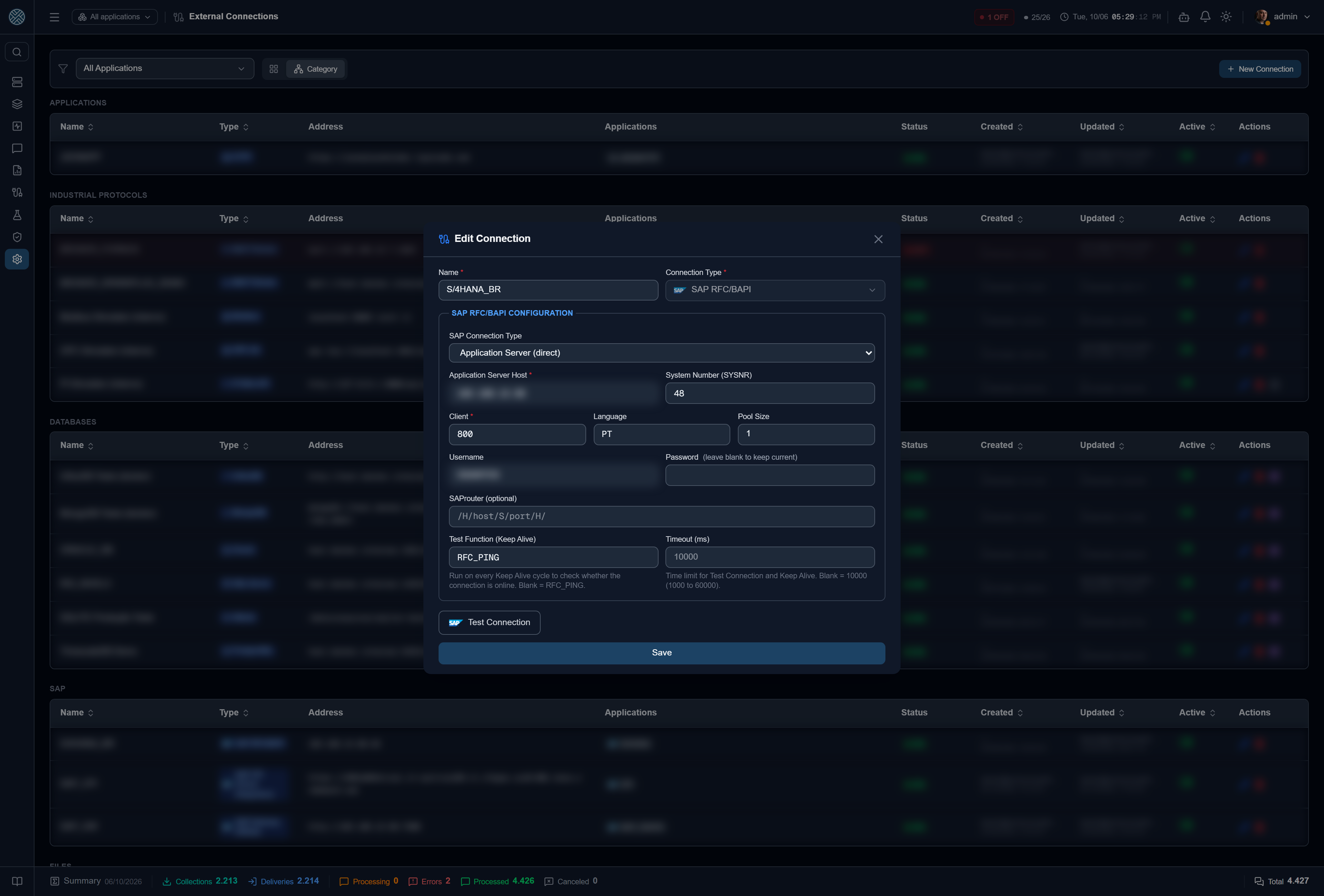
A longer timeout does not fix an unreachable SAP. If the test gives timeout of 10000ms exceeded with no answer at all, first check whether the host answers on ports 32NN
(dispatcher) and 33NN (gateway), where NN is the instance number — a closed port or a stale
DDNS give the same error with any limit.
The Test Connection button makes a real call and returns SAP’s error when it fails — where the deployment classics show up: locked user, wrong client, unreachable SAProuter.
Use a service user of communication type, with the S_RFC role restricted to the necessary function groups. That is the integration’s real protection — the CMS’s blocked-function list is only the first layer. See SAP.
Collection — SAP_RFC
Calls a function module or BAPI and turns the return into a message.
Finding the function
The search button looks up functions in SAP by name or fragment and shows each one’s description. On selection, the CMS imports the signature: IMPORT and EXPORT parameters, and the tables.
Declaring the parameters
Parameters are declared in JSON, but you edit them by clicking the fields in the SAP Function Parameters popup. Each IMPORT parameter has an origin:
| Origin | Meaning |
|---|---|
fixo | Literal value, always the same |
template | {{...}} placeholders — date, variables, computed values |
jsonpath | A field of the last received payload |
| comes from outside | Becomes an Input Variable, supplied by whoever calls the Collection |
estrutura | A whole structure parameter (e.g. NOTIFHEADER) built in JSON, with {{variables}} in each field |
resposta | Only in follow-up calls: a field of the previous step’s response |
Structures. A structure parameter opens in its own editor (Monaco, in JSON), with the variables
panel beside it: the Collection/Delivery Input Variables and the Globals. You can create a new
Input Variable straight from the panel and use it in the structure right away — {"SHORT_TEXT": "{{descricao}}", "EQUIPMENT": "{{equipamento}}"}.
Free Input Variables. Besides the ones born from a “comes from outside” parameter, you can declare variables that only show up inside structures or follow-up calls. They join the contract the same way.
In TABLES parameters, out lists the output tables to return, and in (optional) maps the input
tables — origin fixo (a literal array of rows) or jsonpath.
{
  "in":  { "PLANTSELECTION": { "origem": "fixo",
           "valor": "[{\"SIGN\":\"I\",\"OPTION\":\"EQ\",\"PLANT_LOW\":\"1000\"}]" } },
  "out": ["RETURN", "T_MATERIAIS"]
}
Scheduled or on-demand Collection
Here is a design decision that changes the behaviour of the whole integration:
- no Input Variables — the Collection is swept by the scheduler, on the configured cron;
- at least one Input Variable — the Collection leaves the scheduler and gets a URL of its own, executed on demand by whoever calls it.
In on-demand mode, if a required variable is missing, the API rejects with HTTP 400 right away — it does not become a message in error. See Public API.
Testing without leaving the CMS
The test button runs the function with the declared parameters and shows the return. That is what avoids the “save, wait for the cron, look at the message in error, fix” cycle.
For large tables there is also the table fields popup, which lists the return’s columns and lets you peek at values — useful to find the exact field name before writing the Transformer.
Metadata cache
The function’s metadata (import/export parameters and tables) is kept in a local cache in the database. The parameters popup works offline, and an “Update from SAP” button reloads it when the function changes in the ERP.
Installing an SAP Pack fills that cache as a side effect of the compatibility check — after that the popups open instantly, even with SAP unreachable.
Delivery — SAP_RFC_CALL
The reverse path: the message’s data becomes the parameters of an RFC/BAPI call.
The configuration is the same — function, IMPORT parameters, TABLES parameters — with two important differences.
Input Payload
The fields marked “comes from outside” form the Input Payload: the contract the delivered message must fulfil. Each alias resolves against the message payload, and marking one required makes the CMS refuse the send, with a clear message, when the field is missing.
That validation happens before the message reaches SAP. The practical difference is large:
instead of an RFC failure with a technical message, the operator reads “field ordem is missing”.
The matching rule appears in Business Errors tagged AUTO, where you
decide whether it blocks the interface.
Commit
Write BAPIs record nothing until the commit. The “Call BAPI_TRANSACTION_COMMIT after the call”
option makes the connector issue it in the same RFC session as the call — and as the follow-up
calls, after the last one. If the RETURN of any step comes back with type E or A, the connector
issues BAPI_TRANSACTION_ROLLBACK instead of the commit.
Call next, in the same session
Some BAPIs only work in pairs: BAPI_ALM_NOTIF_CREATE builds the PM notification in the session’s
memory, and only BAPI_ALM_NOTIF_SAVE saves it — in the same session. Each CMS message opens its
own RFC connection, so two chained Deliveries (or a forwarded response) will not do: the notification
created in the first does not exist in the second.
The “Call next, in the same session” section adds steps to the same Delivery (and to the Collection), run one after another on the main function’s connection:
- each step has its own function (with the same SAP search), its own import parameters and output tables;
- the
respostaorigin reads a field from the previous step —NOTIFHEADER_EXPORT.NOTIF_NO, for example. The screen lists the previous step’s output fields and suggests the one with the same name; - input payload fields and structures work as in the main function;
- each step’s return goes into the result under the function name (
BAPI_ALM_NOTIF_SAVE.NOTIFHEADER.NOTIF_NO).
The step editor fills itself from SAP: once you pick the function, the import parameters show up ready to map, and the output tables are chosen in a popup.
Configuring BAPI_TRANSACTION_COMMIT as the Delivery’s function is blocked — the commit has a
place of its own, precisely so it does not become a loose call with no business BAPI before it.
Errors
SAP’s error reaches the CMS with the original text, in the connection’s language. From there:
- a communication failure (gateway down, locked user) becomes a Delivery Error, with retries;
- a business return (the
RETURNtable with typeE) becomes a Business Error when a rule is registered — and that is how “order not released” stops looking like success.
The SAP Packs already ship those rules for the scenarios they cover.