MCP Server — /mcp-tokens
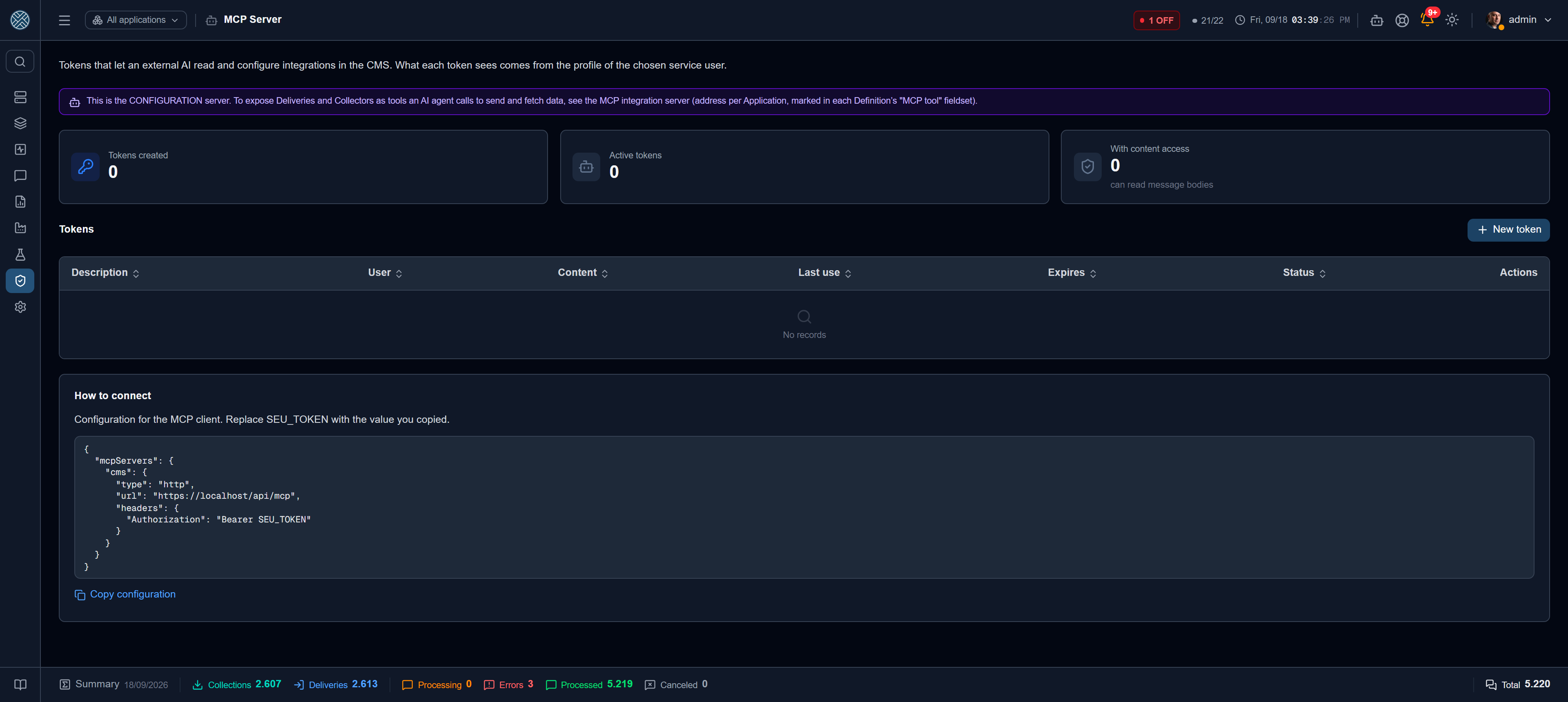
CMS publishes an MCP server (Model Context Protocol): an address an AI assistant — Claude Desktop, Claude Code, or any client that speaks the protocol — uses to read and configure integrations, talking to the system instead of talking about it.
In practice, what used to be “open the Applications screen, create an Interface, then a Delivery, pick the type, fill in the mandatory fields for that type” becomes one sentence: “create an HTTP POST delivery to the MES in the SAP application, validating the response”. The AI discovers what exists, builds the plan, checks it and applies it.
This server is not a message channel. It configures and diagnoses. Sending and collecting messages remains the public API, with an API Key — or, for an AI agent, the MCP integration server, which exposes the marked Deliveries and Collectors as tools, at one address per Application. These are mechanisms with different purposes and different risks.
What the token is, and what it is not
API Key (/api-tokens) | MCP token (/mcp-tokens) | |
|---|---|---|
| Authenticates | Message sending and collection | Configuration and diagnosis |
| Scope | Application + Interfaces | The Role of a service user |
| Stored | In clear text, to be shown again on screen | Only the hash — the value appears once |
| Shows in the audit log as | The token | The service user’s login |
The central decision: an MCP token has no permissions of its own. It points at a service user, and it is that user’s Role that decides everything — which tools the AI can see, which Applications and Interfaces it reaches, what it may change.
The same token can also call the tools of the MCP integration
server — send through a Delivery, run a Collector —, but only
if the Role also has the /mcp/integration-tools Tool. Configuring a Delivery and triggering it are
separate permissions.
An MCP token never sees more than the service user would see on screen. If you want a read-only AI, create a user with a read-only Role and point the token at them — there is no second place where this can be loosened by accident.
Creating a token
Create the service user
Under Users, a user dedicated to the MCP client, with the Role that defines its reach. It is worth treating them as a person: they show up in the audit trail of everything the AI does, and it is their e-mail that receives the token.
Open the screen and click New token
| Field | What it decides |
|---|---|
| Service user | The Role the token carries. Must be active |
| Description | How you recognise this token in the list. E.g. Integration team’s Claude Desktop |
| Expires on | Expiry date. Empty = never expires |
| Allow seeing message content | Unlocks message bodies in diagnosis. Off by default |
Copy the value — it appears once
CMS stores only the hash. The raw value exists outside the client on this screen only: lose it, revoke it and generate another. Alongside comes the ready-made client configuration, already carrying this installation’s URL.
The Send to… button mails the token and the configuration — always to the service user’s address, never to whoever pressed the button and never to a typed address. The send, and the failure to send, both land in the Audit Log.
Connect the client
{
  "mcpServers": {
    "cms": {
      "type": "http",
      "url": "https://your-cms/api/mcp",
      "headers": { "Authorization": "Bearer cms_mcp_..." }
    }
  }
}
The value starts with cms_mcp_ on purpose: whoever finds the string in a configuration file knows
where it is from, and a sweep for cms_mcp_ finds a token leaked into a repository.
What the AI can do
Tools are filtered by the service user’s Role before they are offered — the AI does not even see a tool that would return 403 when called. That is why the same server behaves differently depending on the token.
Read
| Tool | What it returns |
|---|---|
cms_list_applications · cms_get_application | Applications visible to the token, with Keep Alive and status |
cms_list_interfaces · cms_list_definitions · cms_get_definition | Interfaces and Definitions, with each one’s readable configuration. On a Delivery, cms_get_definition also brings each producer Application’s Transformer, with its Content-Type |
cms_list_connections · cms_list_credentials | Connections and Credentials — without passwords or tokens |
cms_list_transformers | Where each Transformer is used — use by a producer Application counts as a Delivery. The script does not come out |
cms_list_business_errors | Configured Business Errors |
cms_describe_types | Type catalogue: the domain enums and the mandatory fields of each Delivery, Collection and Connection type |
cms_describe_types is the piece that prevents most errors: without it the model guesses enum values
and field names; with it, it consults the contract before assembling anything.
Diagnose
| Tool | Answers |
|---|---|
cms_search_messages | “Did that message go through?” — by Interface, Definition, status and period |
cms_interface_status | Queue backlog, whether it is blocked and why, last processing |
cms_application_health | Current Keep Alive and the last downtime window |
cms_recent_errors | Latest errors grouped by Definition, to find the source before opening message by message |
cms_screen_link | The address of a CMS screen already filtered, with the filter’s exact count |
cms_search_messages returns metadata — id, status, dates, attempts. The body only comes out if
the token has content permission on, and encrypted payloads never come out, with or without that
permission: decrypting requires its own Tool, with a justification and re-authentication, and is
outside the MCP’s reach.
cms_screen_link returns no data: it returns where to look. It is the cheap way to answer
“did this message go through?” — the count comes from a single query, the content never enters the
answer, and the list of reachable screens is closed. Each screen is checked against the token’s
permission before the address comes out. The path is relative: whoever hosts the installation
knows its public address, the API does not.
For windows relative to now, cms_screen_link accepts periodo (hoje, ontem, 1h, 24h,
7d…) instead of dataInicio/dataFim: the address carries the shortcut, and the screen
resolves the dates on every query.
Test before writing
| Tool | What it does |
|---|---|
cms_test_connection | Tests an existing External Connection by name — the same test as the screen’s button |
cms_preview_transform | Applies a Transformer, saved or ad-hoc, to a sample payload |
cms_test_read | Runs a Collection’s read without storing a message, returning a sample |
cms_test_read refuses, with an explanation, anything with a side effect: a Collection with a
post-collection command, a post-read file action, an RFC that may write, and the event-driven types —
which have nothing to read on demand.
Create and change
cms_create_* and cms_update_* cover Application, Interface, Delivery, Collection, Business Error
and External Connection. Creating an Application whose code already exists does not duplicate: it
returns the existing one, marked as already existing.
For a whole integration at once, the path is different:
| Tool | Role |
|---|---|
cms_validate_integration | Checks the whole plan without writing: clashing codes, invalid enums, missing mandatory fields, references that do not exist |
cms_apply_integration | Applies the plan. Runs as a dry run by default — the first call returns what would be created |
Deliveries and Collections created by cms_apply_integration are born disabled. Turning them on
is a human act: somebody opens the screen, checks and activates. Re-applying the same plan does not
duplicate, and anything marked as customised is only overwritten if you explicitly authorise it.
Built-in documentation and script
Beyond the tools, the server publishes resources — content the client reads once and keeps in context:
cms://catalog/types— the same catalogue ascms_describe_typescms://docs/como-criar-integracao— what an Application, Interface, Definition and Business Error are, and in what order to create themcms://docs/direcao-e-tipos— why whoever starts the conversation decides between DELIVERY and COLLECTION
And a ready-made prompt, configurar_integracao, which the client offers as a command: you
describe the goal in one sentence and it walks the script through to validation and preview.
Why it is safe to let an AI in here
The right question is not “is the AI trustworthy?”, but “what can it reach, even if it goes off script?”.
- Secrets do not come out. Every response is assembled field by field, from an allow-list — passwords, tokens and private keys are not on it. On top of that, a final sweep walks the whole response, error messages included, and cuts anything matching a secret pattern. If that net has to act, the incident is recorded.
- Encrypted content never comes out, under any circumstance, not even with content permission on.
- Nothing is created enabled. Deliveries and Collections are born disabled.
- Nothing exposes itself. The switches that open a way out for data — Expose as MCP tool,
Return collected content to the AI and Return the collected result in the API response — are
only turned on by a person, on screen. The create and update tools, and
cms_apply_integration, refuse to turn them on; turning them off is still allowed. - Everything goes through the Role. The same Tool and allowed-Interface checks that apply on screen apply here, in the same code.
- Everything lands in the audit log, under the service user’s login.
Revoking
In the list, Revoke turns the token off immediately without deleting it — the usage history stays readable. Delete removes the record, and any client using that value loses access straight away. A token whose expiry date has passed stops authenticating on its own.
The token is also valid only while the service user is: deactivating the user brings down all of their tokens immediately, without waiting for expiry — as happens with the screen session of a deactivated user.
The Last use column is the quick way to find a forgotten token: one that was never used, or has not been used for months, probably should not still exist.
Turning the whole server off
To shut the door at once, without touching a single token, turn the MCP Server feature off in Settings → AI: from then on no token is accepted.
The refusal happens after the token is validated, on purpose — calling without a credential would otherwise reveal that the server exists and is switched off, and the single answer for a missing/invalid/expired/revoked token would lose its point.
This is the one switch on the AI tab that has nothing to do with cost: the MCP server does not consume the provider configured in the CMS — whoever connects pays for the model on their side. Here it is access control.
Screen permission
The Tool is /mcp-tokens. Whoever has it can create and revoke tokens — that is, can grant an AI
the access of any available service user. Treat it with the same care as Roles, and do not include
it in operational profiles.