Triggers — /triggers
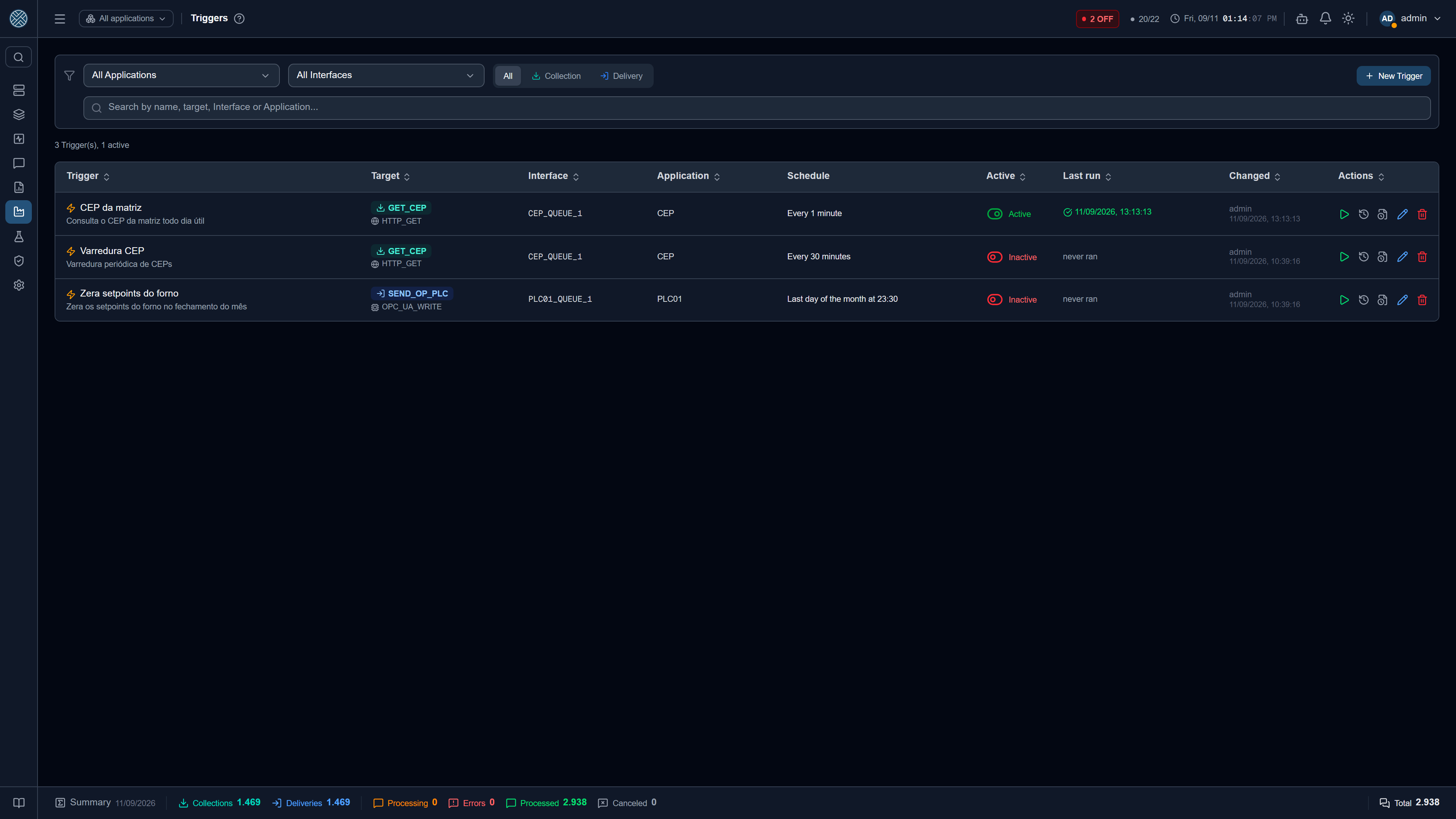
A Collector with Input Parameters and a Delivery with an input contract (Input Payload, or write tags in OPC UA, Modbus, Sparkplug and PI) are event-driven: they only run when someone calls the CMS dynamic API with the values. That someone does not always exist — the calling system was never built, or the query is the same every day.
A Trigger solves this from inside CMS. It stores the fixed values an external producer would send and its own schedule, and at the scheduled time it runs the definition through the same path as the dynamic API. Nothing changes in the Interface schedulers: a Trigger is an internal caller with a schedule, not a second execution engine.
What shows up in the list
- Collectors: only those that require parameters — eligible for the dynamic API (HTTP, SQL Server, Oracle, SQLite, PostgreSQL, InfluxDB, MongoDB, SAP RFC, PI Web API) and with at least one declared Input Parameter. A regular pull Collector does not appear: it already runs on its own in the Interface scheduler, and a Trigger would make it run twice.
- Deliveries: all of them, except those of the Help Desk tools — a ticket is opened by an alert or by the header button, not on a schedule. A Delivery only happens when someone hands it a message, so a Delivery Trigger is “create this message at this time”. One that declares an input contract (Input Payload, OPC UA or Modbus write tags, Sparkplug command metrics, PI write tags) opens in Fields, one per alias; one that does not opens straight in Body, where you write the message.
If the Collector you are looking for is missing, its record does not declare Input Parameters yet — declare them there first.
Creating a Trigger
- Name: free text, unique. It is the name shown under Schedulers.
- Target: pick Collector or Delivery and the definition. The Application and Interface combos are only a funnel to find the definition; picking the definition straight from the search fills both in.
- Parameters: one field per alias of the contract. A required alias without a default must be
filled; empty uses the default from the record, when there is one. For equipment targets (OPC UA,
Modbus, Sparkplug, PI) the screen shows the destination of each value and warns that the values
will be written to the equipment at the scheduled time.
- On a Collector, a switch toggles between Fields and JSON: the same alias object, just edited as text — handy for pasting the body that already lives in an external tool. Going back to Fields requires a valid flat JSON.
- On a Delivery, the switch toggles between Fields and Body. In Body you write the whole message, in the Content-Type you choose (JSON, XML or text), and it enters through the same path as an external POST: Content-Type validation, Transformer and Business Errors of the Delivery. Switching to Body starts the text with the JSON of the filled fields; switching back, a flat JSON becomes fields again, while XML or nested JSON starts with empty fields. If the body is JSON and the Delivery declares a contract, required aliases are still checked on save; XML and text are left to the Delivery itself, as for any producer.
- Schedule, in five modes: every N seconds/minutes/hours; daily (optionally weekdays only); weekly (selected days and time); monthly (day 1 to 28 or the last day of the month); or a cron expression. The screen shows the readable sentence and the next three runs, in the server time zone.
Parameter values accept the same placeholder syntax as Collectors: {{dataHoraAtual}},
{{ultimaExecucao}} (the last run of this Trigger — empty on the first) and {{NAME}} of a
Global or Application Variable. This is what lets a Trigger do incremental sweeps — “orders since
last time” — with no external system at all. The { } button next to each value (and to the
body) lists the two placeholders and the available Variables. A placeholder without a value
becomes empty.
Enable, pause, run now
Every Trigger is born disabled. Creating one runs nothing.
- Enabling only happens on this screen, after a confirmation that shows the target, the parameters, the frequency and the next run. The rule lives on the server: trying to enable a Trigger from the Schedulers screen is refused, and that screen sends you here.
- Pausing is immediate, from here or from Schedulers.
- Run now fires one run outside the schedule. On a “last day of the month” Trigger the manual run ignores the day rule — that is exactly what it is for.
What happens on a run
- Collector: the query runs at the source with the fixed parameters, and the messages follow the forwarding configured on the Collector. If the source Application is offline, the parameters are kept and the Interface re-runs the query when it comes back.
- Delivery: a message is born on the Interface — with the body
{alias: value}in Fields mode, or with the raw text and the chosen Content-Type in Body mode — and follows the normal flow — Transformer, Business Errors, retries. The message is not flagged as a test. - Disabled target, a contract that changed and left a required alias empty, a failure at the source: all become an error in the scheduler history and in the “Last run” column. The Trigger does not disable itself — pausing is your call, looking at the error.
- On the Messages screens, a message generated by a Trigger carries a discreet bolt next to the status, with the Trigger name in the tooltip; the detail popup and the detail page show the bolt with the name. It is only an origin mark, with no shortcut: unlike a test message, it is real traffic and counts in dashboards and reports.
Under Schedulers
Each Trigger is a trigger-<id> scheduler, listed in the Triggers group of
Schedulers under the name you gave it. There you can pause, run now and see
the run history; editing the schedule and enabling are done here.
History
Two histories, behind different buttons on the row:
- Runs — every firing, with duration, result and message (the scheduler history itself).
- Changes — who created it, who changed what (before and after), who enabled, disabled, ran manually or deleted it. Comes from the audit log.
Import/Export, Packs and MCP
Triggers travel in Import/Export as the Triggers domain, referencing the target definition by
its code. A Pack can declare Triggers for its own Collectors and Deliveries. Through the
MCP Server, cms_list_triggers lists and cms_create_trigger creates. In
every case the Trigger arrives disabled.
Permission
The Tool is /triggers, in the Integration Config group, right after Deliveries. The scope is the same
as the other master-data screens: you see the Triggers whose target definitions are in your
Interfaces.