UNS access control — /uns/access
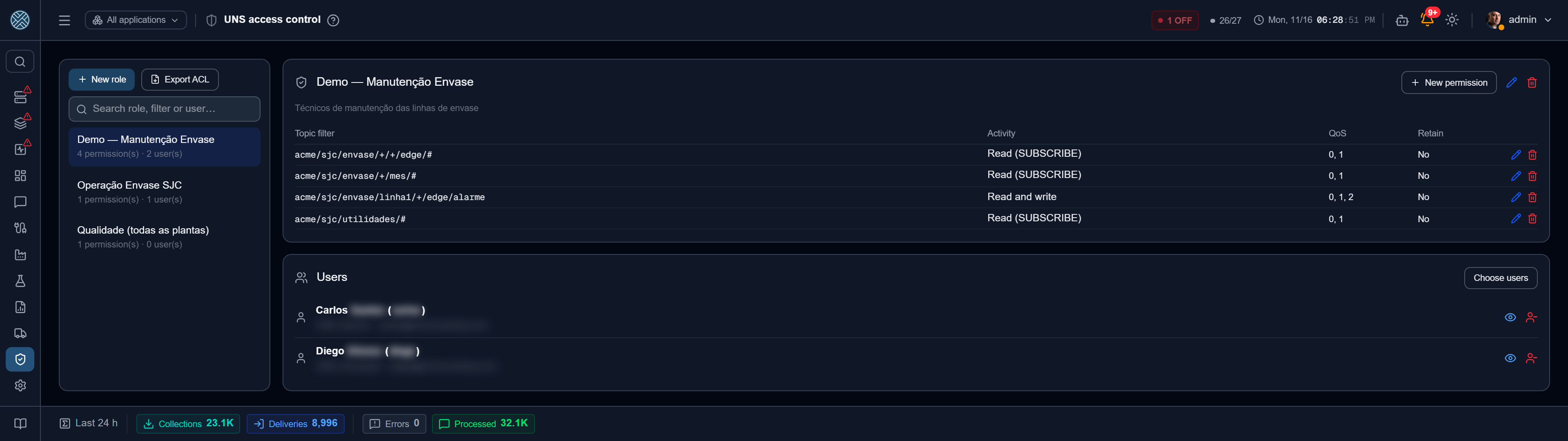
In the menu, the screen is under Security Services › UNS access, next to Profiles and Users. It decides what each person sees and writes inside the UNS. Who gets into each screen of the module is still defined by the Profile, through the Tool of each route (see Access level per Tool); the UNS role scopes the content.
Whoever has the /uns/access Tool decides what the others see in the namespace: it is the module’s
administrator power.
How it works
The model is the same as HiveMQ’s:
- a role has permissions;
- each permission is an MQTT topic filter with an activity: read (SUBSCRIBE), write (PUBLISH) or both;
- a person can be in several roles, and their access is the sum of them.
The filter cuts along the tree or along the kind of information:
| Filter | Reaches |
|---|---|
acme/sjc/envase/# | Everything under Filling at SJC |
+/+/+/+/+/quality/# | Only the quality namespace, in every plant |
acme/+/+/+/+/edge/temperatura | The temperature of every piece of equipment in the company |
+ matches exactly one level; # matches everything below and can only be the last level. An empty
level (a//b) is refused, because no UNS topic has an empty level.
Deny by default: without a permission matching the topic, the person does not see the variable. CMS administrator profiles see and write the whole UNS, with or without a role; without this rule, a new installation would have nobody able to configure the roles.
Roles
The left column lists the roles, each with its number of permissions and users. The search looks up the name, the description, a topic filter or a user of the role.
New role asks for the Name (required and unique, case-insensitive) and the Description. The pencil edits, and the trash can deletes: the role’s users lose the access it gave at once.
Permissions
The selected role shows its permissions in a table: Topic filter, Activity, QoS and Retain. With more than 8 permissions, a search by topic appears. New permission opens the form.
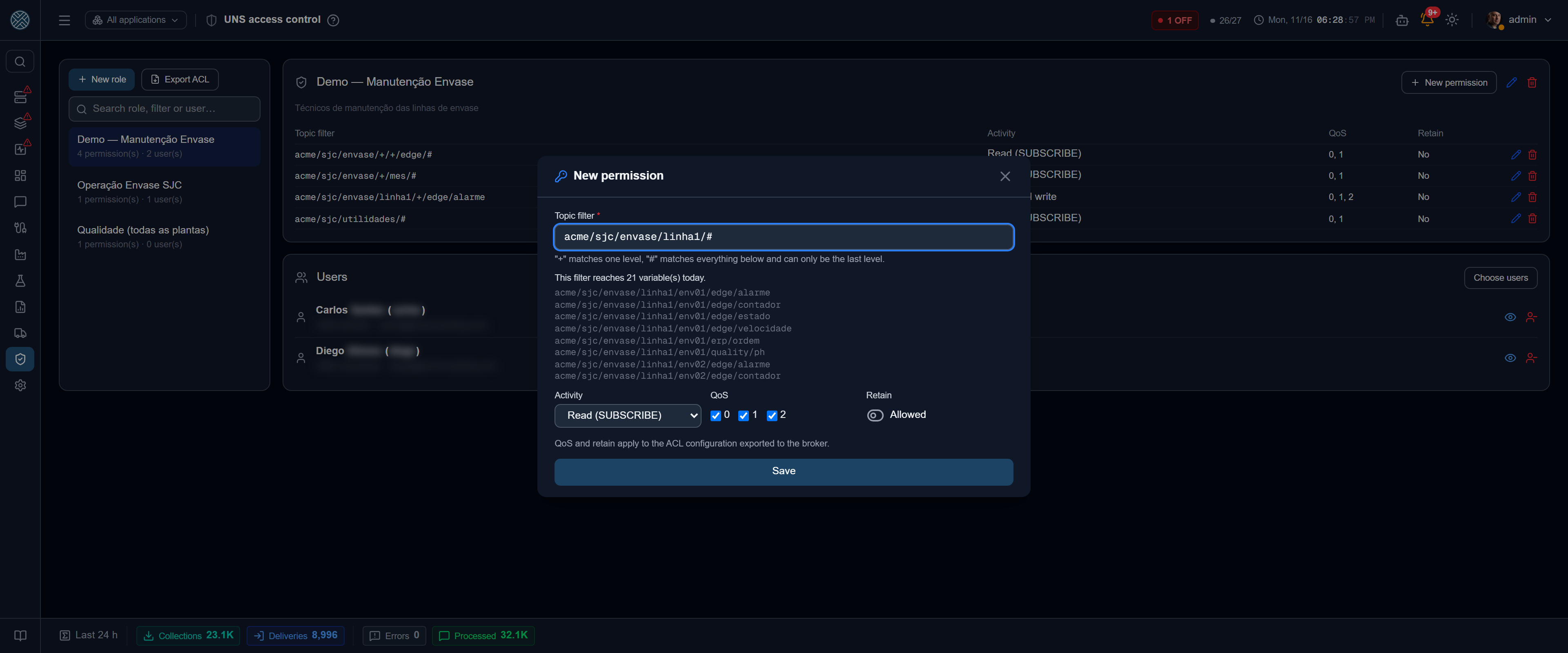
| Field | What it holds |
|---|---|
| Topic filter | Required. MQTT syntax, with + and # |
| Activity | Read (SUBSCRIBE), Write (PUBLISH) or Read and write |
| QoS | The allowed QoS levels (0, 1 and 2 ticked by default) |
| Retain | Allowed turns on the use of retain (off by default) |
While the filter is typed, the screen shows This filter reaches n variable(s) today., with a sample of the topics. An invalid filter shows the error right there.
QoS and retain change nothing inside the CMS: they only apply to the ACL exported to the broker.
Deleting a permission also removes the access of the role’s users at once.
Role users
The Users panel lists who is in the role, with their profile and e-mail. An inactive user shows struck through, and the CMS administrator gets the CMS administrator badge: taking that user out of a role or putting them in one does not change their access, which is already the whole UNS.
- Choose users opens the list of all users, with search by name or login, to tick and untick.
- The user icon with a minus sign removes from the role. The person stops seeing and writing, at once, what this role gave; their other roles keep applying.
- The eye opens UNS access of (the person).
Seeing a person’s access
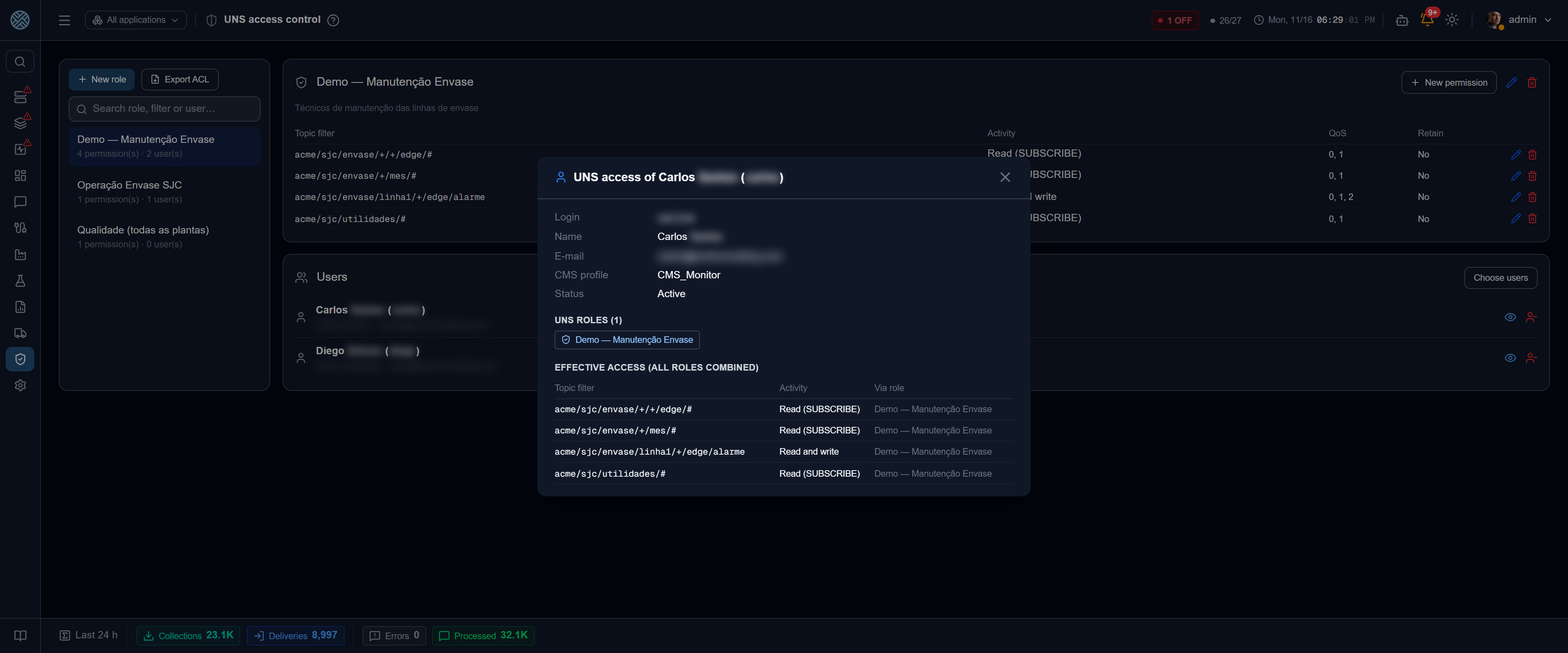
The popup shows the login, the name, the e-mail, the CMS profile and the status, the person’s UNS roles (each one opens the role) and the Effective access (all roles combined): each filter, the activity and which role it came from. With no filter at all, the popup warns that the person sees nothing of the UNS.
Where the role applies
| Where | What the role scopes |
|---|---|
| Namespace Explorer | Only the variables the person can read show up, plus the nodes above them. The trend (historian) follows the same rule |
| Dashboards | Each person sees, on the same dashboard, only the variables their role allows. On TV, what counts is what the person who generated the token sees, checked on every refresh |
| Plant Dashboards | Values follow the viewer’s role; which dashboards show up depends on the profile |
| UNS Monitor | The problems and refused deliveries only of the variables the person reads |
| Telemetry | Mapping a tag to a variable requires write access to it |
| Delivery to the UNS | The picker only lists variables the person can write to, and Save checks again (see Delivery to the UNS) |
| UNS variable Collection | The picker only lists variables the person can read, and Save checks again |
| Message timeline | A UNS item whose variable the person does not read shows up as variable outside your UNS roles, without the topic |
| i3X API | Read, history, subscription and write scoped by the role. The token acts as whoever generated it |
The Asset Model is not scoped by the role: whoever has its Tool sees and edits the whole model.
Export ACL
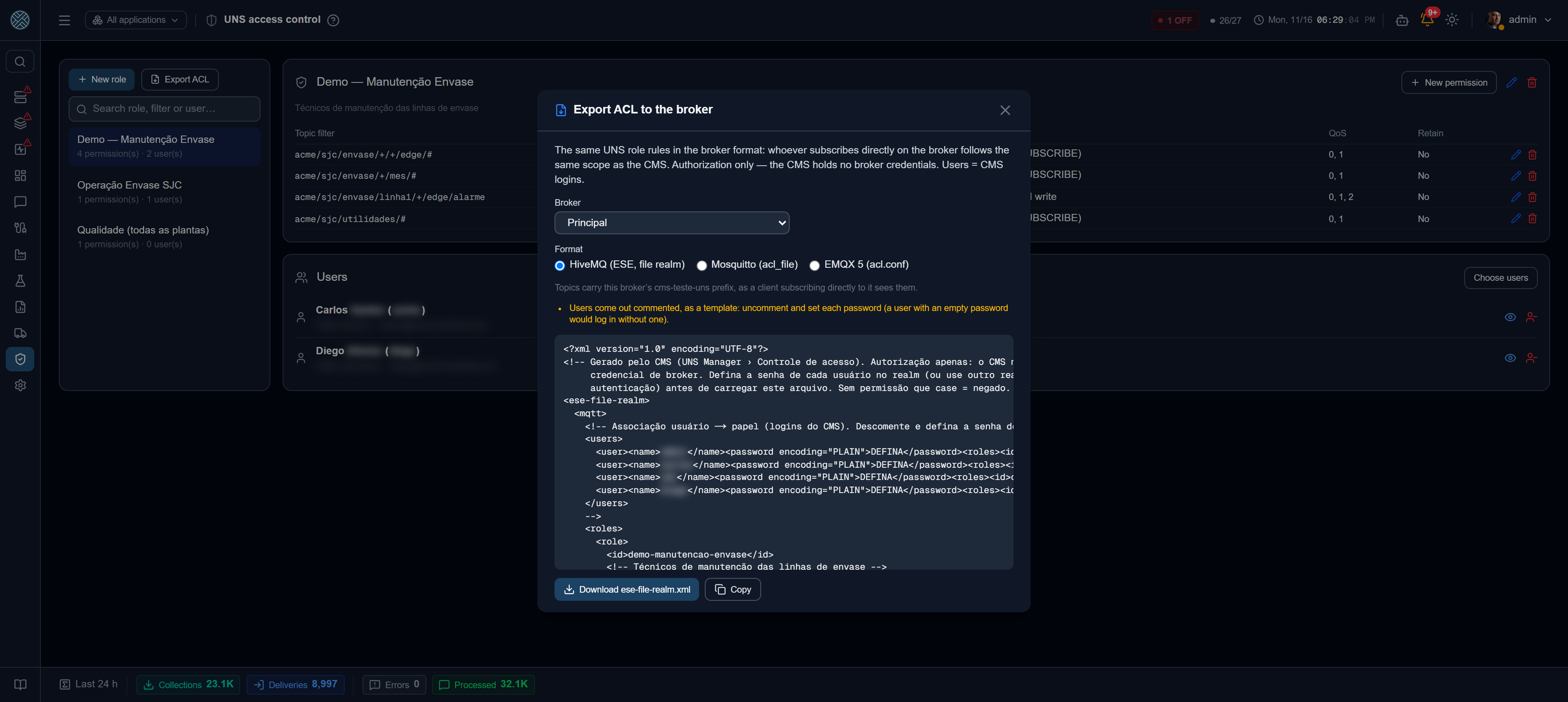
Export ACL produces the same role rules in the broker’s format, so that whoever subscribes directly on the broker obeys the same scope as the CMS. The customer keeps a single source of truth.
| Format | File |
|---|---|
| HiveMQ (ESE, file realm) | ese-file-realm.xml |
| Mosquitto (acl_file) | acl_file |
| EMQX 5 (acl.conf) | acl.conf |
The export is per broker. With more than one broker in MQTT publishing, the Broker picker chooses which one the file is for: that broker’s topic prefix goes into every rule, as a client subscribing directly to it sees the topics.
The popup shows the content, with buttons to copy and to Download the file. The export carries:
- each role with its permissions (filter, activity, QoS and retain), with deny by default in all three formats;
- the active users of each role, by their CMS login;
- the CMS account on the chosen broker, with that broker’s topic filter and permission to publish with retain, when it has a user configured.
The export is authorization only. The CMS does not keep anyone’s broker credentials: the users’ passwords are set on the broker itself.
The warnings that may show up:
| Warning | What to do |
|---|---|
| Users come out commented, as a template (HiveMQ) | Uncomment and set each one’s password. A user with an empty password would log in without one |
| Mosquitto acl_file does not control QoS or retain | Those role restrictions do not reach the broker |
| Some login has a character the broker file does not accept unescaped | That login was left out; create its rule by hand on the broker |
| The UNS publication broker has no user configured | The cms-uns account was not included in the file. Configure the user in MQTT publishing or create the rule by hand |
The role changes access at once inside the CMS. On the broker, only after the exported file is applied there again.