Database catalog
When the other side is a database, the information needed to configure the integration is already in there: table names, column types, the primary key. The catalog reads that and generates the Collector and the Delivery ready to go.
Opens from the table icon, under External Connections (to browse) or on a database Application row (which carries the Application along and does not ask again).
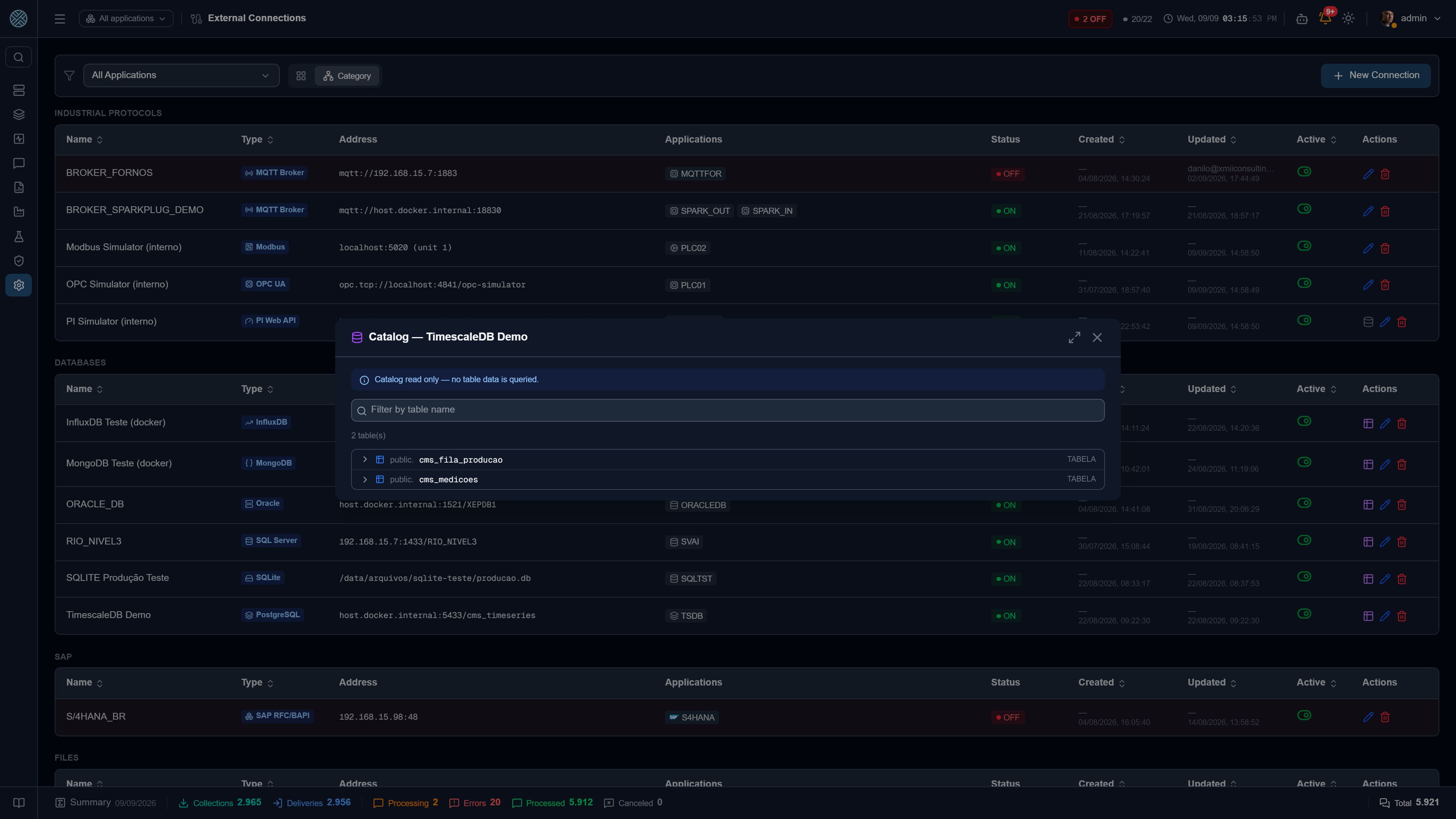
Supported databases
| Database | Catalog shows | Generates |
|---|---|---|
| PostgreSQL (incl. TimescaleDB) | schemas, tables, views, columns, primary key | Collector and Delivery |
| SQL Server | schemas, tables, views, columns, primary key | Collector and Delivery |
| Oracle | schemas, tables, views, columns, primary key | Collector and Delivery |
| SQLite | tables, views, columns, primary key | Collector and Delivery |
| MongoDB | collections and inferred fields | Collector and Delivery |
| InfluxDB | buckets, measurements, tags and fields | Collector and Delivery |
The catalog is structure read-only — no table data is queried. With one honest exception, below.
MongoDB is different, and the screen says so. There is no schema in MongoDB: the field list is inferred from a sample of up to 100 documents in the collection — which means CMS does read data there. And the result is a good approximation, not a truth: a document outside the sample may have fields that do not appear in the list.
What the catalog hides, and why
A production database is full of objects that do not matter. Each type has its rule:
- PostgreSQL — schemas created by an extension are omitted. In a database with TimescaleDB, the
_timescaledb_*ones account for almost the whole list and would bury the business tables. - Oracle — the schemas the database itself marks as its own (SYS, XDB, CTXSYS…) are omitted. Except the connection user’s own schema: connecting as SYSTEM is common, and without that exception the catalog would come back empty for exactly the person who created the table there.
- SQLite — the internal
sqlite_*tables are omitted. - InfluxDB 3.x — only tables in the
ioxschema, which are the actual measurements.
What you choose
Opening a table and clicking Create Collector / Delivery, you decide two independent things: read and write. You can pick one, the other or both — and the highlighted panel shows in real time what will be created, with the COLLECTOR and DELIVERY badges.
Read
| Mode | What it generates |
|---|---|
| Do not read | Nothing on the Collector side |
| Read periodically | A cron-scheduled Collector, with filter and a row ceiling |
| Read on demand | A Collector that leaves the scheduler and becomes callable by URL |
In on-demand mode you pick which columns become input parameters. Each one becomes a required
WHERE filter, filled in by whoever calls the API — and the screen shows the call, ready:
POST /api/collect/MES_ORDERS_C/MES_READ_ORDERS
{ "id": "..." }
The Interface created in that mode ticks every 5 seconds, not every 5 minutes. The Collector runs at call time, but forwarding what it brought still goes out on the queue tick — with the default interval the answer would arrive instantly and then sit there.
Write
| Mode | What it generates |
|---|---|
| Insert rows | A Delivery with INSERT from the message payload |
| Update rows by key | A Delivery with UPDATE, matching by the key you choose |
UPDATE is offered even on a table with no declared primary key — staging tables, materialised
views and legacy schemas often have no PK and still have a logical key that only someone who knows
the data can point at. In that case choosing the columns is mandatory: what is not accepted is an
UPDATE with no WHERE, which would rewrite the whole table.
Columns, filter, ceiling and prefix
- Columns — which ones go into the
SELECTand the write command. Empty means all. - Filter — the fixed
WHEREcondition, without typing the wordWHERE. In MongoDB it is a JSON object; in InfluxDB it is therange()time window. - Maximum rows per run — not a convenience: with no ceiling, a scheduled Collector can bring the whole table on the first tick.
- Code prefix — the start of the name of everything created, suggested from the Application. The final name is still editable in the review.
The generated command
The review shows the command that will be saved, before it is saved. The same safety rule holds in every dialect: the message payload goes in as a single bound parameter, and it is the database that extracts the fields. No value is concatenated into the command text.
| Database | Read | Write |
|---|---|---|
| PostgreSQL | SELECT ... LIMIT n | jsonb_array_elements over :payload |
| SQL Server | SELECT TOP (n) ... | OPENJSON(:payload) WITH (...) |
| Oracle | SELECT ... WHERE ROWNUM <= n | JSON_TABLE(:payload, '$[*]' COLUMNS ...) |
| SQLite | SELECT ... LIMIT n | json_each + json_extract |
| MongoDB | JSON FIND filter | insertOne / updateOne |
| InfluxDB | Flux with range + pivot | line protocol with mapped tags and fields |
A single object and a batch go through the same command: if the payload is a list, every row goes in at once.
Particulars worth knowing
Oracle uses MERGE for UPDATE. This is not a style preference: an UPDATE whose source data is
JSON_TABLE reports the right rows as affected and writes NULL into all of them — the
correlation with the target table works in WHERE EXISTS and fails in SET, silently. MERGE is
the form Oracle actually supports for writing from JSON.
MongoDB has a key and a type. The _id field is treated as the key, and a parameter pointing at
a field of type objectId is converted to an ObjectId in the query — comparing the raw string would
never match, and the query would come back empty with no error at all.
InfluxDB generates the common case, not the aggregate. The Collector comes out as “the recent
window of these fields”, with pivot to become one row per instant. Hourly averages, last value per
device and the like depend on an intent the catalog does not know — for those, write the Flux by
hand from what the catalog showed. Written fields always come out with type AUTO, because InfluxDB
fixes a field’s type on the first write: writing an integer today would make 10.5 be rejected
months later.
An InfluxDB input parameter can only be a tag. Filtering by a field would compare the measured value, which is the opposite of slicing the series.