CMS — Industry 4.Now
CMS (Collaborative Manufacturing Suite) is an industrial integration platform where you can collect, receive and send payloads through interfaces and definitions, between systems. CMS makes integrations simpler by transforming payloads between source and destination, which is how we integrate corporate systems (ERP, MES, WMS) with the shop floor (PLCs, sensors, OPC UA and Modbus servers). All of it monitored, with a 24h agent to help solve problems and help integrate applications.
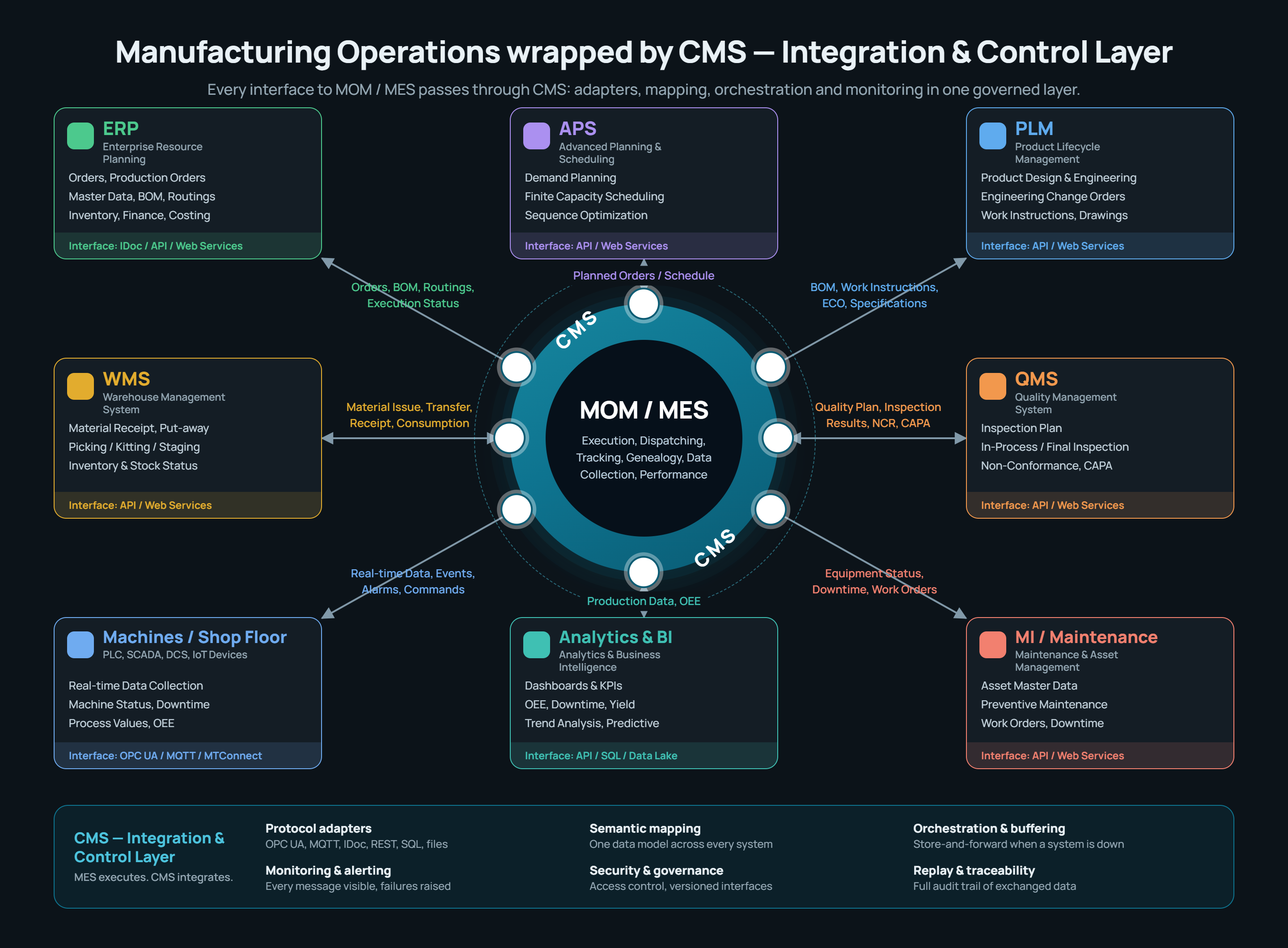
What CMS does
- Receives messages over REST (
POST /:interface/:definition) and SOAP (/ws/:interface/:definition), with API inputs and a WSDL generated dynamically from the definition. - Collects messages actively (pull/event): HTTP GET/POST, MQTT topic, SQL Server/Oracle/PostgreSQL/SQLite/InfluxDB query, SAP RFC/BAPI call, IDoc reception, OPC UA trigger tag and Modbus TCP register.
- Transforms payloads with scripts — handwritten or AI-generated.
- Configures itself from what the other side already publishes: a Swagger file, an OData
$metadata, a WSDL, a Postman collection, a database catalog, the files in a folder or a ready-made SAP pack become Interfaces, Collectors and Deliveries through an assistant, with the AI naming, grouping and writing the Transformer (see Assistants). - Delivers asynchronously with sequential (FIFO) or parallel ordering, with a configurable number of retries and backoff, including writing OPC UA tags and Modbus registers.
- Monitors application availability, blocked interfaces, business errors and message backlog, raising alerts by e-mail, webhook and in-app notification.
- Opens up to an AI through an MCP server of its own: a connected assistant reads the catalogue, diagnoses messages and builds a whole integration, with its reach limited to the Role of a service user (see MCP Server).
- Explains and investigates itself through the AI Assistant: it answers about the product by reading this manual — citing the page — and, with the Agent module, investigates your installation with evidence for every step and proposes the integration ready for approval.
Where to start
ConceptsMessage lifecycleFirst message (walkthrough)Configuration assistantsAI AssistantScreen guideIntegrationsPublic API
How this help is organized
| Section | Audience | Content |
|---|---|---|
| Getting started | Everyone | System vocabulary, message lifecycle and an end-to-end walkthrough |
| Configuration assistants | Implementer | The six assistants: Swagger/OData/WSDL/Postman/MCP, database catalog, folder catalog, SAP packs, linking two Definitions and AI Transformer generation |
| Screen guide | User / implementer | What each screen does and how to use it day to day |
| Integrations | Implementer | Per-protocol setup: HTTP/SOAP, MQTT and Sparkplug B, databases, SAP (RFC, IDoc, Gateway/OData, CPI and packs), OPC UA, Modbus, PI Web API, files — plus the CMS public API |
This documentation ships with the code: it lives in cms-docs/ inside the CMS repository, so a
behavior change and its help update land in the same commit.