UNS Snapshots — /uns/snapshots
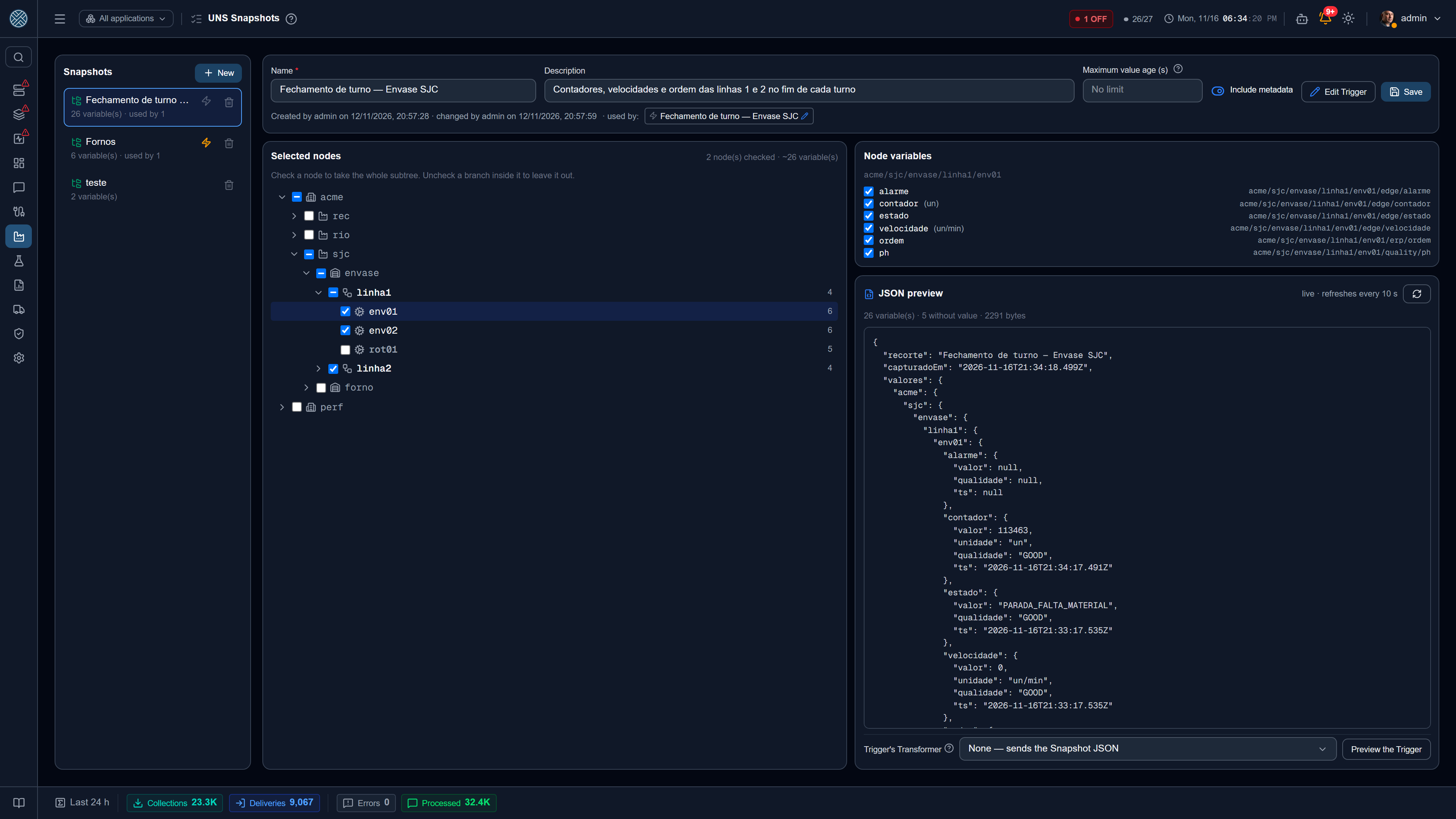
A Snapshot is a selection of namespace nodes saved under a name. At firing time, CMS reads the current value of each variable in the selection and builds a single JSON, with the node hierarchy and the values. It is a picture of the line at one instant: the shift closing, the end of an order, the hourly summary that the MES, the ERP or the data lake ask for.
A Snapshot sends nothing on its own. What fires it is:
- a Trigger, in UNS Snapshot mode: at a scheduled time, the JSON becomes the body of a Delivery or a Router;
- a UNS variable Collection, in the UNS Snapshot read along field: when the Collection’s condition fires, the Snapshot JSON goes along in the payload.
The screen is in the UNS Manager › Snapshots menu, and only shows up with the UNS module in the license.
The screen
On the left, the list of Snapshots, with the number of variables and how many Triggers and Collections use each one. A bolt at the end of the row shows that the Snapshot already has a Trigger: yellow when the Trigger is active, dimmed when it was created but is still disabled. The Trigger name shows on mouse-over.
At the top of the open Snapshot are the fields and the actions:
| Field | What it holds |
|---|---|
| Name | Unique. It is how Triggers and Collections find the Snapshot in another environment |
| Description | Free text |
| Maximum value age (s) | Optional. If any value is older than this at firing time, the run fails and says which variables were old. A variable that has no value at all does not count: it goes in the JSON as null. Empty = no limit. Up to 30 days |
| Include metadata | Off, each variable becomes just the value. On, it becomes {valor, unidade, qualidade, ts} |
The authorship line below shows who created and who changed it, and used by lists the Triggers and Collections that use the Snapshot. The pencil on a Trigger in that list opens the Trigger right there, without leaving the screen.
The trash icon next to each Snapshot in the list deletes it. A Snapshot in use cannot be deleted: the message says who uses it.
Selecting the nodes
The Selected nodes panel shows the namespace tree with a checkbox on each node:
- Checking a node takes the whole subtree, including what is created under it later. The selection is dynamic: a new machine registered inside the line enters the Snapshot without editing anything.
- Unchecking a branch inside a checked node removes only that branch. The checkbox of the node above becomes partial.
- Clicking a node name opens the Node variables beside it, where you can take a specific variable out of the selection.
The summary at the top says how many nodes are checked and how many variables the selection has.
The limits are 500 checked nodes and 2,000 variables per Snapshot. Above that, the preview warns and Save is refused.
The live preview
The JSON preview follows the selection: each node checked or unchecked rebuilds the JSON with the current values, and it refreshes on its own every 10 seconds. The summary under the title says how many variables went in, how many still have no value and the size in bytes.
The preview also warns, before saving, about:
- variables outside your UNS access — saving like this is refused (see Access);
- a selection over the variable limit;
- values older than the maximum age — a run right now would fail, and the list says which.
The maximum age suits telemetry, which arrives all the time. A variable that changes by event (the ERP order, an alarm) can go hours without a new value and would make the run fail. In that case, leave the maximum age empty or take that variable out of the Snapshot.
The JSON
{
  "recorte": "Fechamento de turno — Envase SJC",
  "gatilho": "Fechamento de turno — Envase SJC",
  "capturadoEm": "2026-11-12T23:53:26.484Z",
  "valores": {
    "acme": {
      "sjc": {
        "envase": {
          "linha1": {
            "env01": {
              "contador": { "valor": 165802, "unidade": "un", "qualidade": "GOOD", "ts": "2026-11-12T23:53:24.789Z" },
              "velocidade": { "valor": 471.2, "unidade": "un/min", "qualidade": "GOOD", "ts": "2026-11-12T23:53:24.789Z" }
            }
          }
        }
      }
    }
  }
}valoresfollows the hierarchy: one object per node, from the root, with the attribute as the leaf.- Without metadata, the leaf is just the value:
"contador": 165802. gatilhoonly comes when the run was fired by a Trigger.- A variable without a value still goes in, as
null. - When an attribute has the same name as a child node, the attribute gets the namespace in its name
(
temperatura__mes), and the node stays intact. - The same selection always gives the same shape: variables go in by topic order.
The Delivery that receives the JSON treats it like any JSON body: its Transformer can change the format to what the destination system expects.
Using it in a Trigger
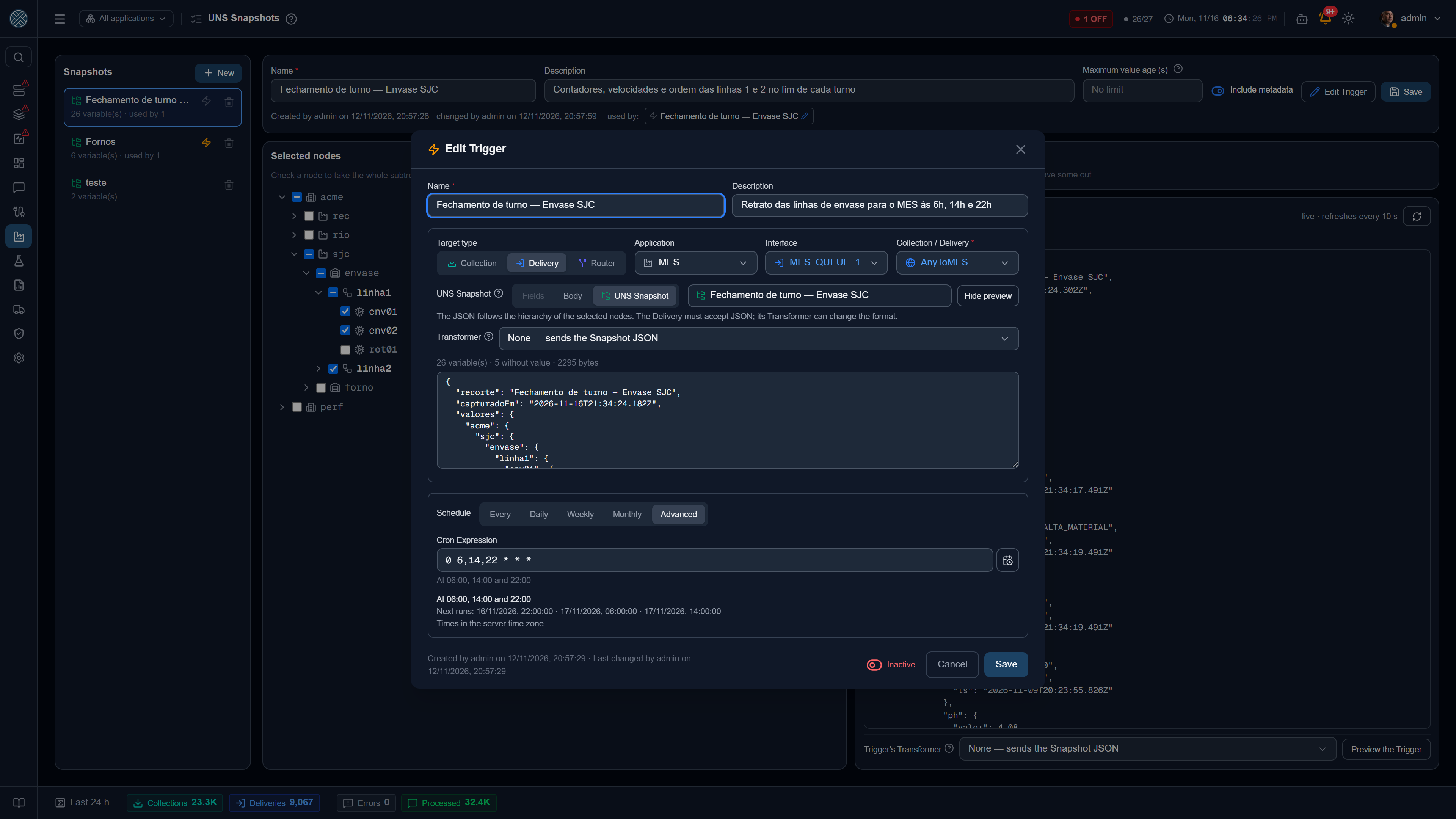
Create Trigger with this snapshot opens the Trigger form over the screen, already in UNS Snapshot mode and with the Snapshot fixed. What is left is to pick the Delivery (or the Router) and the schedule.
A Snapshot has only one Trigger. Once the Trigger exists, the button becomes Edit Trigger and opens the existing one; creating a second Trigger with the same Snapshot is refused, from any screen. To send the same picture to two destinations, use a Router as the target.
The Active / Inactive switch in the form footer enables and disables the Trigger; it takes effect when you click Save. The bolt in the Snapshots list changes color along with it.
At firing time, the Trigger reads the values, builds the JSON and creates the message on the Delivery’s Interface. If any value is over the maximum age, the run ends in error in the Last run column, with the old variables in the message, and no message is created.
When the Snapshot has a Trigger, the footer of the JSON preview gains two things:
| Control | What it does |
|---|---|
| Trigger’s Transformer | Picks the Transformer the Trigger applies to the JSON before sending. Saved right away, on the Trigger |
| Preview the Trigger | Swaps the preview for what the Trigger sends, already transformed — and Show the Snapshot JSON goes back. It is computed over the saved Snapshot, which is what the Trigger reads at firing time |
The Transformer lives on the Trigger, and not on the Snapshot, because the format belongs to whoever receives it: the same Snapshot can feed a Collection that wants the original JSON.
Using it in a Collection
In the UNS variable Collection, the UNS Snapshot
read along field picks a Snapshot. When the Collection fires (change, condition or interval), the
Snapshot JSON goes into the payload in recorte.
If the capture fails (a value over the maximum age, for example), the message is stored anyway, with
recorte: null and the reason in recorteErro. The event that fired the Collection is not lost.
Access
- License: only with the UNS module.
- Screen: the Tool is
/uns/snapshots. Creating and editing Triggers from here also requires the/triggersTool. - Variables: whoever saves must be able to read, through access control, every variable in the selection. The preview shows how many were left out; with any left out, Save is refused.
Rename, delete and move to another environment
- Renaming updates the name stored in the Triggers and Collections that use the Snapshot.
- Deleting only works with the Snapshot not in use.
- In Transport, the Snapshot goes in the UNS package: pick it under Snapshots, next to the subtree, the dashboards and the types. It travels by node path (the plant prefix mapping applies to it), and the checked nodes must exist at the destination or come in the same subtree; if any is missing, the preview points it out. A Snapshot with the same name at the destination is compared and can be updated.
- Triggers and Collections carry only the Snapshot name (and fields linked to variables carry the topic), never the internal number, and their package warns that the Snapshot goes in the UNS package. Order does not matter: when the Snapshot arrives, the Triggers and Collections at the destination waiting for that name start using it.
- In file Import/Export, the Snapshots that the file’s Triggers and Collections use go along, in the same format as Transport. On import, a Snapshot that does not exist at the destination is created (the checked nodes must exist there) and the Triggers and Collections start using it. A Snapshot with the same name at the destination is updated with the one in the file.
- Undoing the transport deletes the Snapshot it created, unless a Trigger or a Collection already uses it; in that case it stays.
For the AI (MCP)
| Tool | What it does |
|---|---|
cms_list_uns_snapshots | Lists the Snapshots, with the number of variables and who uses each one |
cms_preview_uns_snapshot | Returns the JSON of a Snapshot with the current values |
cms_create_trigger accepts modoCorpo: RECORTE_UNS with recorteUns (the Snapshot name), and
camposUns to link fields to variables. A Trigger created this way arrives disabled, like every
Trigger created by the AI.