UNS Settings — /uns
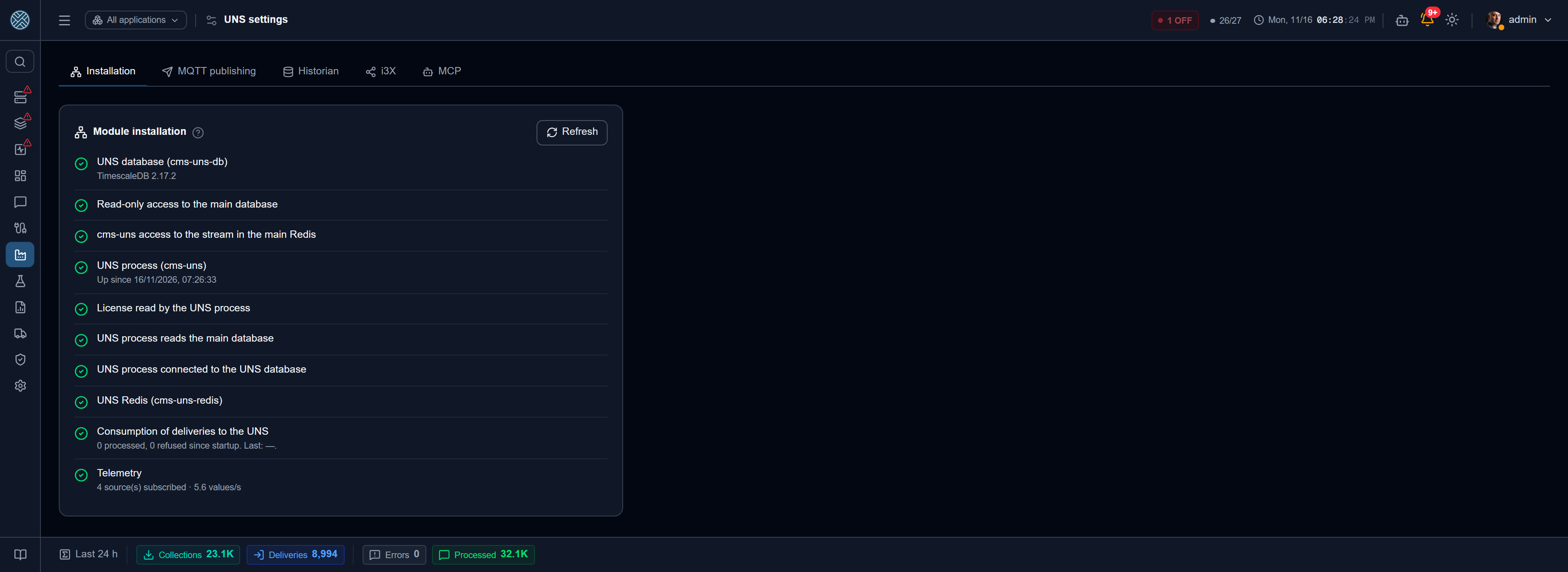
UNS Settings brings together five tabs: Installation, MQTT publishing, Historian, i3X and MCP. Each tab stays under its own Tool, and only shows up for whoever has it:
| Tab | Address | Tool |
|---|---|---|
| Installation | /uns | /uns |
| MQTT publishing | /uns?aba=publicacao | /uns |
| Historian | /uns/historian | /uns/historian |
| i3X | /uns?aba=i3x | /uns/i3x |
| MCP | /uns?aba=mcp | /uns/mcp |
The live channel test, which used to be a tab here, is now the UNS test screen,
in Integration Tests. The old address (/uns?aba=ao-vivo) leads there.
Installation
The Module installation panel shows whether each piece of UNS Manager is up. It refreshes every 15 seconds, and Refresh checks right away. The help icon next to the title explains the module in three paragraphs.
Each line shows in green (ok), red (failure, with the reason below) or grey (not installed, which is not an error).
| Line | What it checks |
|---|---|
| UNS database (cms-uns-db) | The UNS database answers. Below, the TimescaleDB version, or the warning Connected, but without the TimescaleDB extension (the historian works, without compression or aggregates) |
| Read-only access to the main database | The database user that cms-uns uses to read the trail in the main database exists |
| cms-uns access to the stream in the main Redis | The main Redis user that only reaches the queue of deliveries to the UNS exists |
| UNS process (cms-uns) | The process is up, and since when |
| License read by the UNS process | The process read the license and found the module |
| UNS process reads the main database | The read-only connection works |
| UNS process connected to the UNS database | The process writes to the UNS database |
| UNS Redis (cms-uns-redis) | The live-feed Redis answers |
| Consumption of deliveries to the UNS | The process is reading the Delivery queue. Below, how many were processed and refused since it started, and the last one |
| Telemetry | The Telemetry sources are connected. Below, how many sources are subscribed and how many values per second arrive |
The process lines (license, databases, Redis, consumption and telemetry) only show up with the process up.
Module enabled, but not installed
If the license has the module and the machine does not have the pieces, the screen says: The module
is enabled in the license but is not installed on this machine. To install it, add uns to
COMPOSE_PROFILES in .env, run ./scripts/instalar.sh and bring the stack up.
Telemetry above 5 thousand values per second
Up to about 5 thousand values per second, telemetry lives alongside the integration engine on the same machine. Above that, the Telemetry line warns that the UNS should run on its own server, so it does not compete with the integration engine for the machine.
MQTT publishing
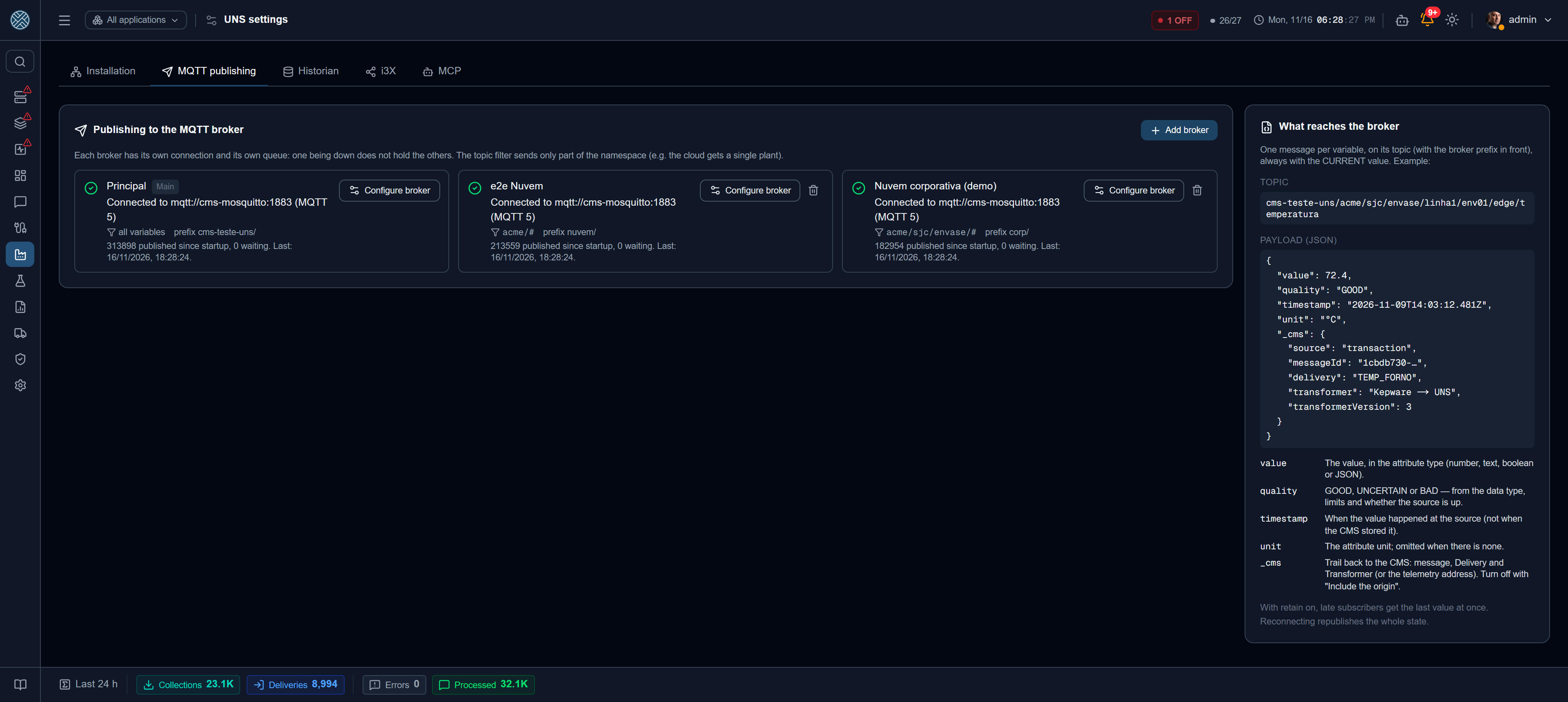
The UNS process publishes the current value of each variable on its topic, in JSON, to the customer’s MQTT brokers. The CMS does not host a broker.
Since 2026-11-09 you can publish to several brokers. There is always a Main one, and Add broker creates the extras. Each broker has its own connection and its own queue: a broker that is down does not hold the others back. The topic filter sends only part of the namespace to a broker (for example, the cloud receives only one plant).
Each card shows:
- the name, and the Main badge on the main one;
- the status: Off., Connected to (with the MQTT version), On, not connected to (values wait and go out when the broker is back) or On, but the UNS process did not answer.;
- the topic filter (or all variables) and the prefix, if any;
- how many publications went out since the process started, how many are waiting and the last one;
- the last error, in red.
Configure broker opens the form. The trash can deletes an extra broker; the main one cannot be deleted, only turned off. Deleting a broker stops publishing to it, but what is already retained there stays on the broker.
The broker form
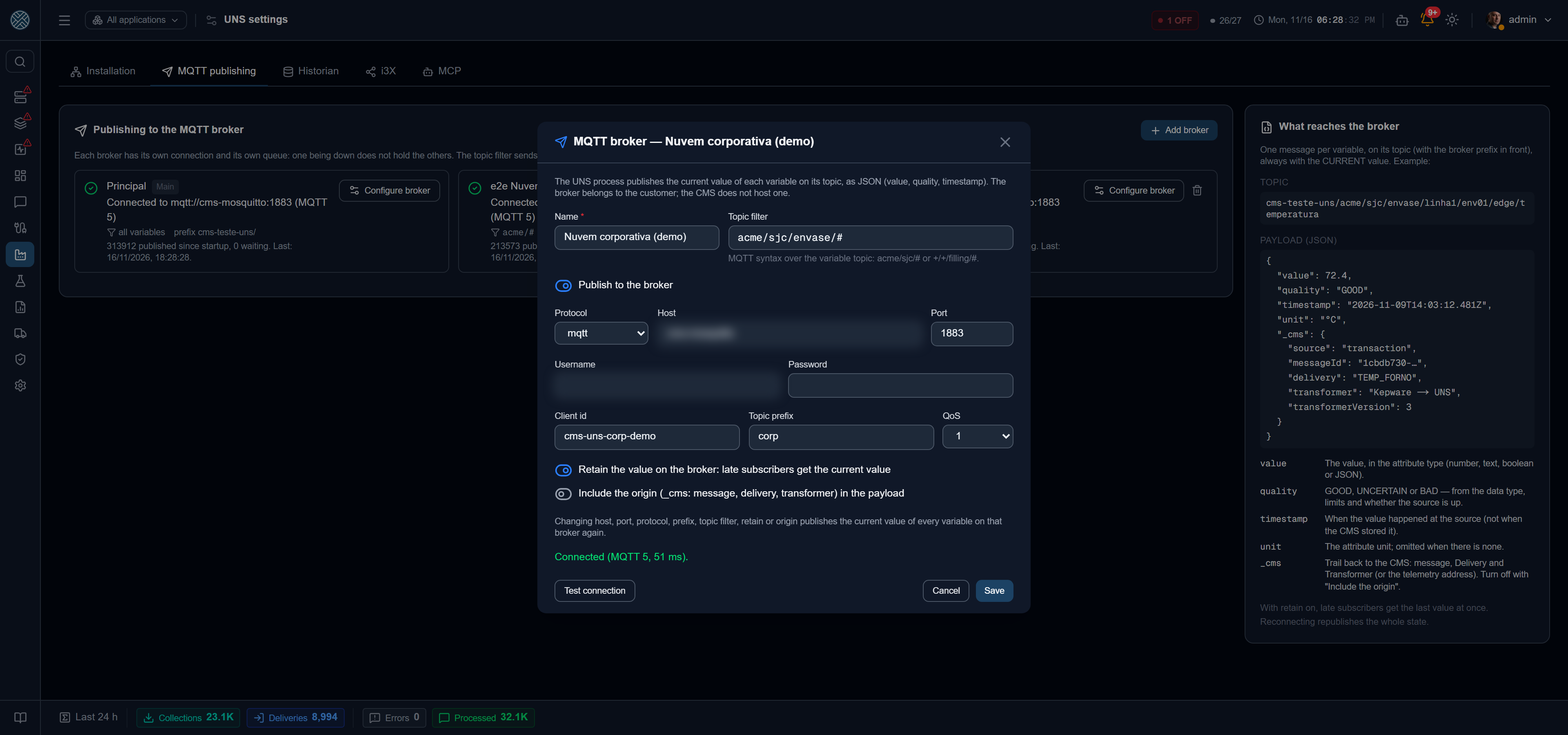
| Field | What it holds |
|---|---|
| Name | Required. Shows on the card |
| Topic filter | MQTT syntax over the variable topic: acme/sjc/# or +/+/envase/#. + takes a whole level, # only at the end. Empty = all variables |
| Publish to the broker | Turns publishing to this broker on and off. To turn it on, the address is required |
| Protocol | mqtt (port 1883), mqtts (8883), ws (8080) or wss (8884). Changing the protocol changes the port, if it was still the default. On WebSocket, the path is /mqtt |
| Host | Just the name or the IP, with no protocol, port or slash. The plant network is allowed; the address of the CMS itself (Redis, database, API), loopback and cloud metadata are refused |
| Port | From 1 to 65535 |
| Verify the broker certificate | Only on mqtts and wss. Off, it accepts a self-signed certificate |
| User and Password | The password is stored encrypted and never comes back to the screen: it shows •••••• (kept). Remove password deletes the stored password on save |
| Client id | No spaces and not empty. Left empty on a new broker, the system uses cms-uns-<number>; the main one uses cms-uns. Two brokers on the same server and port cannot use the same client id: one would knock the other off |
| Topic prefix | Goes in front of the variable topic. Non-empty levels, no + or #, no / at the start or end and not starting with $. Empty = the variable topic |
| QoS | 0, 1 (default) or 2 |
| Retain the value on the broker | On (default), late subscribers get the current value at once |
| Include the origin (_cms: message, delivery, transformer) in the payload | On (default), the payload carries the origin trail in the _cms field |
Test connection connects with what is in the form, before saving, and shows the MQTT version and the time, or the reason for the failure. With no password typed, the test uses the stored password. The system tries MQTT 5 first; a broker that refuses it falls back to 3.1.1.
If the warning UNS_CHAVE_CIFRA is not set on the server shows up, the password field is disabled:
run ./scripts/instalar.sh with the uns profile on.
What gets republished
Changing the host, port, protocol, prefix, retain, origin or the topic filter publishes again the current value of every variable of that broker. A new broker also receives the whole state. Every new connection, including the reconnection after an outage, republishes the whole state: a broker restarted without persistence, or with its retained messages wiped, gets the current value of each variable back. It is retained state, not history: what goes out is the current value, not every value that went by while the broker was down.
A publication the broker does not acknowledge goes back to the queue. A variable the broker refuses (due to a topic ACL, for example) waits a while before trying again, without holding the others back.
What reaches the broker
The card next to the brokers shows the format. It is one message per variable, on its topic (with the broker prefix in front), always with the current value:
acme/sjc/envase/linha1/env01/edge/temperatura{
"value": 72.4,
"quality": "GOOD",
"timestamp": "2026-11-09T14:03:12.481Z",
"unit": "°C",
"_cms": {
"source": "transaction",
"messageId": "1cbdb730-…",
"delivery": "TEMP_FORNO",
"transformer": "Kepware → UNS",
"transformerVersion": 3
}
}| Field | What it holds |
|---|---|
value | The value, in the attribute type (number, text, boolean or JSON) |
quality | GOOD, UNCERTAIN or BAD, from the data type, limits and whether the source is up |
timestamp | When the value happened at the source, not when the CMS stored it |
unit | The attribute unit; omitted when there is none |
_cms | The trail: source (transaction or telemetry); in a transaction, messageId, delivery (Delivery code), transformer and transformerVersion; in telemetry, address (the tag address). With quality other than GOOD, qualityReason comes along. A value from a Test Bench message comes with test: true. Omitted with Include the origin off |
Historian
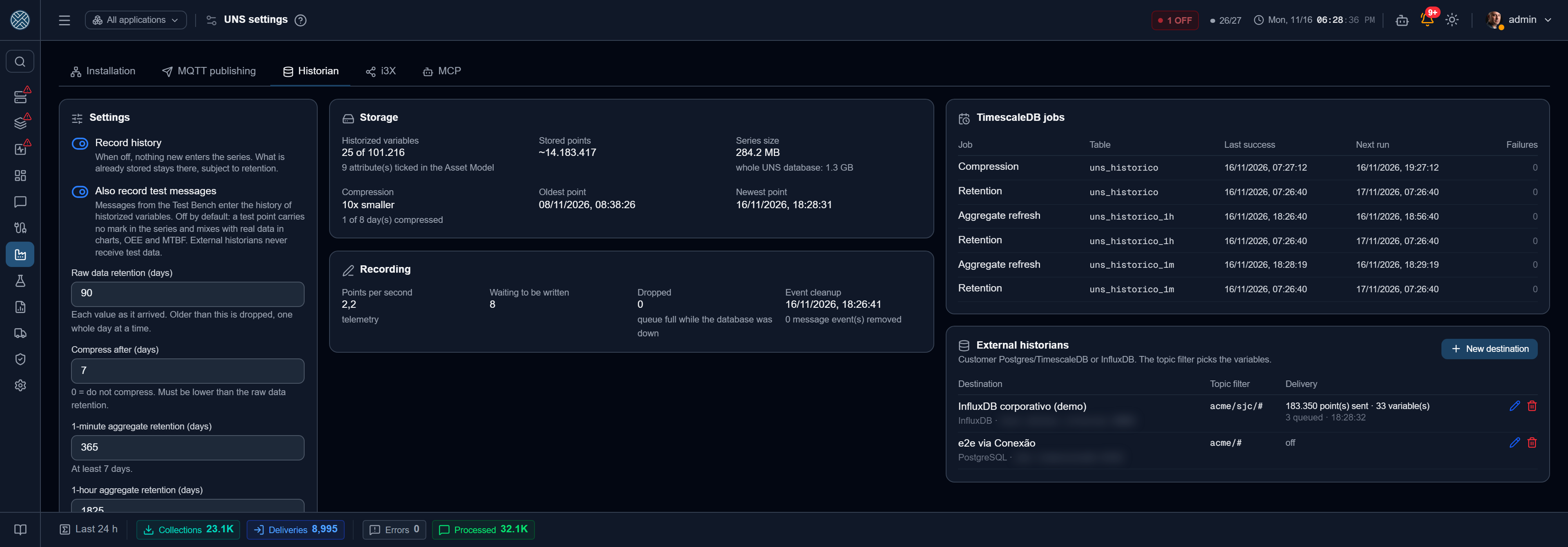
The historian keeps the series of each variable in the UNS database itself (TimescaleDB). What goes in is decided on the attribute, in the Asset Model: with Historize ticked, every instance of that attribute starts being recorded. The trend of each variable opens in the Namespace Explorer.
- Telemetry: every value that passed the mapping’s deadband goes in.
- Transaction: every value of the message goes in, including a reprocessed one older than the current value (it goes to the series without touching the current value).
- Test Bench messages do not go in, unless Also record test messages is on (see below). The variable’s current value changes all the same, marked as test in the Explorer.
Raw data is compressed after a few days and deleted at the end of the retention. The 1-minute and 1-hour aggregates (average, minimum, maximum) keep the long history and answer the trends over weeks and months.
Configuration
| Field | What it holds |
|---|---|
| Record history | Off, nothing new goes into the series. What is already recorded stays there, subject to retention. Default: on |
| Also record test messages | On, the values that arrive through the Test Bench go into the series of the historized variables. Default: off, because a test point carries no mark in the series and mixes with real data in charts, OEE and MTBF. Applies only to the built-in historian: external historians never receive test data |
| Raw data retention (days) | Each value as it arrived. Older than this is deleted, a whole day at a time. From 1 to 3650; default 90 |
| Compress after (days) | 0 = do not compress. Must be lower than the raw retention. Default 7 |
| 1-minute aggregate retention (days) | Minimum 7, maximum 3650; default 365 |
| 1-hour aggregate retention (days) | The long history: trends over months and years. From 1 to 36500; default 1825 (5 years) |
Save stores and applies the rules in the database in the same operation: if applying fails, nothing is saved, and Saved and applied only shows up when it worked. The same raw data retention clears, every hour, the events that the message timeline shows.
Without the TimescaleDB extension in the UNS database, the screen warns that the series is stored in a plain table, without compression, automatic retention or aggregates; only the raw retention stays editable.
Storage and writing
| Panel | Shows |
|---|---|
| Historized variables | How many variables out of how many are being recorded, and how many attributes are ticked in the Asset Model |
| Stored points | Approximate total of points |
| Series size | The size of the history, and below it that of the whole UNS database |
| Compression | How many times smaller the compressed data became, and how many days were already compressed |
| Oldest point / Newest point | The period covered |
| Points per second | Telemetry only |
| Waiting to be written | Points queued for the database |
| Dropped | Points lost because the queue filled up with the database down (in red when there are any) |
| Event cleanup | When the last cleanup of message events ran and how many were removed |
A high telemetry volume grows the UNS database disk: keep an eye on the size here.
TimescaleDB jobs
With TimescaleDB, the TimescaleDB jobs table lists the jobs the database runs by itself: Retention, Compression and Aggregate refresh, with the table, the last success, the next run and the number of failures. A job whose last run failed gets the failed badge.
External historians
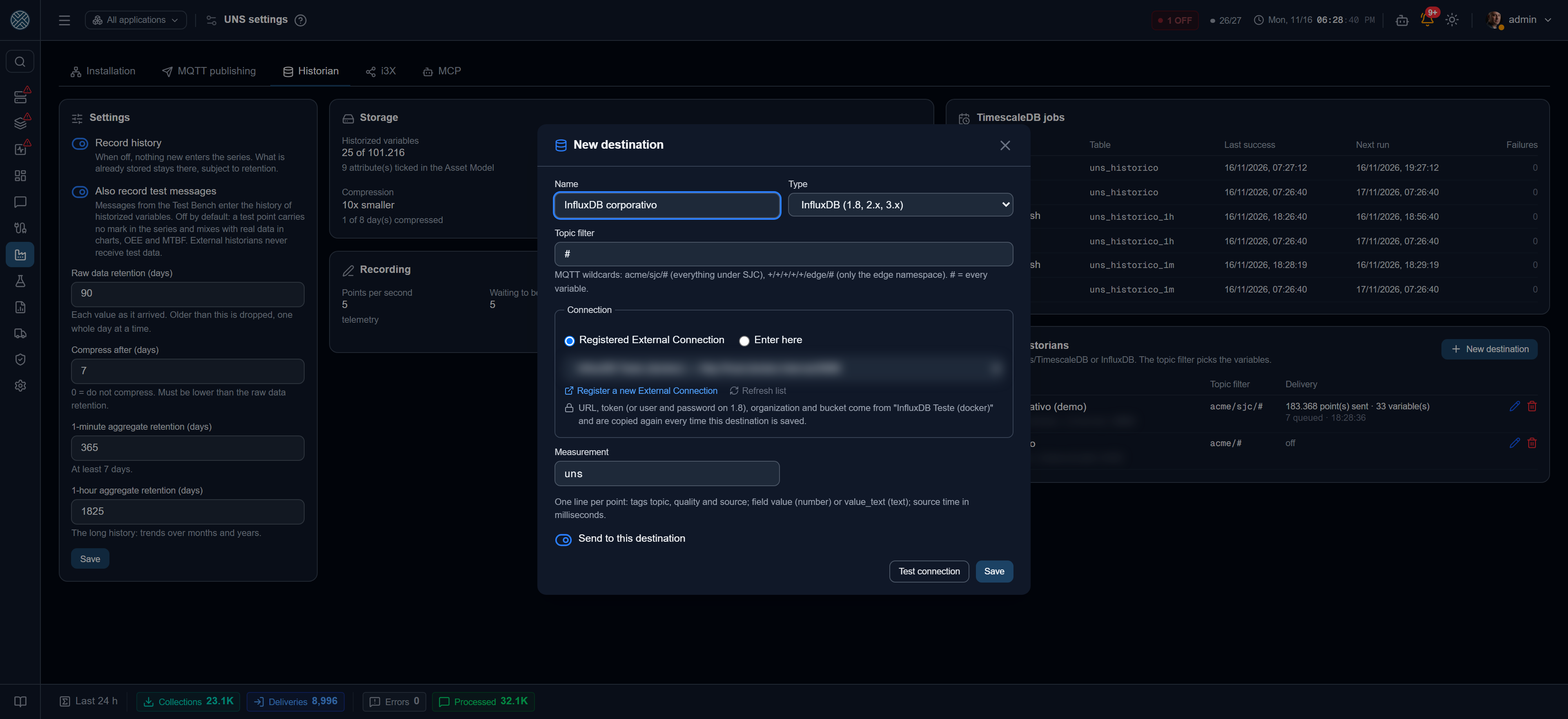
Besides the built-in historian, the UNS writes to the customer’s Postgres/TimescaleDB or InfluxDB. The destination picks the variables through the topic filter, regardless of the Historize tick: to write to both places, tick the attribute and add the destination.
The table shows each destination with its filter and the sending status: off, waiting for cms-uns to load it, or how many points were sent, from how many variables, how many are queued and, in red, how many were dropped. New destination opens the form.
| Field | What it holds |
|---|---|
| Name | Required and unique among the destinations |
| Type | PostgreSQL / TimescaleDB or InfluxDB (1.8, 2.x, 3.x) |
| Topic filter | MQTT wildcards: acme/sjc/# (everything under SJC), +/+/+/+/+/edge/# (only the edge namespace). # = all variables |
| Connection | Registered External Connection or Enter here (see below) |
| Host, Port, SSL (sslmode require) / HTTPS, Verify the certificate | Only in Enter here |
| Database, User, Password | Postgres, only in Enter here. The stored password does not come back to the screen |
| Schema and Table | Postgres. Letters, digits and _, up to 63, starting with a letter or _ |
| Bucket, Organization, Token | InfluxDB, only in Enter here. On 1.8: bucket = database/retention (e.g. planta/autogen), organization empty and token = user:password |
| Measurement | InfluxDB |
| Send to this destination | Turns sending on and off |
Test connection checks the destination with what is in the form and shows the time and what it found.
What gets written:
- Postgres: columns
ts,topico,variavel_id,valor_num,valor_texto,qualidade,origem,mensagem_id. The table is created on the first send if it does not exist (as a hypertable, if the database has TimescaleDB). - InfluxDB: one line per point, with the tags
topic,qualityandsource, the fieldvalue(number) orvalue_text(text) and the source time in milliseconds.
Registered External Connection or Enter here
Registered External Connection (the default for a new destination) reuses an External Connection of the destination’s type (PostgreSQL for Postgres/TimescaleDB, InfluxDB for InfluxDB). The combo lists the compatible ones, with the address and the inactive mark when that is the case. Register a new External Connection opens the form, and Refresh list reloads the combo afterwards.
What comes from the connection is locked with a padlock:
- Postgres: host, port, SSL, database, user and password. The connection’s schema becomes the suggestion for a new destination; schema, table and the rest stay editable.
- InfluxDB: URL, token (or user and password on 1.8), organization and bucket. The measurement stays editable.
These fields are copied from the External Connection every time the destination is saved. Changed the password or the address in the External Connection? Open the destination and save it again so it starts using the new values.
The UNS process does not read the integration engine’s External Connections (their password is encrypted with another key). That is why the system copies the connection into the destination at save time, and the destination keeps which External Connection it came from. If that connection is deleted, the form warns you: pick another one or enter it here.
Enter here is the earlier mode: host, port, credentials and the rest typed into the destination itself.
Destination down
Every 2 seconds the queue of each destination goes out in a batch. A destination that is down does not block anything: the points are kept on disk and go out in order when it comes back, even after the UNS process restarts, and the table shows how many are on disk. The interval between attempts grows up to 1 minute. When the reserved space runs out (2 million points on disk), the new point is dropped and counted. Turning off or deleting the destination discards what was in the queue; what was already written there stays in the customer’s historian.
i3X
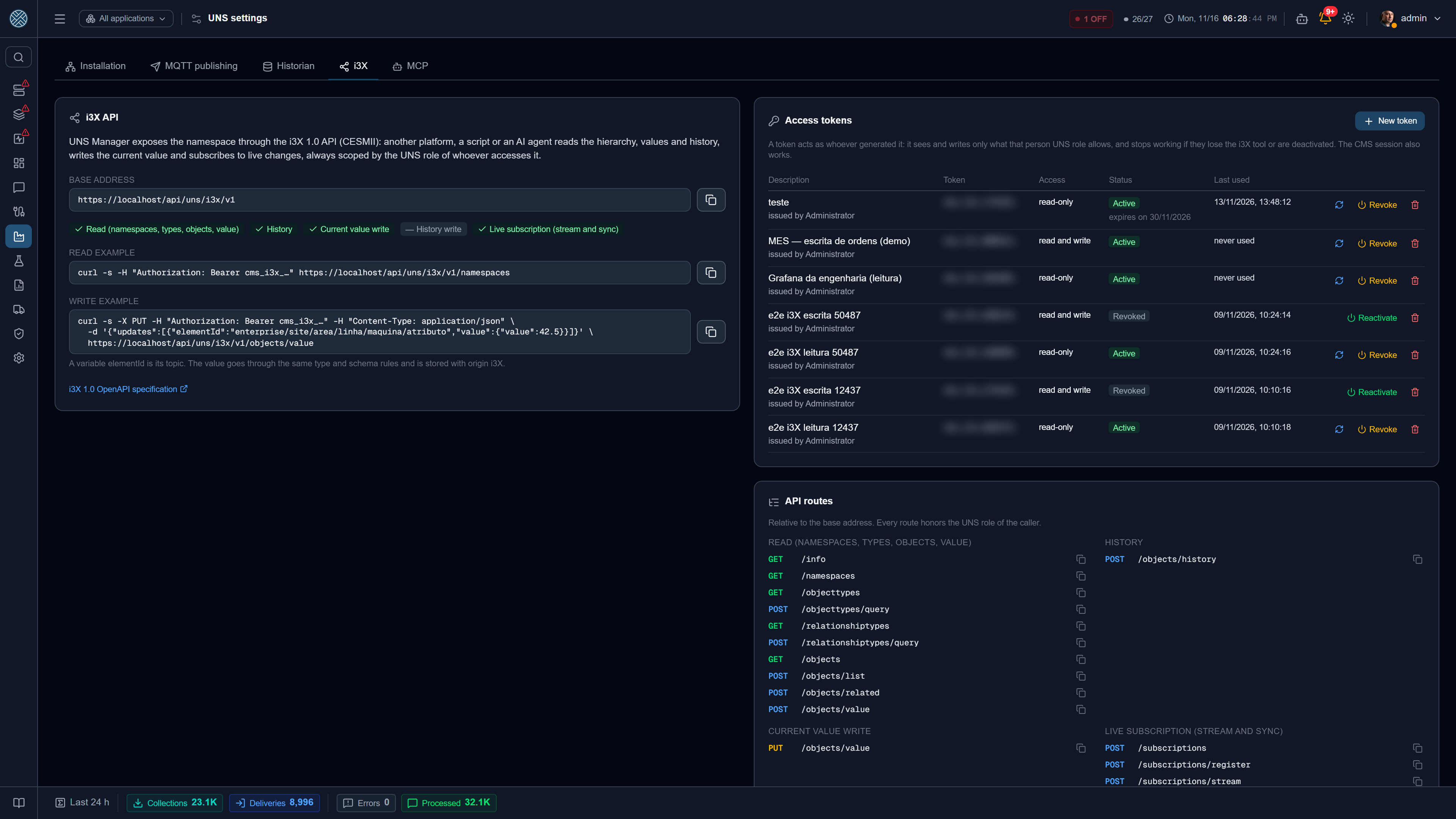
UNS Manager exposes the namespace through the i3X 1.0 API (CESMII). Another platform, a script or an AI agent reads the hierarchy, the values and the history, writes the current value and subscribes to live changes, always scoped by the UNS role of whoever accesses it. The i3X 1.0 OpenAPI specification link opens the official specification.
| Item | What it shows |
|---|---|
| Base address | https://<servidor>/api/uns/i3x/v1, with a copy button |
| Capabilities | Read (namespaces, types, objects, value), History, Current value write and Live subscription (stream and sync). History write is not supported |
| Read example | A curl that lists the namespaces |
| Write example | A curl that writes the current value of a variable |
| API routes | The routes, relative to the base address, grouped by capability, each with a button to copy the URL |
Write example:
curl -s -X PUT -H "Authorization: Bearer cms_i3x_…" -H "Content-Type: application/json" \
  -d '{"updates":[{"elementId":"enterprise/site/area/linha/maquina/atributo","value":{"value":42.5}}]}' \
  https://<servidor>/api/uns/i3x/v1/objects/value
The elementId of a variable is its topic. The value goes through the same type and schema rules as
the other origins and comes in with origin i3X.
| Capability | Routes |
|---|---|
| Read | GET /info, GET /namespaces, GET /objecttypes, POST /objecttypes/query, GET /relationshiptypes, POST /relationshiptypes/query, GET /objects, POST /objects/list, POST /objects/related, POST /objects/value |
| History | POST /objects/history |
| Current value write | PUT /objects/value |
| Live subscription | POST /subscriptions, POST /subscriptions/register, POST /subscriptions/stream, POST /subscriptions/sync |
PUT /objects/history answers 501: history write is not supported.
Besides the tree relationships (HasParent/HasChildren, HasComponent/ComponentOf), i3X publishes
the relationship types of the Knowledge Graph and returns in
POST /objects/related the relationships between nodes and variables.
Access tokens
An external client authenticates with its own token, in the Authorization: Bearer cms_i3x_…
header. The CMS session also works.
New token (for whoever can edit the /uns/i3x Tool):
| Field | What it holds |
|---|---|
| Description | To recognize the client (e.g. “Rio MES integration”). Up to 200 characters |
| Expires on (optional) | The date the token stops working, at the end of the day. Must be in the future |
| Allow writing the current value | Without it, the token only reads. With it, it writes wherever its UNS role allows writing |
The token shows up only once, right after it is generated: copy it and keep it in the client’s configuration. Afterwards, only its beginning stays visible in the list.
The list shows the description (and who issued it), the beginning of the token, the access (read and write or read-only), the status (Active, Revoked or Expired, with the expiry date), the last use and the actions Generate new value, Revoke, Reactivate and delete. Deleting cuts the client off at once.
Lost the value? Generate a new one
The CMS keeps only a digest (hash) of the token, never the value: there is no way to show it again.
Generate new value (arrows icon, on an active token) replaces the value of the same token. The old
one stops working at once, the new one shows up once, and description, access and expiry stay the
same. Whoever uses it must replace it with the new value in the client’s configuration. The change is
recorded in the Audit Log (UNS_I3X_TOKEN_REGENERADO), with the beginning of the old and the new
value.
How the role scopes the token
The token acts as whoever generated it:
- it sees and writes only what that person’s UNS role allows, checked on every call. If their access changes, the token’s changes with it;
- it stops working if the person is deactivated or loses the
/uns/i3xTool. Reading requires the GET and POST levels on the Tool (the specification queries in batch through POST); writing requires PUT; - a read-only token gets 403 on writes; an invalid, revoked or expired token gets 401, without saying which of the cases it is.
Each person sees and revokes the tokens they issued. Whoever sees the whole UNS (administrator profile) sees and revokes all of them.
A live subscription covers up to 5 thousand variables, and each token (or each person, through the session) has up to 100 subscriptions.
MCP
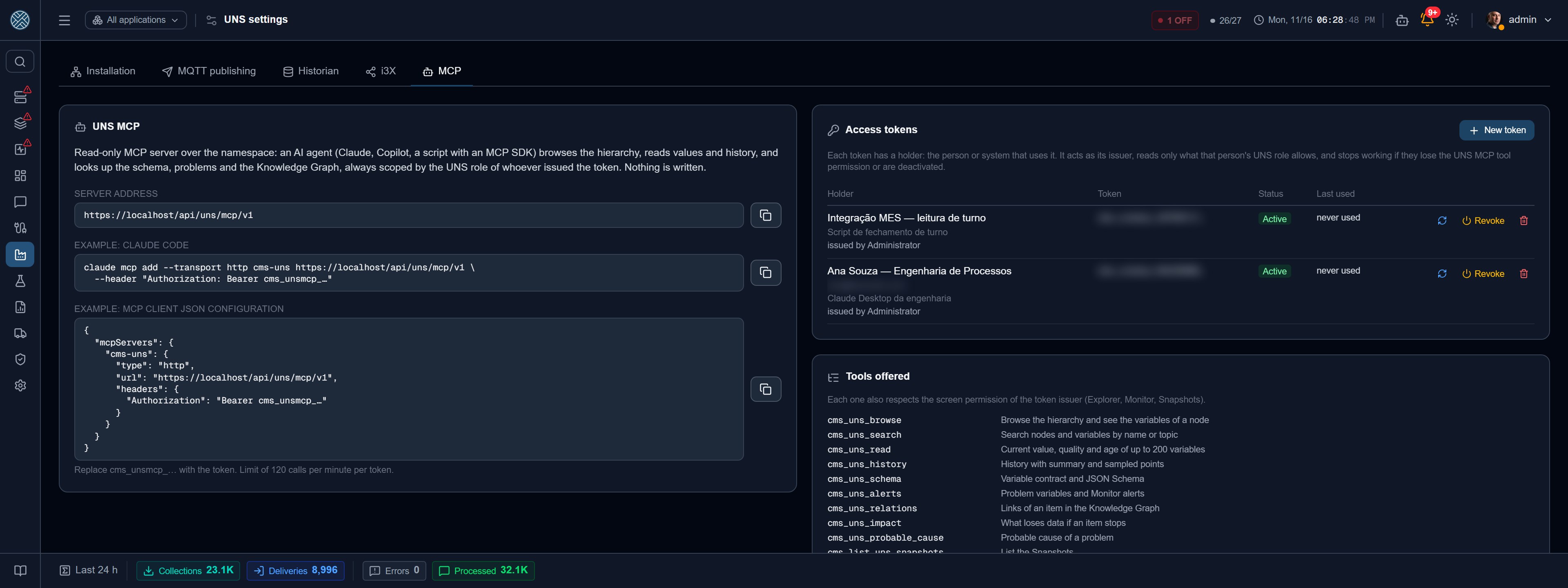
A UNS-only MCP server, read-only. An AI agent (Claude, Copilot, a script with an MCP SDK) browses the hierarchy, reads values and history, and looks up the schema, the problem variables and the Knowledge Graph, always scoped by the UNS role of whoever issued the token. Nothing is written.
It is a server separate from the configuration MCP Server: another address, other tokens, another Tool. Whoever only needs plant data gets no access to the tools that create and change integrations.
Turning the feature on
The server starts off, because it opens plant data to the outside. It is turned on in Settings › AI, switch UNS MCP server. While it is off, the tokens are kept, but every call gets 403; the tab warns about it and leads to the switch. The switch does not consume the configured AI provider: whoever connects pays for the model.
Connecting a client
| Item | What it shows |
|---|---|
| Server address | https://<servidor>/api/uns/mcp/v1, with a copy button |
| Example: Claude Code | The claude mcp add --transport http … command with the token header |
| Example: MCP client JSON configuration | The mcpServers block to paste into the client’s configuration file |
The transport is HTTP (Streamable HTTP), without a session. Replace cms_unsmcp_… in the examples
with the token.
Access tokens
Each token has a holder: the person or system that uses it. One person can issue several, one per
client. New token (for whoever can create on the /uns/mcp Tool):
| Field | What it holds |
|---|---|
| Holder | Required. Who will use the token, for example “Ana Souza — Process Engineering” |
| Holder e-mail (optional) | To know whom to warn before revoking |
| Purpose (optional) | For example “engineering Claude Desktop” |
| Expires on (optional) | The date the token stops working, at the end of the day |
The token shows up only once, right after it is generated. The list shows the holder (with e-mail, purpose and who issued it), the beginning of the token, the status, the last use and the actions Generate new value, Revoke, Reactivate and delete. As in i3X, Generate new value replaces the value of the same token and the old one stops working at once.
The token acts as whoever issued it: it sees only what that person’s UNS role allows reading, and
stops working if they are deactivated or lose the /uns/mcp Tool (GET level). Each person sees the
tokens they issued; the administrator sees all of them. Creating, changing, revoking, generating a new
value and deleting are recorded in the Audit Log (UNS_MCP_TOKEN_*), with the holder.
What the agent can do
| Tool | Answers | Requires in the Profile |
|---|---|---|
cms_uns_browse | The hierarchy: the roots or a node, with children (up to 3 levels) and the variables with their value | Namespace Explorer |
cms_uns_search | Nodes and variables by name or topic (at least 2 characters) | Namespace Explorer |
cms_uns_read | Current value, quality, age and origin of up to 200 variables | Namespace Explorer |
cms_uns_history | History of up to 10 variables over a period: summary (minimum, maximum, average) and up to 1000 sampled points | Namespace Explorer |
cms_uns_schema | The variable’s contract: type, unit, limits, expected interval, whether it is historized, JSON Schema | Namespace Explorer |
cms_uns_alerts | Problem variables and fired alert rules | UNS Monitor |
cms_uns_relations, cms_uns_impact, cms_uns_probable_cause | Links, impact and probable cause. See For the AI | Namespace Explorer |
cms_list_uns_snapshots, cms_preview_uns_snapshot | The Snapshots and the JSON each one would produce now | Snapshots |
What the role does not allow reading answers as nonexistent, so as not to reveal what exists outside the scope. A tool whose screen the Profile lacks does not even show up for the agent.
A current value that came from the Test Bench comes back with teste: true and a note, because it only
goes into the history with Also record test messages on (see Historian).
Each token makes up to 120 calls per minute; above that, 429. The UNS tools show up in the Tools tab of the MCP Server (group UNS namespace) and turning one off there applies to both servers.