Transformers — /transformers
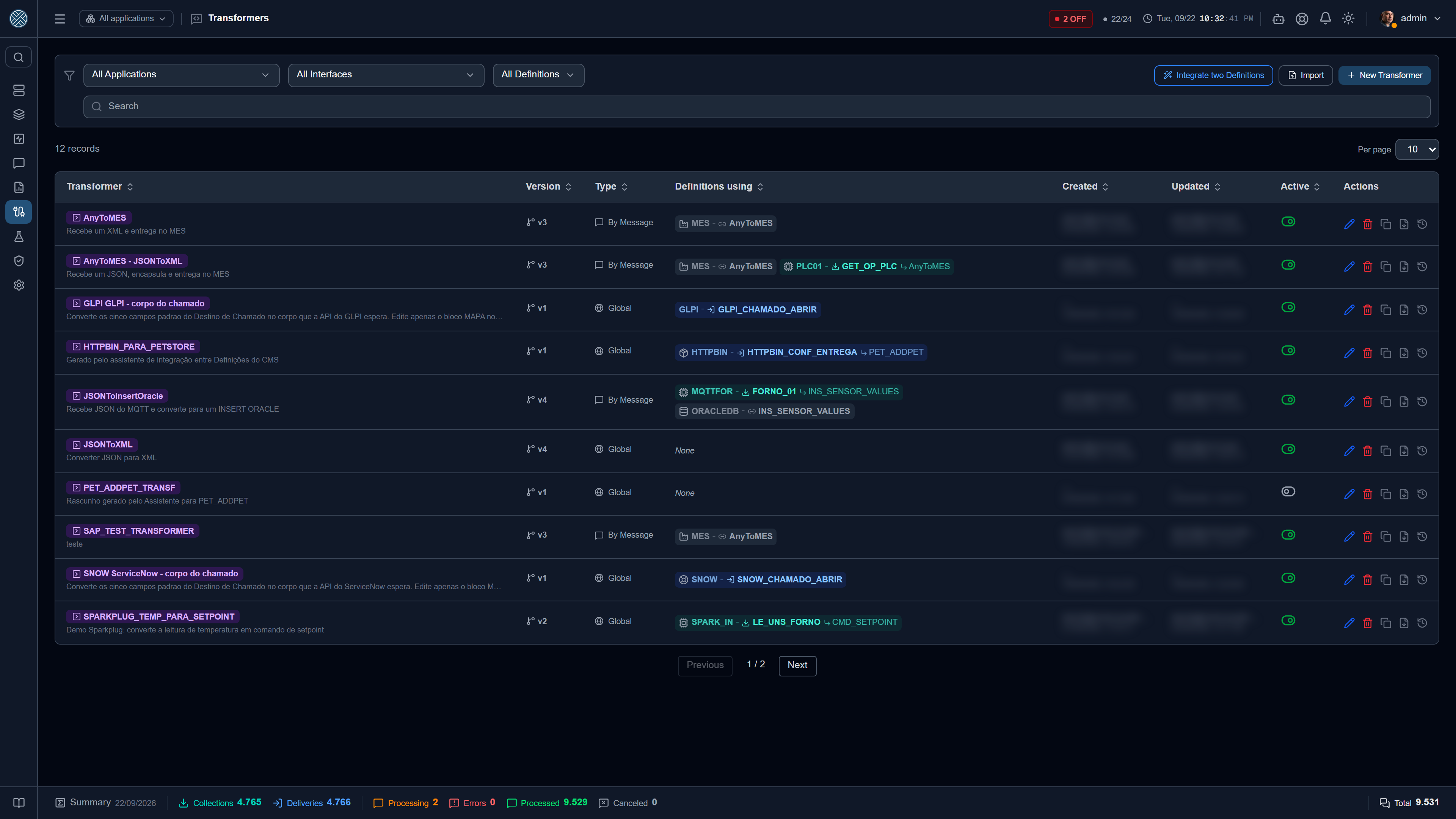
A Transformer converts the payload between the sender’s format and the receiver’s: JSON ↔ XML, renaming fields, flattening structures, computing derived values, splitting one message into several.
The same Transformer is reusable in Delivery Definitions, in Collections and in the forwardings of a Collection to several interfaces.
Where the Transformer sits in the flow
- Delivery — between receipt and sending to the destination.
- Collection — between reading the source and forwarding to the target interfaces.
- Forwarding — a Transformer of its own per destination, when the same collection feeds systems that expect different formats.
- Producer Application — on a Delivery that receives from several systems, a Transformer of its own per producer, which converts that producer’s format into the Delivery’s and runs before the Delivery Transformer. See Transformer by producer Application.
Before changing a Transformer, check the consolidated usage shown in the listing. It covers direct use in Definitions and indirect use — via Collection forwardings and by producer Application on a Delivery. Both must be considered, and the second one is easy to forget.
Who uses this Transformer
The Definitions using column shows, on each row of the listing, one chip per use, in the form
Application icon · Application code — Collection/Delivery icon · Definition code. The chip colour
matches the rest of the system: teal for Collection, blue for Delivery.
Clicking a chip does not take you to the Definition: it opens the list of uses, and you pick what to open from there. This is the widest column in the table, and a stray click should not throw you out of the screen.
The chip distinguishes the two natures of the link:
| Link | Means |
|---|---|
| Direct | The Delivery or Collection itself transforms with this Transformer |
| Forwarding | Only one destination of that Collection uses it; the Definition may use another, or none |
| By producer | Only the messages of one producer Application go through it, before the Delivery Transformer |
| Reference | The Definition is in this Transformer’s Scope: it may come to use it, but transforms nothing with it today |
The distinction matters when changing something: touching a forwarding Transformer affects one branch of the Collection, not the whole Collection. The forwarding row shows the destination after an arrow; the By producer row shows the producer’s code next to a send icon — without it, the chip would look the same as the Delivery’s direct use. The usage modal’s search also finds it by the producer’s code.
Reference comes in grey, with a link icon, outside the teal/blue pair that across the product means Collection and Delivery in operation. A Definition that is in the Scope and using it counts once, as real usage. See Scope is not usage.
When there are more uses than fit in the column, the +N chip opens the same list, and the usage modal has a search field of its own — a shared Transformer accumulates dozens of rows, and scrolling in search of the right one is not checking anything.
The usage count is not cut by your Interfaces; the identity of who uses it is. A Transformer used only by another area showed “None” and looked free to delete — today it shows the total, and the difference appears as “N in Interfaces you cannot access”. Knowing something is in use does not reveal by whom: no Application code, no Definition code, no id.
Deleting a Transformer in use
Deleting a Transformer that a Delivery, a Collection or a producer Application still uses is refused, with a message saying how many uses remain — remove it from there first. Before, the same situation reached the screen as a generic server error.
A forwarding does not block the deletion: the destination that used the deleted Transformer falls back to the destination Delivery’s Transformer, as it already did.
Writing by hand — /transformers/:id
A Monaco editor (the same as VS Code), with an immediate test against a sample payload. Use new
as :id to create one from scratch.
The script is JavaScript. Besides the payload, it receives a context:
| Field | Content |
|---|---|
topico | Source topic, in MQTT collections |
uid | Message identifier |
dataRecebimento | Time of receipt |
vars | Available variables: the Global ones plus those of the Application in context |
An Application variable overrides a Global one with the same name. That is what lets you write a
single Transformer using vars.CENTRO and install it across several plants — see
Variables.
The Result in full screen
The 3. Result column is narrow for a large result. The full-screen icon, next to the copy one, opens the result in a popup with:
- Original / Formatted — JSON or XML indented for reading. A result that is not valid JSON or XML stays in Original only.
- Copy original or Copy formatted — copies what is on screen, and the label says which.
Formatting is for reading only: Transformation OK and the Expected Output use the original result, exactly as the script produced it.
Converting XML
Three functions are available in the script, with no import:
| Function | What it does |
|---|---|
xmlToJson(xml) | Converts XML into an object, turning what looks like a number into a number |
xmlToJsonRaw(xml) | Converts XML into an object with no type coercion: every text stays a string |
jsonToXml(obj) | Builds the XML back from the object |
Use xmlToJsonRaw whenever the XML carries an identifier. xmlToJson eats the leading zero:
the production order <ID>000100234567</ID> reaches the script as 100234567 — a number that does
not exist in the ERP. The same goes for material code, batch, plant and postcode, and the damage is
silent, because the script receives a plausible number.
Both functions drop the namespace prefix and keep attributes. xmlToJson still exists and is still
the default on purpose: every Transformer already written was written against its behaviour, and a
script comparing if (x.Qtd > 10) would start comparing text if the conversion changed underneath —
the break would show up on the first message, in production.
The name opens locked
When editing, the Transformer field comes with a padlock. The name is not just a label: it is the natural key for import and export (packs, export files, MCP tools) and it is how the team recognises the script in the Definitions using it. Renaming makes an older pack create a new Transformer instead of updating this one.
Clicking the padlock brings up the impact warning; only after confirming does the field unlock. There is no padlock when creating — nothing points at the name yet. The change is recorded in the audit log, under its own action Change Transformer Name.
Scope is not use
The target button, next to the scope tag, opens the list of Application / Interface / Definition this Transformer reaches. That list is a reference, not a link: the actual link is created by the Definition itself, on its own screen.
To leave no doubt, every row in the popup carries an Actual use column:
| Tag | Means |
|---|---|
| In use | The Definition — or one of its forwards, or a producer Application on it — points at this Transformer right now |
| Reference only | Nothing points at it yet; the Definition is listed only as a candidate |
An In use reference cannot be removed from here: undo the link on the Definition screen first — on those rows the bin icon is dimmed, with the reason in the tooltip.
Removing takes two steps, just like adding. The bin marks the reference to leave — the row is highlighted and the icon turns into an undo —, and nothing is removed until you click Save. Closing the window discards the marks, both the removals and any add rows you filled in.
If the marks would empty the scope, the screen says so first: with no references left the Transformer becomes Global again — it shows up for everyone and can be picked in any Delivery or Collection Definition. That is the only real effect of removing a reference.
Version history
Every saved change to the script, the payload models or the name creates a version. In the history:
- the newest is the Current one — the snapshot of what is saved today;
- the rest are Obsolete: kept for review and for restoring, but not what runs.
Restore this version asks for confirmation and only changes what is on screen — the script and the models become those of the chosen version, but nothing is written until you click Save Transformer. To back out, leave the screen without saving.
An obsolete version can be removed, also with confirmation; removal is permanent and goes to the audit log. The Current version never leaves — without it the history would lose the reference to what is live.
Moving a Transformer to another environment
A Transformer written and tested in staging can go to production — or to another customer’s installation — as a file. There is no need to go through Import/Export in the Danger Zone, which moves whole domains at once.
Exporting
In the listing, the Export to file icon on the Transformer’s row downloads a .json with the
record, the script, the input and output payload models and the list of Scope Definitions.
Deliberately left out: the version history (the destination starts counting from scratch) and the authorship from the source (whoever imports becomes the author). If you only see part of the Scope, the file carries only that part.
The Scope is stored by short names — Application · Interface · Definition — never by the record’s internal number. Those numbers are sequential and local: the same id points at something else in the destination, and a file carrying them would tie the script to the wrong Definition without complaining about anything.
Importing
The Import button, next to New Transformer, asks for the file and shows what will happen before writing anything.
For each Scope Definition, the CMS looks for the same trio of short names here and reports what it found:
| Situation | What the screen shows |
|---|---|
| The trio exists in this environment | exists here |
| The Application does not exist here | Application does not exist here |
| The Application exists, the Interface does not | Interface does not exist here |
| The Interface exists, the Definition does not | Definition does not exist here |
| The Definition exists, but belongs to an Interface you cannot access | exists, but belongs to an Interface you cannot access |
And for each row you choose:
- Use this one — only shown when the trio matched; reuses the Definition that was found;
- Choose another — opens the Application → Interface → Definition combos of this environment, so you can point that Scope by hand;
- Skip — discards the row.
Skipping every row (or importing a Transformer that was already global) brings the Transformer in as Global: it becomes available to every Definition, and the link can be made later, on each Definition’s screen.
The import never overwrites an existing Transformer. If one with the same name already exists here, the imported one comes in as “name (importado)” — the screen says so before writing. It is up to you to compare the two and delete the old one, if that is the case.
Choose another depends on the /applications and /interfaces Tools: without them the combos
would be empty, and the screen shows the option disabled with the reason. The chosen Definition is
also re-checked on the server against your Interfaces — you cannot tie the script to an area you
cannot reach.
Every import is recorded in the audit log, under the Import Transformer action, with the name that came in the file, the name it was created with and how many Scope links were born.
Generating with AI
Someone who does not write code can generate the script by describing the result. It is one of the ways the CMS uses AI — see Configuration assistants for the full set.
Provide the examples
An input payload (X) and an output one (Y) — as a real example or as a JSON Schema.
Describe the transformation
A free-text prompt explaining the rules (“sum the quantities per batch”, “convert the date to ISO
8601”, “when shift is missing, use 1”).
Review the result
The backend generates the script and runs it in the same sandboxed worker pool used in production, against the sample payload. You see the compared result (X → obtained Y), not the code — unless you open the code icon, which also shows the full history of generations and prompts.
Adjust or approve
If the result is not right, adjust the prompt and generate again — every attempt stays in the history and can be restored. Only when you click Approve does the script become effective for real use.
The provider (Anthropic, OpenAI or one compatible with the OpenAI API, such as Ollama, Groq or OpenRouter) is chosen in Settings → AI. The API key is stored encrypted and never shown again.
The AI call happens only on this screen, by explicit user action. The engine that runs transformers during receipt, delivery and collection does not depend on AI — a provider outage does not affect the delivery of a single message.
Connecting two Definitions that already exist
The Integrate two Definitions button at the top of this screen opens the assistant that generates the Transformer between two ends already configured in the CMS, from what actually flows through each one. See Between Applications.
The execution engine
Implemented in cms-api/src/modules/transformador/.
Isolation
Scripts run in worker_threads, in a pool managed by TransformadorWorkerPool:
- the API’s main thread is never blocked by a slow or hung script;
- each worker has a memory limit via
resourceLimits; - besides the
vmtimeout inside the worker, there is an external timeout: a hung worker is killed and replaced in the pool.
The pool size comes from TRANSFORMADOR_WORKER_POOL_SIZE (default 4).
In practice: a script with an infinite loop takes down the execution for that message only — not the API, not the scheduler, not the other interfaces.
Generation is decoupled from execution
The AI lives in modules/transformador-ia/, separate from the pool. Every generation is recorded in
TransformadorGeracao with the prompt used and can be restored.
Never point the execution engine at the AI service. The separation exists so a provider outage does not affect message delivery.
Versions and scope
TransformadorVersao— script version history.TransformadorEscopo— where the transformer is in use.
The consolidated usage in the listing does not come from TransformadorEscopo: it is counted
across the five real link tables (Delivery, Collection, the two forwarding kinds and
DefinicaoTransformadorProdutor, the Transformer by producer Application). TransformadorEscopo
only holds the reference list behind the scope popup — the difference between the two is exactly the
Actual use column.