Telemetry — /uns/telemetry
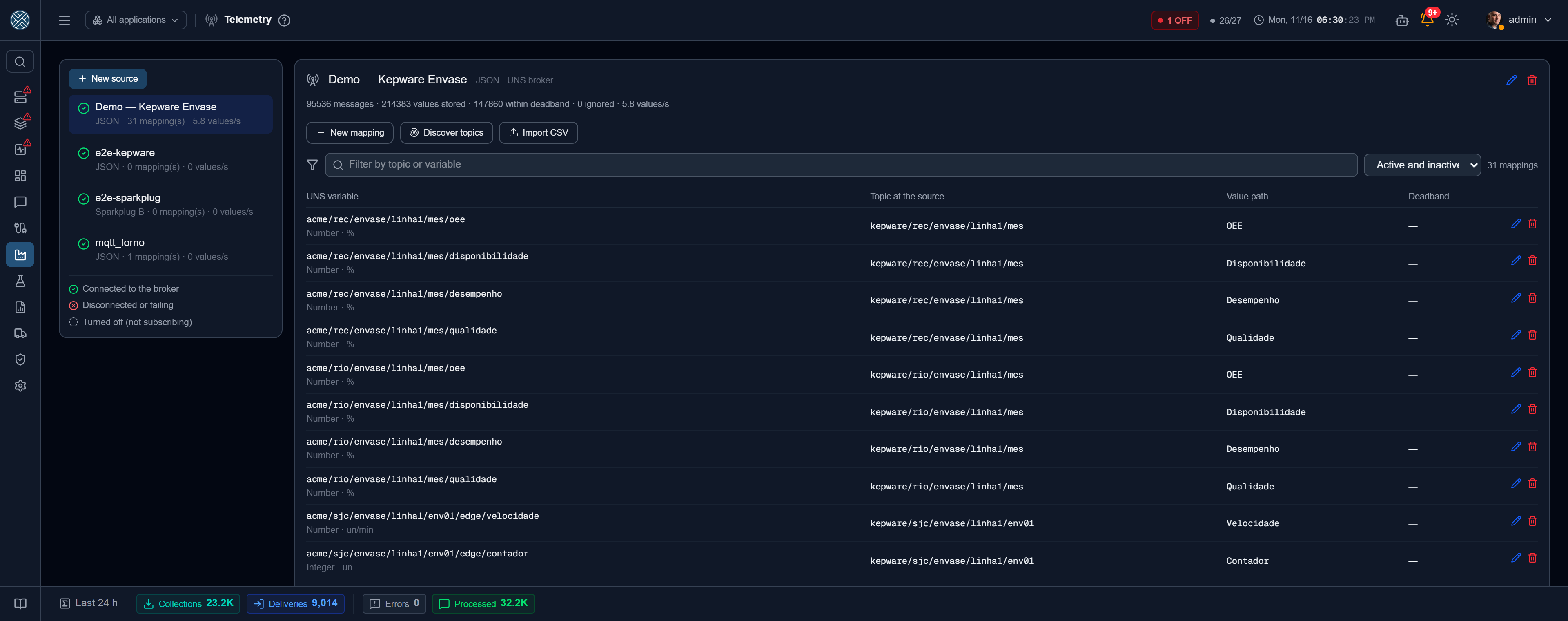
Telemetry brings into the UNS the shop-floor data that already flows through an MQTT broker — what Kepware, Ignition or Node-RED publish. The UNS process subscribes to the mapped topics and stores the value of each variable directly, without creating a message and without going through the integration engine. That is why it handles sensor volume, which would not fit in Collections and Deliveries.
The screen has two parts:
- Sources — which broker to read from, in which format (JSON or Sparkplug B).
- Mappings — which topic (or Sparkplug metric) feeds which variable of the Asset Model.
The screen requires the Telemetry Tool in the profile and the UNS module in the license. The stored value shows up in the Namespace Explorer, with the source and the address in the value origin.
Sources
The list on the left shows each source with its format, how many mappings it has and how many values per second it is storing. The icon tells the status:
| Icon | Status |
|---|---|
| Green, with a check | Connected to the broker |
| Red, with an X | Disconnected or failing |
| Grey, dashed | Turned off (not subscribing) |
Clicking a source opens its details on the right: format, where the connection comes from and, with the source on, the counters since the UNS process started — messages received, values stored, how many stayed within the deadband, how many messages were ignored and the rate in values per second. A connection error shows in red right below. If the UNS process does not answer, the screen warns that the subscription state will show up when it is back. The status refreshes every 10 seconds.
Registering a source
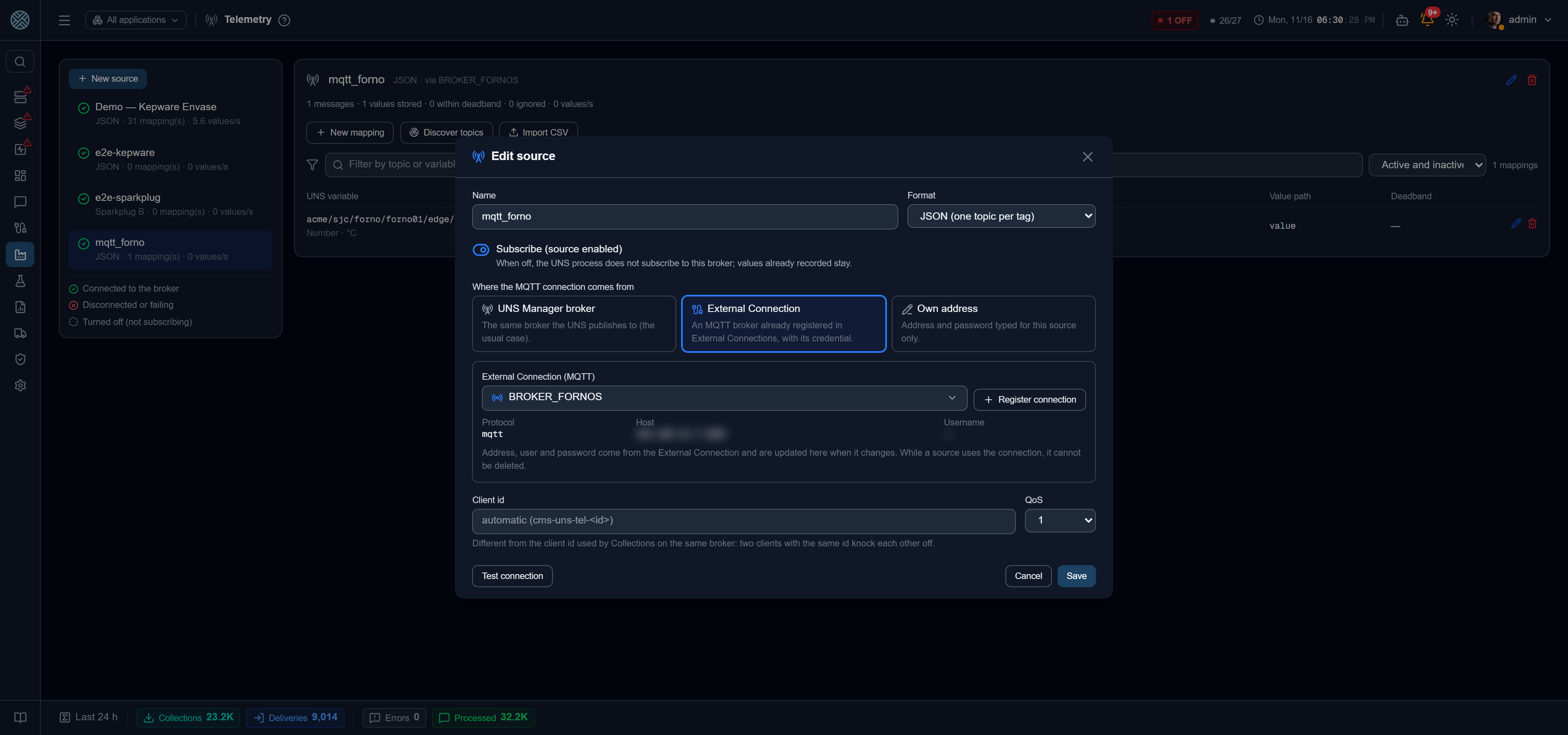
New source opens the form.
| Field | What it holds |
|---|---|
| Name | Required and unique, up to 100 characters |
| Format | JSON (one topic per tag) or Sparkplug B. A source with mappings cannot change format: remove the mappings first |
| Subscribe (source enabled) | Off, the UNS process does not subscribe to this broker; values already stored stay |
| Where the MQTT connection comes from | One of three options, described below |
| Client id | Empty = automatic (cms-uns-tel-<id>). Must differ from the client id used by Collections on the same broker: two clients with the same id knock each other off |
| QoS | 0, 1 or 2 |
| Ask the edge for a rebirth when a metric arrives without BIRTH | Sparkplug B only. Sends the Node Control/Rebirth command (NCMD), at most one per minute per edge |
The three connection origins:
| Option | When to use |
|---|---|
| UNS Manager broker | The same broker the UNS publishes to. This is the most common case. The broker is configured in Settings |
| External Connection | An MQTT broker already registered in External Connections, with its credential. The address, user and password come from the connection and follow it when it changes. While some source uses the connection, it cannot be deleted. Register connection opens External Connections in another tab |
| Own address | Protocol (mqtt, mqtts, ws or wss), Host, Port, User and Password typed only for this source. The stored password does not come back to the screen: the field shows that it is kept, and Remove password deletes it on save |
With mqtts or wss, Verify the broker certificate shows up. If the chosen External Connection
is marked as Sparkplug B and the source is not, the screen warns you to check the format.
Test connection connects with the form data, without saving, and answers “Connected (MQTT version, time in ms)” or the reason for the failure.
Ask the edge for a rebirth sends a command to the plant. Turn it on only with the go-ahead of whoever looks after the edge.
Deleting the source deletes its mappings. The last value of each variable stays in the UNS.
Mappings
Each mapping links one origin to one UNS variable. A variable receives telemetry from only one mapping, in any source.
The source table shows the UNS variable (topic, data type and unit), the Topic at the source (in Sparkplug, Address · metric), the Value path (JSON only; “whole payload” when empty) and the Deadband. An inactive mapping shows faded. The search filters by topic or variable, the picker separates Active only and Inactive only, and the list is paginated.
Mapping requires write permission (PUBLISH) on the variable, given by the UNS roles in UNS access. The variable picker only shows the ones the user can write to.
New mapping
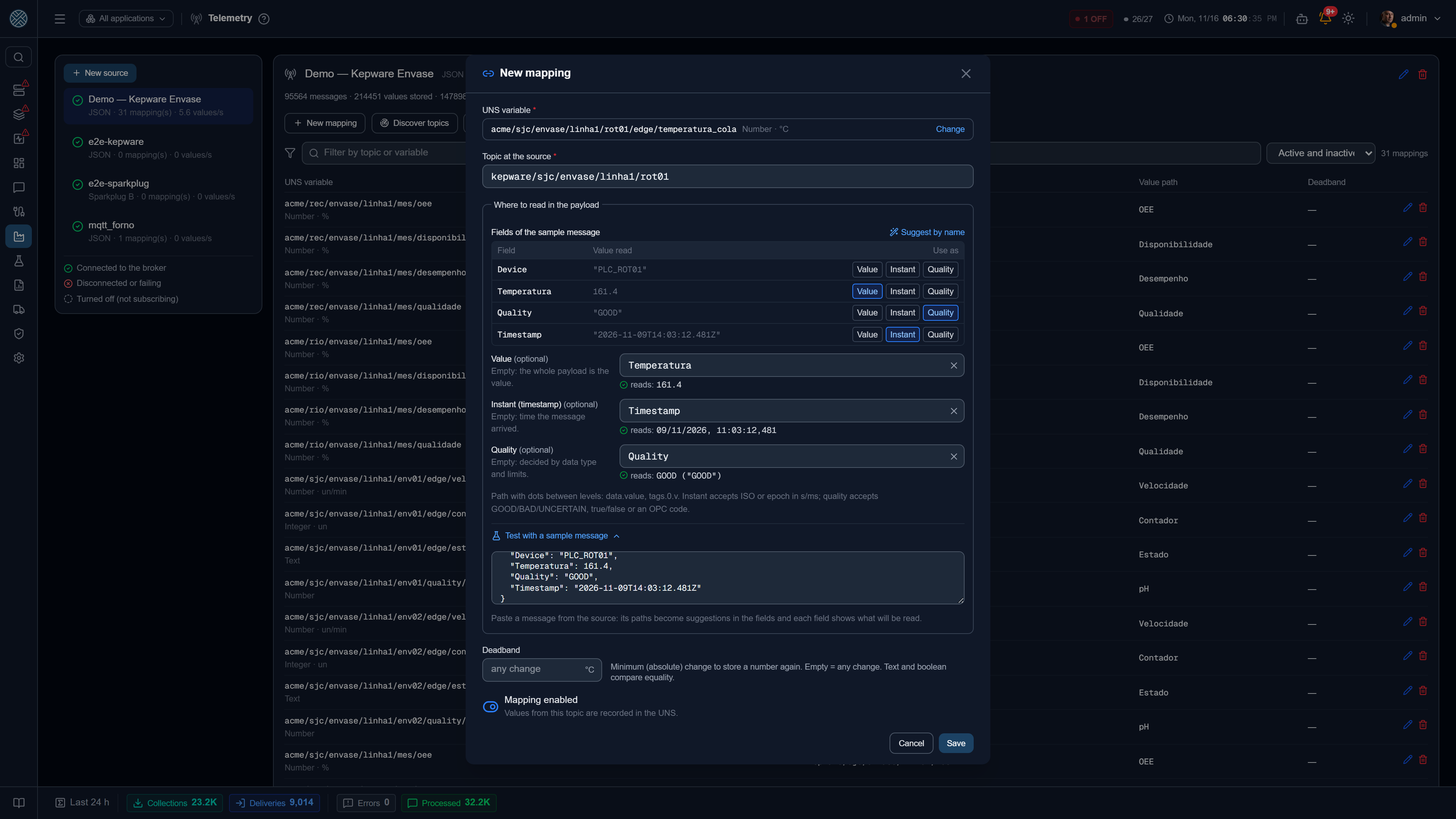
New mapping (or Map, in topic discovery) opens the popup. Only two items are required — the variable and the topic. While one is missing, the screen says next to the button To save, missing: and the field name, and Save is disabled.
| Field | What it holds |
|---|---|
| UNS variable | Required. Choose UNS variable… opens the variable picker, browsable by branch; when editing, it opens on the equipment of the current variable. Change picks another one |
| Topic at the source | Required (JSON). The exact topic, without + or #, up to 512 characters |
| Address (group/edge[/device]) and Metric | Required (Sparkplug B), in place of the topic. The address has 2 or 3 levels; the metric is the name announced in the BIRTH |
| Deadband | Optional. See Deadband |
| Mapping enabled | Off, the messages of this topic are ignored, without deleting the mapping |
The topic cannot be one the UNS itself publishes on the same broker: subscribing to it would create a loop (the UNS would read what it published and publish it again). With a publishing prefix, nothing under it can be mapped.
Where to read in the payload (JSON)
On a JSON source, the Where to read in the payload block says which part of the message each thing comes from. All three are optional:
| Part | Empty means | Accepts |
|---|---|---|
| Value | The whole payload is the value | Any value. What is not JSON becomes raw text (an edge that publishes a plain RUNNING) |
| Instant (timestamp) | The time the message arrived | ISO 8601 or epoch in seconds or milliseconds |
| Quality | Decided by the attribute’s data type and limits | GOOD/BAD/UNCERTAIN, true/false or an OPC quality code |
The path uses a dot between levels: dados.valor, tags.0.v (a list index is also a level). An
instant more than 5 minutes in the future is treated as a wrong clock and the arrival time is used. If
the source says one quality and the data type says another, the worse one wins.
Test with a sample message opens a field to paste a real message from the source (when the mapping comes from discovery, it already comes with the captured message). Nothing there is saved. With the message:
- the Fields of the sample message table lists each field (up to 3 levels and 60 fields) with the Value read and, under Use as, the Value, Instant and Quality buttons. Clicking fills in the path; clicking again clears it. A field takes only one part: choosing it for another removes it from the previous one;
- Suggest by name fills in the empty parts by the usual names —
value,valor,vfor the value;timestamp,time,ts,datetimefor the instant;quality,qualidade,q,statusCodefor the quality; - under each field, what will be read shows up. In orange, the problem: a path that does not exist in the message, an invalid date (uses the arrival time), an unknown quality (decided by the type) or a value that is not a number for a numeric variable.
If the Value path does not exist in a message, nothing is stored for that message.
Deadband
The deadband avoids storing noise. It only applies to Number or Integer variables: the value is only stored again when it varies more than the deadband, in absolute value. Empty (or zero) = any change is stored. On text, boolean and JSON variables the field is locked and the value is stored whenever it changes.
Two exceptions are stored even within the band:
- a quality change — a sensor that comes back from BAD with the same number has to show up;
- every 60 seconds the value goes out again, even if unchanged, so the age of a stable sensor does not grow and make it look stalled.
Sparkplug B
On a Sparkplug B source, the mapping uses the address group/edge (node metric) or
group/edge/device (device metric) and the metric name as announced in the BIRTH. The UNS reads the
type and alias of each metric in the BIRTH and follows the data through it.
When the edge goes down (NDEATH or DDEATH), its variables become UNCERTAIN until a new value arrives. NDEATH takes down the node and all its devices.
Discovering topics
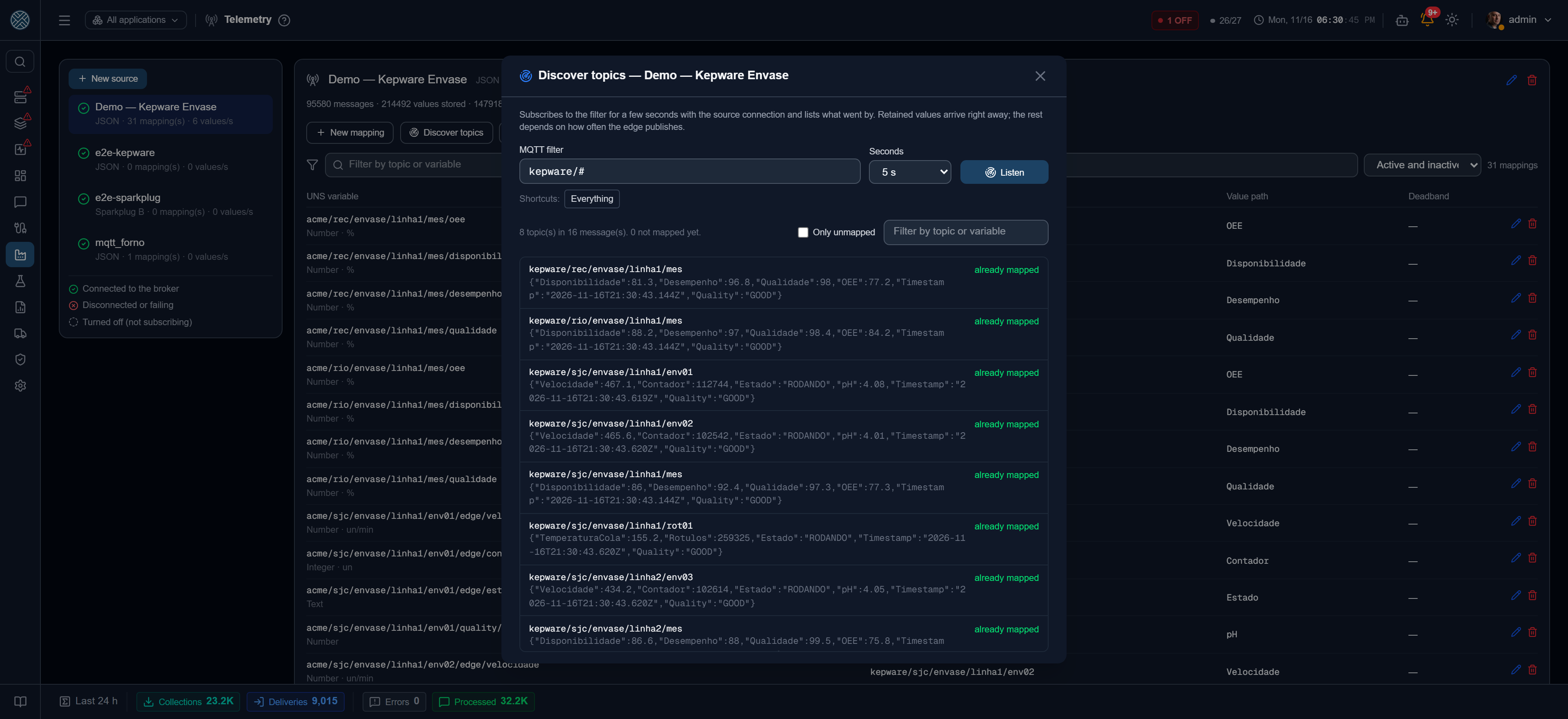
Discover topics listens to the broker for a few seconds, with the source’s connection, and lists what went by. It is the way to map without typing a topic.
| Field | What it holds |
|---|---|
| MQTT filter | What to subscribe to. Starts at # (JSON) or spBv1.0/# (Sparkplug). Case matters and # only works at the end |
| Seconds | 3, 5, 10 or 15 |
On a Sparkplug B source, the Shortcuts change the filter: Everything, Node birth (NBIRTH), Device birth (DBIRTH) and Data only (DDATA). The births carry every metric with its type, so they are the best starting point.
Listen starts; the bar shows the elapsed time and Stop interrupts. Topics with a retained value
(retain) arrive at once; the others only when the edge publishes again.
The result says how many topics went by, in how many messages, and how many still have no mapping:
- JSON — each topic with a payload sample and the
retainmark when it came retained. - Sparkplug B — each address with its metrics, the type and the last value of each one.
Each item has Map, which opens New mapping with the topic (or address and metric) filled in and, on JSON, the sample message and the suggested value path. An item the source already maps shows as already mapped. Only unmapped hides those, and the field next to it filters by part of the topic or the metric.
The list keeps up to 500 topics (and 500 metrics per address). Beyond that, the screen warns that the list was cut: refine the filter.
If nothing goes by, the screen explains the likely reasons — the edge publishes less often (listen
longer), the filter does not match (case, # not at the end) or the source is not connected — and
offers Listen for 15 s.
Importing CSV
For plants with many tags, Import CSV creates the mappings in one go. The popup shows the header expected for the source’s format, with an example line:
| Format | Columns |
|---|---|
| JSON | variavel;topico;caminhoValor;caminhoTimestamp;caminhoQualidade;bandaMorta |
| Sparkplug B | variavel;topico;metrica;bandaMorta |
variavel (the variable’s topic in the UNS) and topico are required in the header; the others can
be missing. Pick the file or paste the content and click Import CSV.
- All or nothing: with any wrong line, nothing is saved and the screen lists the lines with problems (up to 200).
- A variable already mapped in this source is updated, and the mapping becomes active again. A variable mapped in another source is refused.
- Each line goes through the same rules as the screen: the variable must exist and have write permission, cannot repeat in the file, and the topic cannot fall in the namespace the UNS publishes.
- The ceiling is 20 thousand lines per file.
Volume on the same server
The rate of each source shows in the list and in the counters. Up to about 5 thousand values per second, telemetry lives alongside the integration engine on the same server with no noticeable loss. Above that, the installation panel of UNS Manager warns that the UNS process and database should move to a server of their own, so they do not compete with the integration engine for the machine.
When it goes wrong
| Symptom or message | What to do |
|---|---|
| Source in red | Read the error under the source name. Use Test connection in the form to check address, port, TLS and credential |
| “The UNS broker is not configured” | The source uses the UNS broker, but it has not been configured. Configure it in Settings or give the source an External Connection |
| “Choose an MQTT External Connection with an address filled in” | The chosen connection is not MQTT or has no address. Fix it in External Connections |
| “The variable … already receives telemetry from another mapping” | A variable has a single origin. Delete or edit the old mapping |
| “The topic … is published by the UNS itself on this broker” | The topic is a UNS output. Map the edge topic, not the namespace one |
| “Your UNS roles do not allow writing to …” | Ask for the PUBLISH permission on the variable in UNS access |
| Message counter goes up and the value counter does not | If the ignored counter goes up: the value path does not exist in the messages, or the instant read is older than that of the current value. If the deadband counter goes up: the values do not vary more than it. Test the mapping with a sample message |
| Value shows as BAD in the Explorer | The value does not match the attribute’s data type, limits or schema, or the source sent bad quality. The reason is in the value origin |